





Question: Homework: Managing Software Ensure your virtual instance is completely reset by running vagrant destroy and then vagrant up. Once your machine is up, connect to
 Homework: Managing Software Ensure your virtual instance is completely reset by

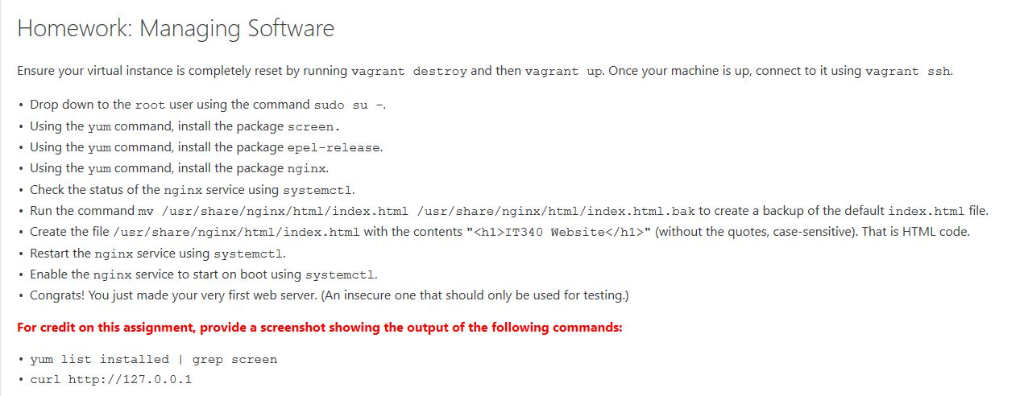
Homework: Managing Software Ensure your virtual instance is completely reset by running vagrant destroy and then vagrant up. Once your machine is up, connect to it using vagrant ssh. . Drop down to the root user using the command sudo su Using the yum command, install the package screen Using the yum command, install the package epel-release. Using the yum command, install the package nginx. Check the status of the nginx service using systemctl .Run the command mv /usr/shareginx/html/index.html /usr/shareginx/html/index.html.bak to create a backup of the default index.html file. .Create the file/usr/shareginx/html/index.html with the contents "IT340 Website" (without the quotes, case-sensitive). That is HTML code. Restart the nginx service using systemctl. Enable the nginx service to start on boot using systemctl. Congrats! You just made your very first web server. (An insecure one that should only be used for testing) For credit on this assignment, provide a screenshot showing the output of the following commands: yum list installed I grep screen curl http://127.0.0.1 Homework: Managing Software Ensure your virtual instance is completely reset by running vagrant destroy and then vagrant up. Once your machine is up, connect to it using vagrant ssh. . Drop down to the root user using the command sudo su Using the yum command, install the package screen Using the yum command, install the package epel-release. Using the yum command, install the package nginx. Check the status of the nginx service using systemctl .Run the command mv /usr/shareginx/html/index.html /usr/shareginx/html/index.html.bak to create a backup of the default index.html file. .Create the file/usr/shareginx/html/index.html with the contents "IT340 Website" (without the quotes, case-sensitive). That is HTML code. Restart the nginx service using systemctl. Enable the nginx service to start on boot using systemctl. Congrats! You just made your very first web server. (An insecure one that should only be used for testing) For credit on this assignment, provide a screenshot showing the output of the following commands: yum list installed I grep screen curl http://127.0.0.1

Step by Step Solution

There are 3 Steps involved in it

1 Expert Approved Answer
Step: 1 Unlock blur-text-image
Question Has Been Solved by an Expert!

Get step-by-step solutions from verified subject matter experts

Step: 2 Unlock
Step: 3 Unlock

Students Have Also Explored These Related Databases Questions!