







Question: HOMEWORK (solve it in C programming language) We will create a menu to select a user whether he/she is a student or teacher. After selection
HOMEWORK
(solve it in C programming language)
We will create a menu to select a user whether he/she is a student or teacher.
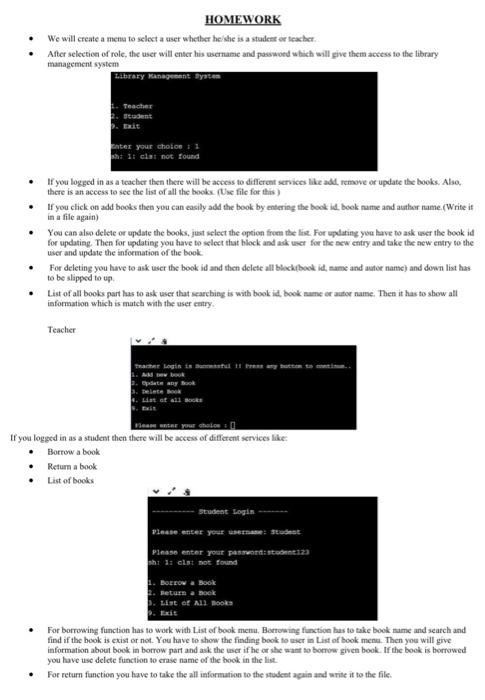
After selection of role, the user will enter his username and password which will give them access to the library management system
Library Management System
1.Teacher
2. Student
9. Exit
Enter your choice : 1
sh: 1: cls: not found,
If you logged in as a teacher then there will be access to different services like add, remove or update the books. Also, there is an access to see the list of all the books. (Use file for this )
If you click on add books then you can easily add the book by entering the book id, book name and author name.(Write it in a file again)
You can also delete or update the books, just select the option from the list. For updating you have to ask user the book id for updating. Then for updating you have to select that block and ask user for the new entry and take the new entry to the user and update the information of the book.
For deleting you have to ask user the book id and then delete all block(book id, name and autor name) and down list has to be slipped to up.
List of all books part has to ask user that searching is with book id, book name or autor name. Then it has to show all information which is match with the user entry.
Teacher
Teacher Login is Successful !! Press any button to continue..
1. Add new book
2. Update any Book
3. Delete Book
4. List of all Books
9. Exit
Please enter your choice :
If you logged in as a student then there will be access of different services like:
Borrow a book
Return a book
List of books
----------Student Login -------
Please enter your username: Student
Please enter your password: student123
sh: 1: cls: not found
1. Borrow a Book
2. Return a Book
3. List of All Books
9. Exit
For borrowing function has to work with List of book menu. Borrowing function has to take book name and search and find if the book is exist or not. You have to show the finding book to user in List of book menu. Then you will give information about book in borrow part and ask the user if he or she want to borrow given book. If the book is borrowed you have use delete function to erase name of the book in the list.
For return function you have to take the all information to the student again and write it to the file.
HOMEWORK We will create a menu to select a user whether he she is a student or teacher After selection of role, the user will enter his username and password which will give them access to ess to the library management system Library Management System Teacher 2. student 2. Et ter your choice 11 1: chat not found . If you logged in as a teacher then there will be access to different services like add. remove or update the books. Also, there is an access to see the list of all the books (Use file for this) If you click on add books then you can easily add the book by entering the book id, beck name and author name.Write it in a file again) You can also delete or update the books, just select the option from the lise. For updating you have to ask user the book id for updating. Then for updating you have to select that block and ask user for the new entry and take the new entry to the user and update the information of the book For deleting you have to ask user the book is and then delete all black book id, name and autor name) and down list has to be slipped to up List of all books part has to ask user that scarching is with book id, book nume et autor sume. Then it has to show all information which is match with the user entry . Teacher The login istu 2. Opdatery Book Delete Book Les at all books Samantar your choion If you logged in as a student then there will be access of different services like: Borrow a book Return a book List of books Student Login Please enter your student Please enter your password: s123 h 1: elst not found BELOW & Book Seturn a book List of All Books For borrowing function has to work with List of book menu, Borrowing function has to take book me and search and find if the book is exist or not. You have to show the finding book to use in List of book menu. Then you will give information about book in borrow part and ask the user if he or she want to bomow given book. If the book is borrowed you have use delete function to erase name of the book in the list For return function you have to take the all information to the student again and write it to the file
Step by Step Solution
There are 3 Steps involved in it

Get step-by-step solutions from verified subject matter experts
 Study Help