







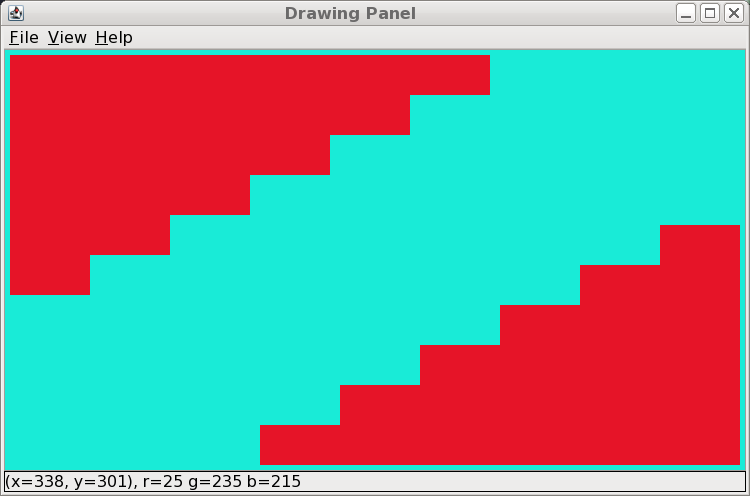
Question: How can I edit these for loops to get these steps to print in the drawing panel how they're supposed to? (as pictured) for(int i
How can I edit these for loops to get these steps to print in the drawing panel how they're supposed to? (as pictured)
for(int i = numberOfSteps; i >= 1; i--) { g.setColor(color); g.fillRect(x, y + (height * i), (width * i), height);
}
for(int i = 0; i
g.setColor(color);
g.fillRect((x + 730) - (width * i), (y + 410) - (height * i), (width * i), height);
} 
Drawing Panel File View Help 338. -301), r=25 g=235 b=215
Step by Step Solution
There are 3 Steps involved in it
1 Expert Approved Answer
Step: 1 Unlock

Question Has Been Solved by an Expert!
Get step-by-step solutions from verified subject matter experts
Step: 2 Unlock
Step: 3 Unlock
 Study Help