





Question: How can I link my .css file to my .xml file? Below are the two files but when I try to open it on the

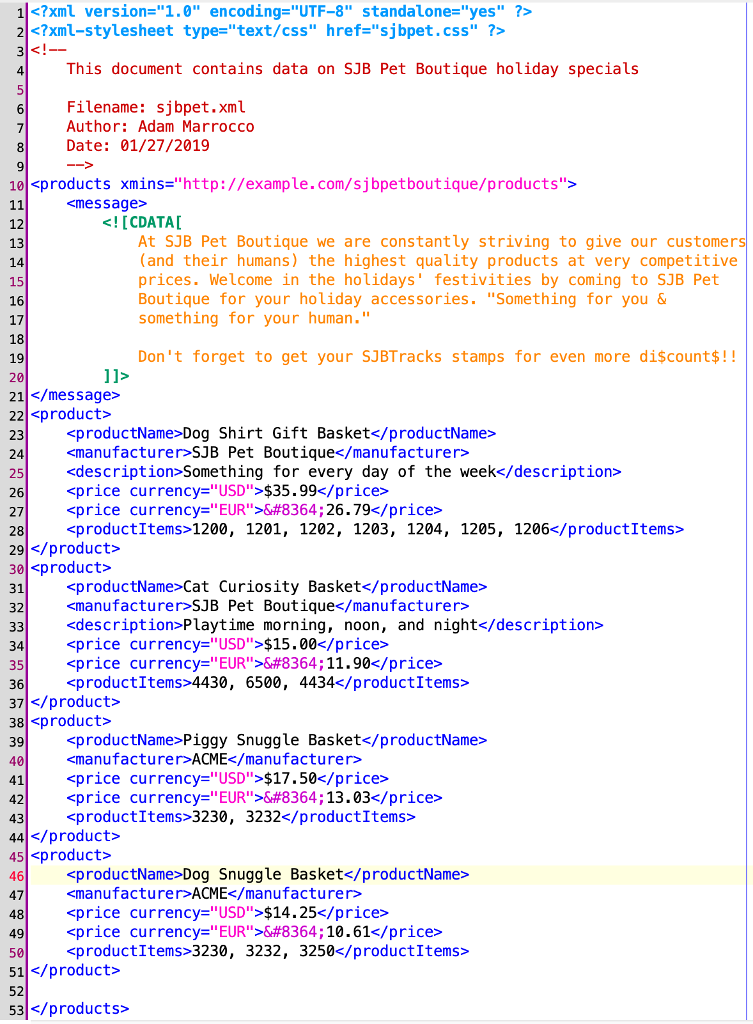
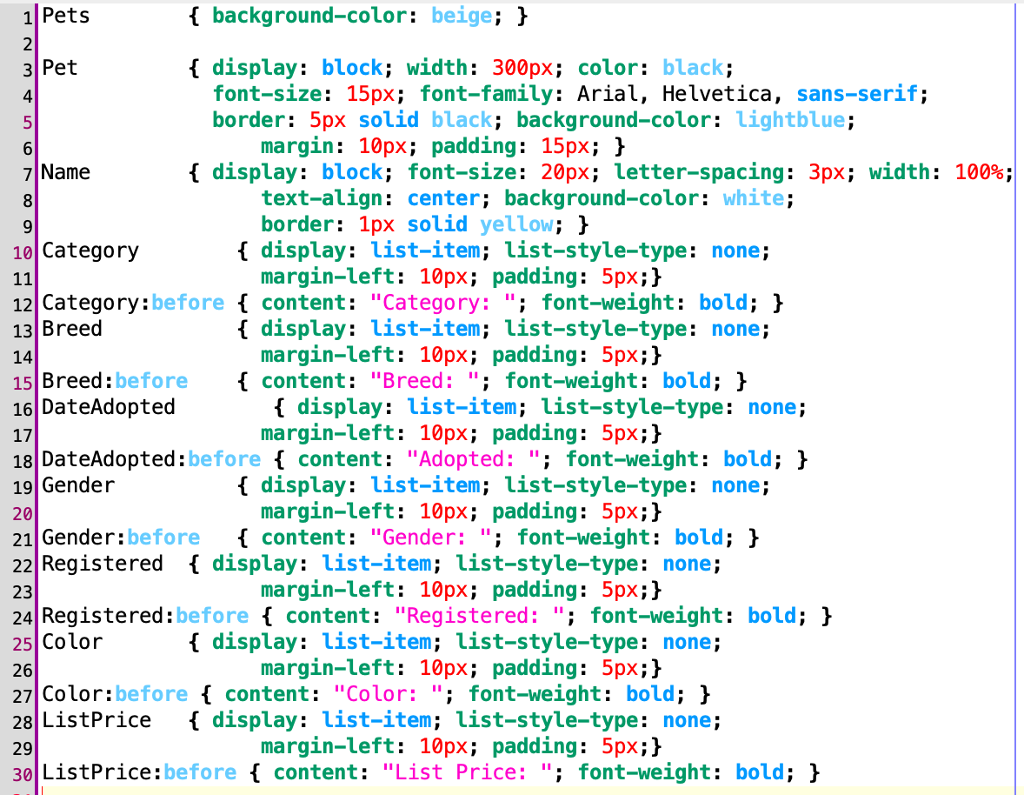
How can I link my .css file to my .xml file? Below are the two files but when I try to open it on the web all I see is the text and no style at all! What did I do wrong??
How can I link my .css file to my .xml file? Below

are the two files but when I try to open it on

1 2 4 This document contains data on SJB Pet Boutique holiday specials 6 Filename: sjbpet.xml Author:Adam Marrocco Date: 01/27/2019 10xproducts xmins "http://example.com/sjbpetboutique/products"> 22 kproduct> 23 24 25 26 27 28 29 30 31 32 33| $15.00 35 36 37 38 kproduct> 39 40 41 42 Don't forget to get your SJBTracks stamps for even more discount$!! Dog Shirt Gift Basket SJB Pet Boutique $35.9/price> €:26.79 1200, 1201, 1202, 1203, 1204, 1205, 1206 xproductName>Cat Curiosity Basket and night 11.90 4430, 6500, 4434 Piggy Snuggle Basket $17.50 13.03 xproductItems>3230, 3232 44 45 xproduct> 46 47 48 49 50 51 52 53 Dog Snuggle Basket ACME xprice currency-"USD">$14.25 10.61 3230, 3232, 3250 1Pets 2 3 Pet 4 background-color: beige; display: block; width: 300px; color: black; font-size: 15px; font-family: Arial, Helvetica, sans-serif; border: 5px solid black; background-color: lightblue; margin: 10px; padding: 15px; 1 { display: block; font-size: 20px; Letter-spacing: 3px; width: 7 Name 8 100%; text-align: center; background-color: white; border: 1px solid yellow; h display: list-item; list-style-type: none; margin-left: 10px; padding: 5px;> 10 Category 12 Category:before f content: "Category:"; font-weight: bold; ) 13 Breed 14 15 Breed:before content: "Breed: " font-weight: bold; 16 DateAdopted 17 18 DateAdopted:before content: "Adopted: "; font-weight: bold; 19 Gender 20 21 Gender:before content: "Gender:"; font-weight: bold; 22Registered display: list-item; list-style-type: none; 23 24 Registered:before f content: "Registered:" font-weight: bold; 25 Color 26 27 Color:before content: "Color:"; font-weight: bold;> 28 ListPrice display: list-item; list-style-type: none; 29 30 ListPrice:before content: "List Price: " font-weight: bold; h display: list-item; list-style-type: none; margin-left: 10px; padding: 5px;} display: list-item; list-style-type: none; margin-left: 10px; padding: 5px;]} display: list-item; list-style-type: none; margin-left: 10px; padding: 5px;> margin-left: 10px; padding: 5px;} f display:list-item:list-style-type: none: margin-left: 10px; padding: 5px;> margin-left: 10px; padding: 5px;]}

Step by Step Solution

There are 3 Steps involved in it

1 Expert Approved Answer
Step: 1 Unlock blur-text-image
Question Has Been Solved by an Expert!

Get step-by-step solutions from verified subject matter experts

Step: 2 Unlock
Step: 3 Unlock

Students Have Also Explored These Related Databases Questions!