





Question: how can I make the code look like the question c++ /consoleapplication.cpp: this file contains the main function. progran execution begins and ends there 11
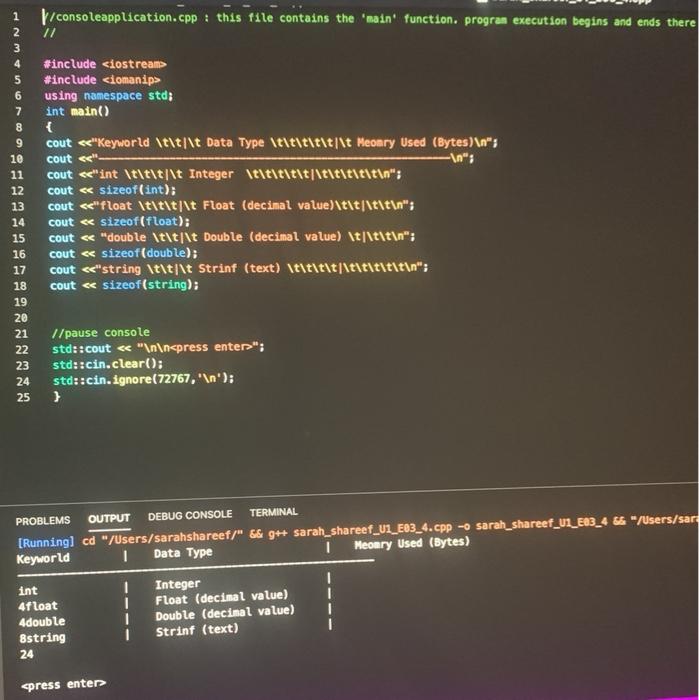
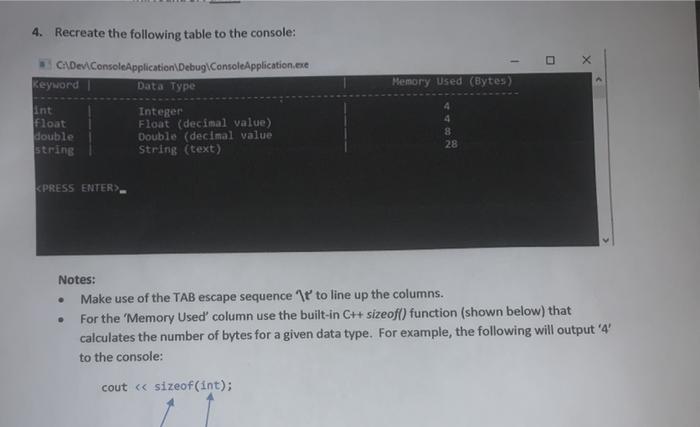
how can I make the code look like the question c++  how can I make the code look like the question c++
\/consoleapplication.cpp: this file contains the main function. progran execution begins and ends

\/consoleapplication.cpp: this file contains the main function. progran execution begins and ends there 11 1 2 3 4 5 6 7 8 9 10 11 12 13 14 15 16 17 18 19 20 21 #include #include using namespace std; int main() { cout "; std::cin.clear(); std::cin. ignore(72767, ' '); } PROBLEMS OUTPUT DEBUG CONSOLE TERMINAL [Running] cd /Users/sarahshareef/" && 9++ sarah_shareef_U1_E03_4.cpp - sarah_shareef_U1_E03_466 /Users/sar Keyworld 1 Data Type I Meomry Used (Bytes) 1 1 int 4float 4double 8string 24 Integer Float (decimal value) Double (decimal value) Strinf (text) spress enten 4. Recreate the following table to the console: CADev ConsoleApplication Debug ConsoleApplication.exe Keyword Data Type Memory Used (Bytes) int Float double string Integer Float (decimal value) Double (decimal value String (text) 4 8 28

Step by Step Solution

There are 3 Steps involved in it

1 Expert Approved Answer
Step: 1 Unlock blur-text-image
Question Has Been Solved by an Expert!

Get step-by-step solutions from verified subject matter experts

Step: 2 Unlock
Step: 3 Unlock

Students Have Also Explored These Related Databases Questions!