







Question: How can I use Window Builder in Java so that, depending on the number of edges a node has, text fields are added to input
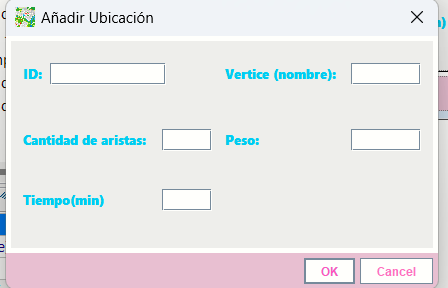
How can I use Window Builder in Java so that, depending on the number of edges a node has, text fields are added to input edge data, which include weight and time in minutes Im trying to create a route management system in Java using an undirected graph via an adjacency list. However, my question focuses on the visual aspect.package visual;
import java.awt.BorderLayout;
import java.awt.FlowLayout;
import javax.swing.JButton;
import javax.swing.JDialog;
import javax.swing.JPanel;
import javax.swing.border.EmptyBorder;
import java.awt.event.ActionListener;
import java.awt.event.ActionEvent;
import java.awt.Color;
import java.awt.Toolkit;
import javax.swing.JLabel;
import java.awt.Font;
import javax.swing.JTextField;
public class Aadir extends JDialog
private final JPanel contentPanel new JPanel;
private JTextField textFieldId;
private JTextField textFieldCantA;
private JTextField textField;
private JTextField textField;
private JTextField textField;
Launch the application.
public static void mainString args
try
Aadir dialog new Aadir;
dialog.setDefaultCloseOperationJDialogDISPOSEONCLOSE;
dialog.setVisibletrue;
catch Exception e
eprintStackTrace;
Create the dialog.
public Aadir
setTitleAuFadir UbicaciuFn;
setIconImageToolkitgetDefaultToolkitgetImageAadirclass.getResourceimagenesimgprijpg;
setBackgroundnew Color;
setBounds;
getContentPanesetLayoutnew BorderLayout;
contentPanel.setBackgroundnew Color;
contentPanel.setBordernew EmptyBorder;
getContentPaneaddcontentPanel BorderLayout.CENTER;
contentPanel.setLayoutnew BorderLayout;
setLocationRelativeTonull;
JPanel panel new JPanel;
panel.setForegroundnew Color;
contentPanel.addpanel BorderLayout.CENTER;
panel.setLayoutnull;
JLabel lblID new JLabelID:;
lblID.setForegroundnew Color;
lblID.setFontnew FontSegoe UI Black", Font.PLAIN, ;
lblID.setBounds;
panel.addlblID;
JLabel lblVertice new JLabelVertice nombre:;
lblVertice.setForegroundnew Color;
lblVertice.setFontnew FontSegoe UI Black", Font.PLAIN, ;
lblVertice.setBounds;
panel.addlblVertice;
JLabel lblcantLugar new JLabelCantidad de aristas: ;
lblcantLugar.setForegroundnew Color;
lblcantLugar.setFontnew FontSegoe UI Black", Font.PLAIN, ;
lblcantLugar.setBounds;
panel.addlblcantLugar;
textFieldId new JTextField;
textFieldId.setBounds;
panel.addtextFieldId;
textFieldId.setColumns;
textFieldCantA new JTextField;
textFieldCantA.setColumns;
textFieldCantA.setBounds;
panel.addtextFieldCantA;
textField new JTextField;
textField.setColumns;
textField.setBounds;
panel.addtextField;
JLabel lblPeso new JLabelPeso:;
lblPeso.setForegroundnew Color;
lblPeso.setFontnew FontSegoe UI Black", Font.PLAIN, ;
lblPeso.setBounds;
panel.addlblPeso;
JLabel lblTiempomin new JLabelTiempomin;
lblTiempomin.setForegroundnew Color;
lblTiempomin.setFontnew FontSegoe UI Black", Font.PLAIN, ;
lblTiempomin.setBounds;
panel.addlblTiempomin;
textField new JTextField;
textFieldsetColumns;
textFieldsetBounds;
panel.addtextField;
textField new JTextField;
textFieldsetColumns;
textFieldsetBounds;
panel.addtextField;
JPanel buttonPane new JPanel;
buttonPane.setBackgroundnew Color;
buttonPane.setLayoutnew FlowLayoutFlowLayoutRIGHT;
getContentPaneaddbuttonPane BorderLayout.SOUTH;
JButton okButton new JButtonOK;
okButton.setBackgroundnew Color;
okButton.setForegroundnew Color;
okButton.setActionCommandOK;
buttonPane.addokButton;
getRootPanesetDefaultButtonokButton;
JButton cancelButton new JButtonCancel;
cancelButton.setBackgroundnew Color;
cancelButton.setForegroundnew Color;
cancelButton.addActionListenernew ActionListener
public void actionPerformedActionEvent e
dispose;
;
cancelButton.setActionCommandCancel;
buttonPane.addcancelButton;
Step by Step Solution
There are 3 Steps involved in it
1 Expert Approved Answer
Step: 1 Unlock

Question Has Been Solved by an Expert!
Get step-by-step solutions from verified subject matter experts
Step: 2 Unlock
Step: 3 Unlock
 Study Help