







Question: How can i write this code in Assembly for CCS MSP430? #include msp430g2553.h { Hello World }; const char string![] unsigned int i; =
How can i write this code in Assembly for CCS MSP430?
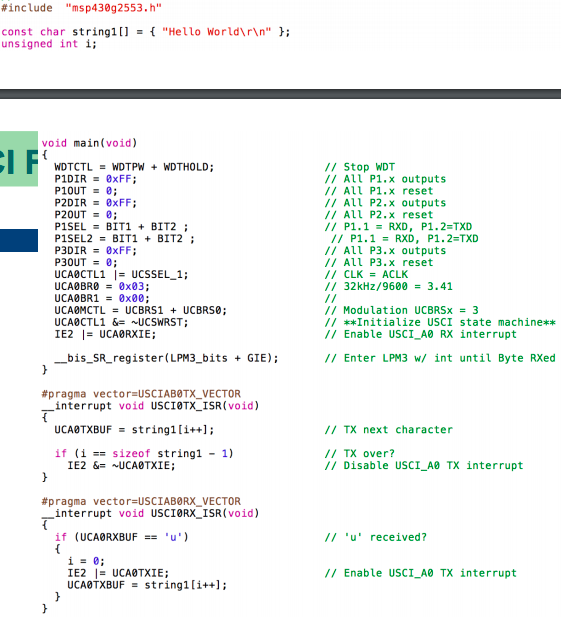
#include "msp430g2553.h" { "Hello World " }; const char string![] unsigned int i; = void main(void) / Stop WDT All P1.x outputs P2DIR 8xFF: All P1.x reset / All P2.x outputs All P2.x reset // P1.1= RXD , P1.2.TXD 20E P1SEL2BIT1BIT2; P30UT UCA0CTL1 UCA0BR0 UCA0BR1 = // P1.1 RXD , P1.2=TXD // All P3.x outputs / All P3.x reset // CLK = ACLK // 32kHz/9600 = 3.41 UCSSEL-1 ; 0x83; 0x00; / Modulation UCBRSx3 // Enable USCI_A0 RX interrupt // Enter LPM3 w/ int until Byte RXed Initialize USCI state machine** UCA0CTL1 &UCSWRST 1E2 I-UCA0RX?E; -bis-SR-register(LPM3-bits + GIE); #pragma vector USCIABOTX-VECTOR interrupt void USCI0TX-ISR(void) UCABTXBUF string1[i+: if i sizeof string1 1) II TX next character TX over? // Disable USCI_A0 TX interrupt #pragma vector-USC IAB0RX-VECTOR interrupt void USCIORX_ISR (void) u'received? // Enable USCI_A TX interrupt UCABTXBUF string1[i++; #include "msp430g2553.h" { "Hello World " }; const char string![] unsigned int i; = void main(void) / Stop WDT All P1.x outputs P2DIR 8xFF: All P1.x reset / All P2.x outputs All P2.x reset // P1.1= RXD , P1.2.TXD 20E P1SEL2BIT1BIT2; P30UT UCA0CTL1 UCA0BR0 UCA0BR1 = // P1.1 RXD , P1.2=TXD // All P3.x outputs / All P3.x reset // CLK = ACLK // 32kHz/9600 = 3.41 UCSSEL-1 ; 0x83; 0x00; / Modulation UCBRSx3 // Enable USCI_A0 RX interrupt // Enter LPM3 w/ int until Byte RXed Initialize USCI state machine** UCA0CTL1 &UCSWRST 1E2 I-UCA0RX?E; -bis-SR-register(LPM3-bits + GIE); #pragma vector USCIABOTX-VECTOR interrupt void USCI0TX-ISR(void) UCABTXBUF string1[i+: if i sizeof string1 1) II TX next character TX over? // Disable USCI_A0 TX interrupt #pragma vector-USC IAB0RX-VECTOR interrupt void USCIORX_ISR (void) u'received? // Enable USCI_A TX interrupt UCABTXBUF string1[i++
Step by Step Solution
There are 3 Steps involved in it

Get step-by-step solutions from verified subject matter experts
 Study Help