







Question: How do I convert this flowchart into python with the added instructions below? COMPSCI 119 LAB #1 - Converting a Flowchart into Python The following
 How do I convert this flowchart into python with the added instructions below?
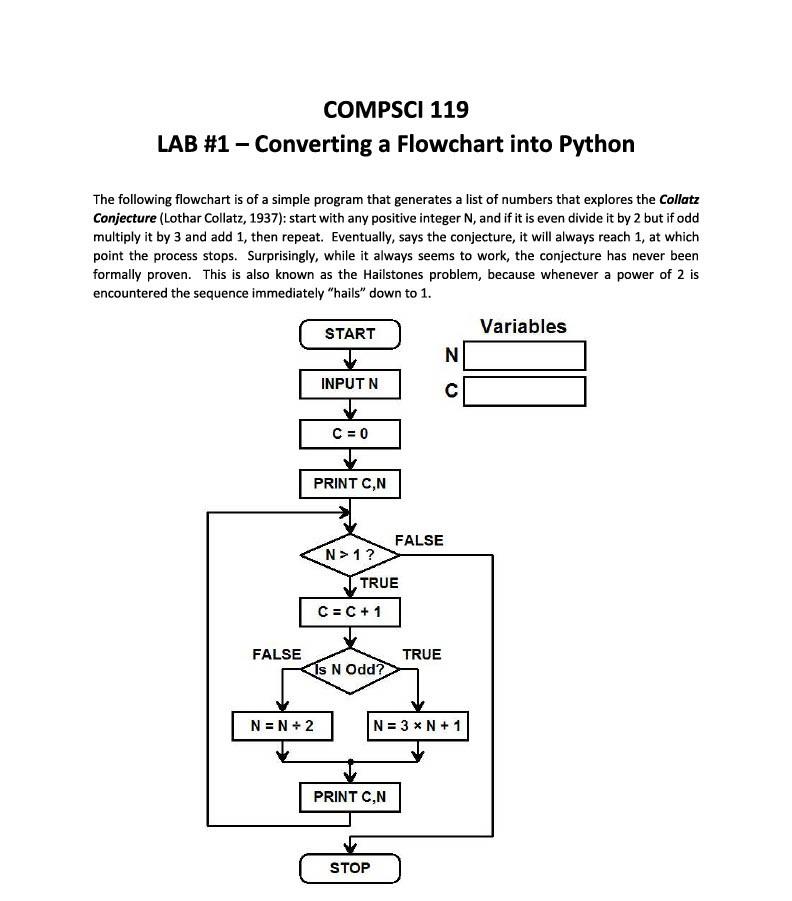
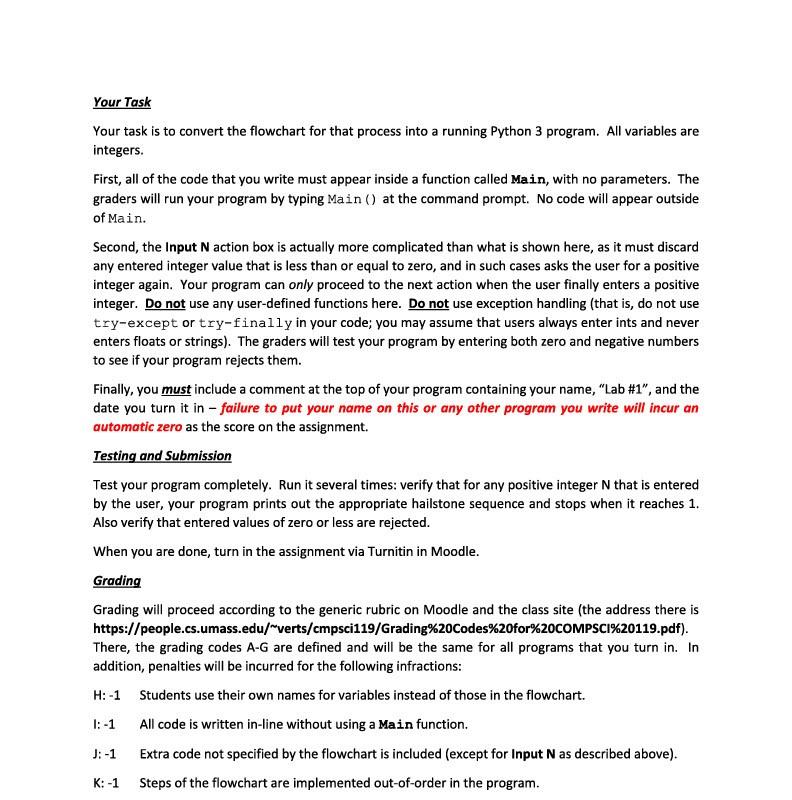
COMPSCI 119 LAB #1 - Converting a Flowchart into Python The following flowchart is of a simple program that generates a list of numbers that explores the Collatz Conjecture (Lothar Collatz, 1937): start with any positive integer N, and if it is even divide it by 2 but if odd multiply it by 3 and add 1, then repeat. Eventually, says the conjecture, it will always reach 1, at which point the process stops. Surprisingly, while it always seems to work, the conjecture has never been formally proven. This is also known as the Hailstones problem, because whenever a power of 2 is encountered the sequence immediately "hails" down to 1. START Variables N INPUTN C = 0 PRINT CAN FALSE N>1? TRUE C = C + 1 FALSE Is N Odd? TRUE N = N + 2 N = 3 * N + 1 PRINT CAN STOP Your Task Your task is to convert the flowchart for that process into a running Python 3 program. All variables are integers. First, all of the code that you write must appear inside a function called Main, with no parameters. The graders will run your program by typing Main () at the command prompt. No code will appear outside of Main. Second, the Input N action box is actually more complicated than what is shown here, as it must discard any entered integer value that is less than or equal to zero, and in such cases asks the user for a positive integer again. Your program can only proceed to the next action when the user finally enters a positive integer. Do not use any user-defined functions here. Do not use exception handling (that is, do not use try-except or try-finally in your code; you may assume that users always enter ints and never enters floats or strings). The graders will test your program by entering both zero and negative numbers to see if your program rejects them. Finally, you must include a comment at the top of your program containing your name, "Lab #1", and the date you turn it in - failure to put your name on this or any other program you write will incur an automatic zero as the score on the assignment. Testing and Submission Test your program completely. Run it several times: verify that for any positive integer N that is entered by the user, your program prints out the appropriate hailstone sequence and stops when it reaches 1. Also verify that entered values of zero or less are rejected. When you are done, turn in the assignment via Turnitin in Moodle. Grading Grading will proceed according to the generic rubric on Moodle and the class site (the address there is https://people.cs.umass.edu/"verts/cmpsci119/Grading%20Codes%20for%20COMPSCI%20119.pdf). There, the grading codes A-G are defined and will be the same for all programs that you turn in. In addition, penalties will be incurred for the following infractions: H:-1 Students use their own names for variables instead of those in the flowchart. 1:-1 All code is written in-line without using a Main function. J: -1 Extra code not specified by the flowchart is included (except for Input N as described above). K: -1 Steps of the flowchart are implemented out-of-order in the program
Step by Step Solution
There are 3 Steps involved in it

Get step-by-step solutions from verified subject matter experts
 Study Help