







Question: how do I do this in Excel *V Rate - 21%/12 = 1.75%; EAR = 23.14% Deferred Annuity 12. Find the present value of an
how do I do this in Excel
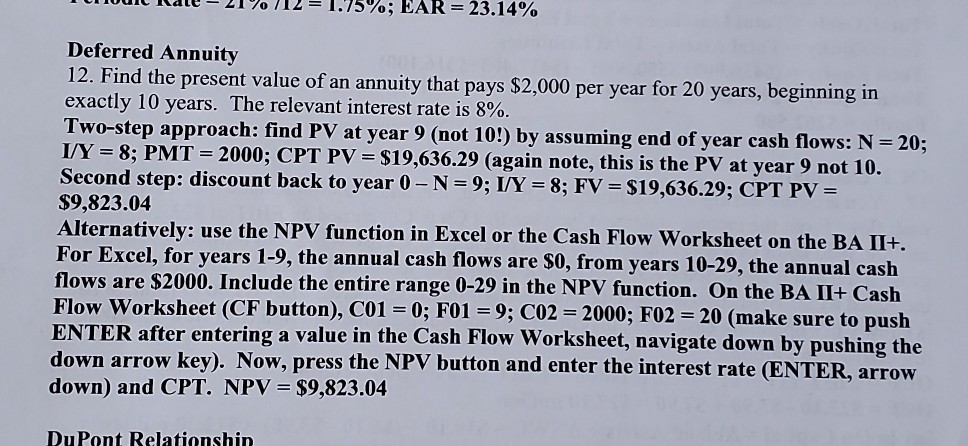
*V Rate - 21%/12 = 1.75%; EAR = 23.14% Deferred Annuity 12. Find the present value of an annuity that pays $2,000 per year for 20 years, beginning in exactly 10 years. The relevant interest rate is 8%. Two-step approach: find PV at year 9 (not 10!) by assuming end of year cash flows: N= 20; I/Y= 8; PMT = 2000; CPT PV = $19,636.29 (again note, this is the PV at year 9 not 10. Second step: discount back to year 0 - N=9; I/Y = 8; FV = $19,636.29; CPT PV = $9,823.04 Alternatively: use the NPV function in Excel or the Cash Flow Worksheet on the BA II+. For Excel, for years 1-9, the annual cash flows are $0, from years 10-29, the annual cash flows are $2000. Include the entire range 0-29 in the NPV function. On the BA II+ Cash Flow Worksheet (CF button), C01 = 0; F01 = 9; CO2 = 2000; F02 = 20 (make sure to push ENTER after entering a value in the Cash Flow Worksheet, navigate down by pushing the down arrow key). Now, press the NPV button and enter the interest rate (ENTER, arrow down) and CPT. NPV = $9,823.04 D.Dont Dolationshin
Step by Step Solution
There are 3 Steps involved in it

Get step-by-step solutions from verified subject matter experts
 Study Help