Question: How do I go about doing this? language is c++ (a) The World Position function in the Camera class returns the world position of the
How do I go about doing this? language is c++

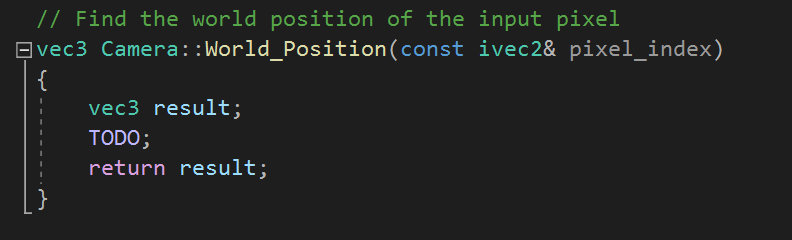
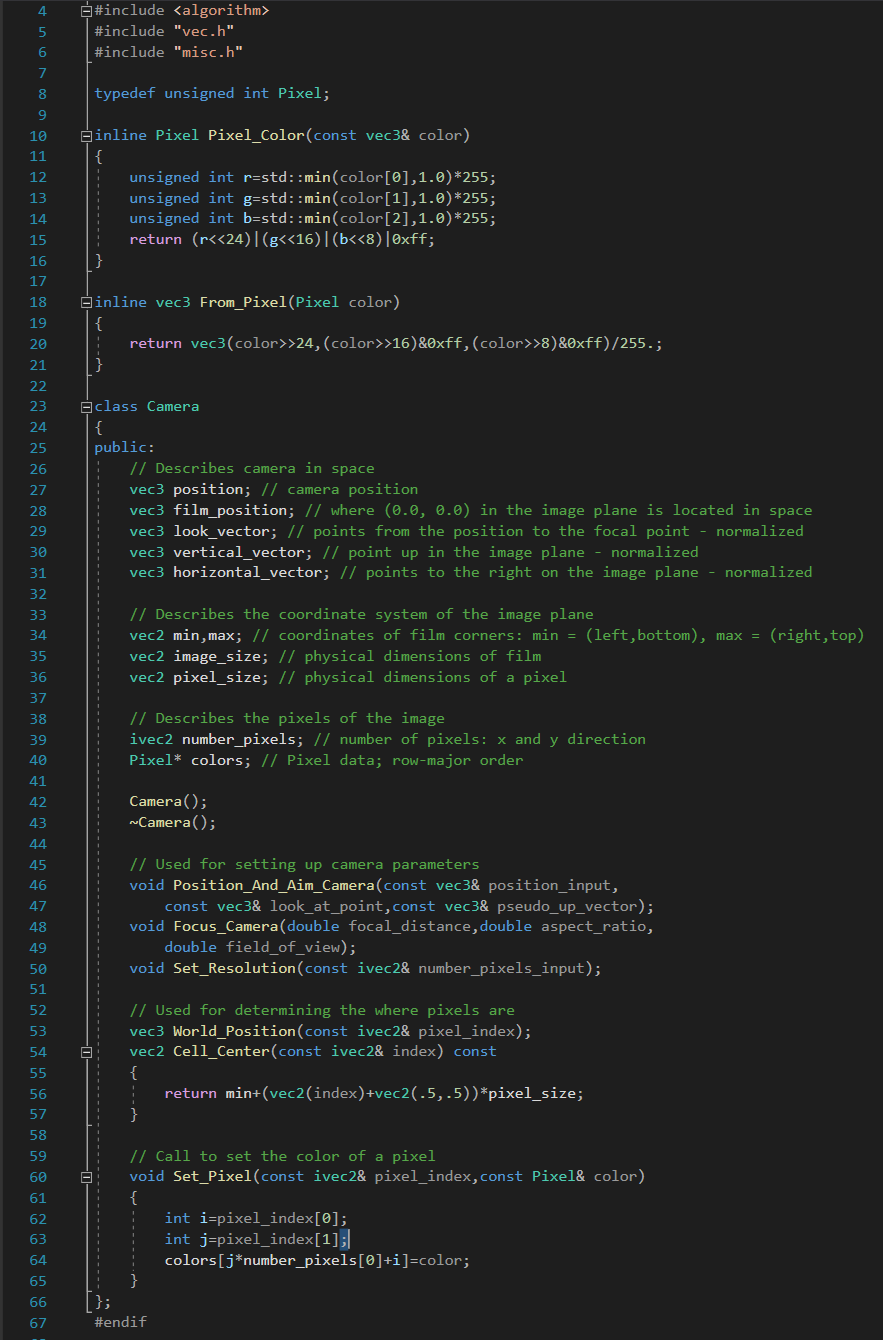
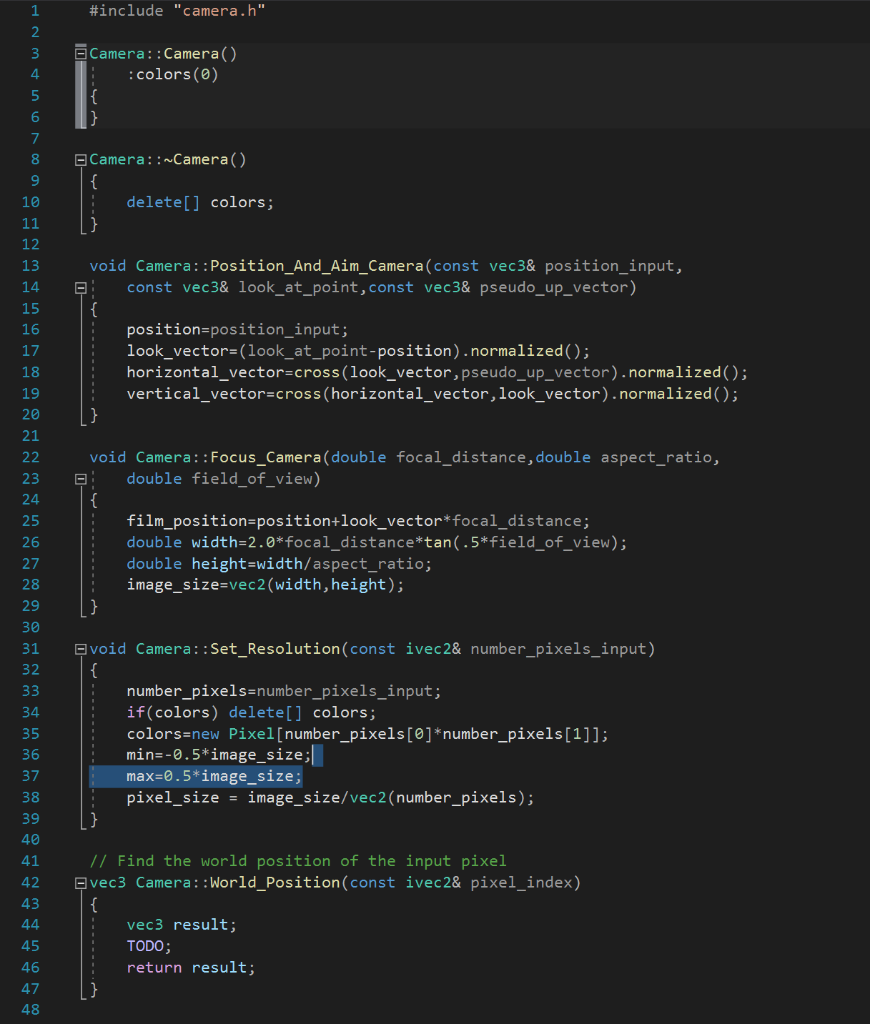
(a) The World Position function in the Camera class returns the world position of the pixel specified by (ivec2 pixel index). This function is implemented in camera.cpp starting from line # // Find the world position of the input pixel vec3 Camera:: World_Position(const ivec2& pixel_index) { vec3 result; TODO; return result; 4 5 #include #include "vec.h" #include "misc.h" 6 typedef unsigned int Pixel; 7 8 9 10 11 12 13 inline Pixel Pixel_Color(const vec3& color) { unsigned int r=std::min(color[@],1.0) *255; unsigned int g=std::min(color[1],1.0)*255; unsigned int b=std::min(color[2],1.0)*255; return (r>24, (color>>16)&Oxff, (color>>8)&Oxff)/255.; } 19 20 21 22 23 24 25 26 27 class Camera { public: // Describes camera in space vec3 position; // camera position vec3 film_position; // where (0.0, 0.0) in the image plane is located in space vec3 look_vector; // points from the position to the focal point - normalized vec3 vertical_vector; // point up in the image plane normalized vec3 horizontal_vector; I points to the right on the image plane - normalized 28 29 30 31 32 33 34 // Describes the coordinate system of the image plane vec2 min,max; // coordinates of film corners: min = (left, bottom), max = (right, top) vec2 image_size; // physical dimensions of film vec2 pixel size; // physical dimensions of a pixel 35 36 37 38 39 40 41 // Describes the pixels of the image ivec2 number_pixels; // number of pixels: x and y direction Pixel* colors; // Pixel data; row-major order 42 Camera(); Camera(); 43 44 45 46 47 // Used for setting up camera parameters void Position_And_Aim_Camera(const vec3& position_input, const vec3& look_at_point,const vec3& pseudo_up_vector); void Focus_Camera(double focal_distance, double aspect_ratio, double field_of_view); void Set_Resolution(const ivec2& number_pixels_input); 48 49 50 51 52 53 - 54 55 // Used for determining the where pixels are vec3 World_Position(const ivec2& pixel_index); vec2 Cell_Center(const ivec2& index) const { return min+(vec2(index)+vec2(-5,.5))*pixel_size; } 56 57 58 59 60 61 // Call to set the color of a pixel void Set_Pixel(const ivec2& pixel_index,const Pixel& color) { int i=pixel_index[0]; int j=pixel_index[1]; colors[j*number_pixels[@]+i)=color; 62 63 64 65 66 67 }; #endif #include "camera.h" 1 2 3 4 5 Camera::Camera() :colors() 6 7 8 Camera::~Camera() { delete[] colors; } void Camera::Position_And_Aim_Camera(const vec3& position_input, const vec3& look_at_point,const vec3& pseudo_up_vector) { position=position_input; look_vector=(look_at_point-position).normalized(); horizontal_vector=cross (look_vector, pseudo_up_vector).normalized(); vertical_vector=cross (horizontal_vector, look_vector).normalized(); } void Camera::Focus_Camera(double focal_distance, double aspect_ratio, E double field_of_view) { film_position=position+look_vector*focal_distance; double width=2.0*focal_distance*tan(.5*field_of_view); double height=width/aspect_ratio; image_size=vec2(width, height); 9 10 11 12 13 14 15 16 17 18 19 20 21 22 23 24 25 26 27 28 29 30 31 32 33 34 35 36 37 38 39 40 41 42 43 44 45 46 47 48 void Camera::Set_Resolution(const ivec2& number_pixels_input) { number_pixels=number_pixels_input; if(colors) delete[] colors; colors=new Pixel[number_pixels[@]*number_pixels[1]]; min=-0.5*image_size; max=0.5* image_size; pixel_size = image_size/vec2(number_pixels); // Find the world position of the input pixel Svec3 Camera:: World_Position(const ivec2& pixel_index) { vec3 result; TODO; return result









 Study Help