







Question: Language is C. There is a lot of code but everything is in screenshots. Please read carefully and let know if for any questions/clarification. *
Language is C. There is a lot of code but everything is in screenshots. Please read carefully and let know if for any questions/clarification.
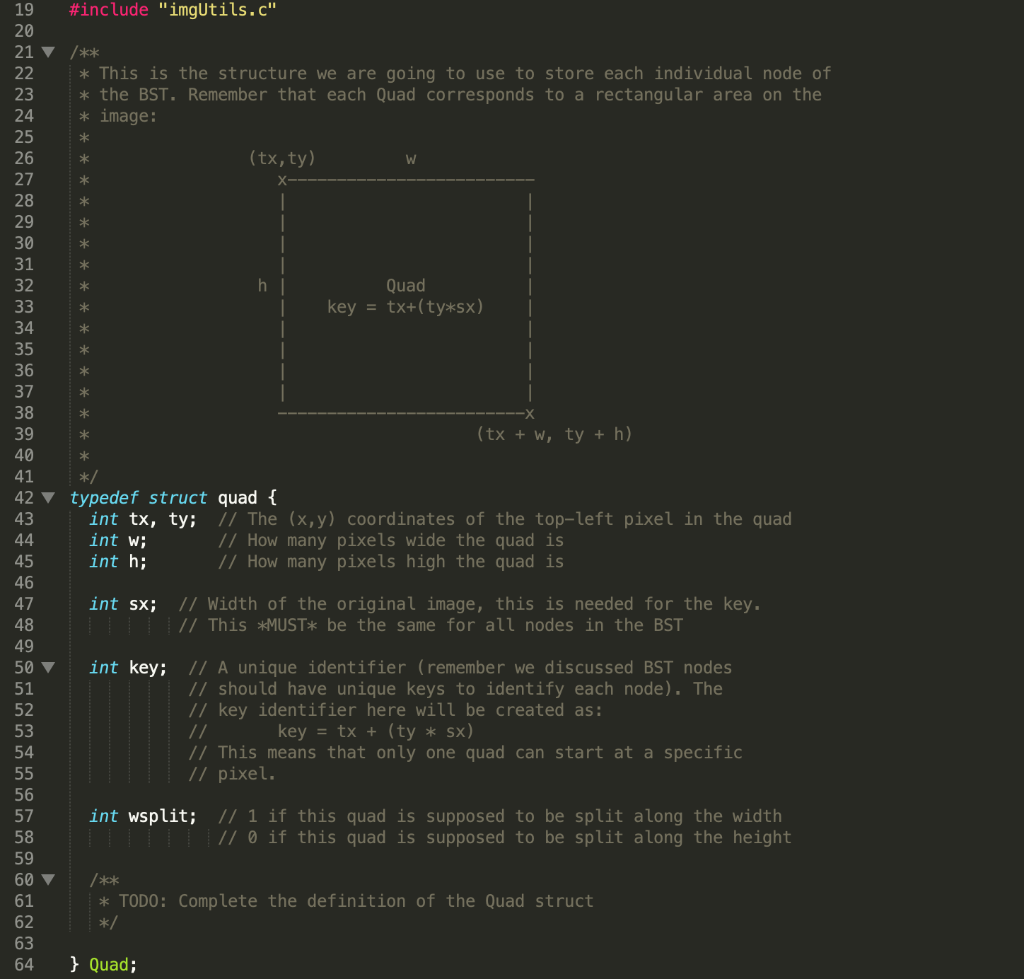
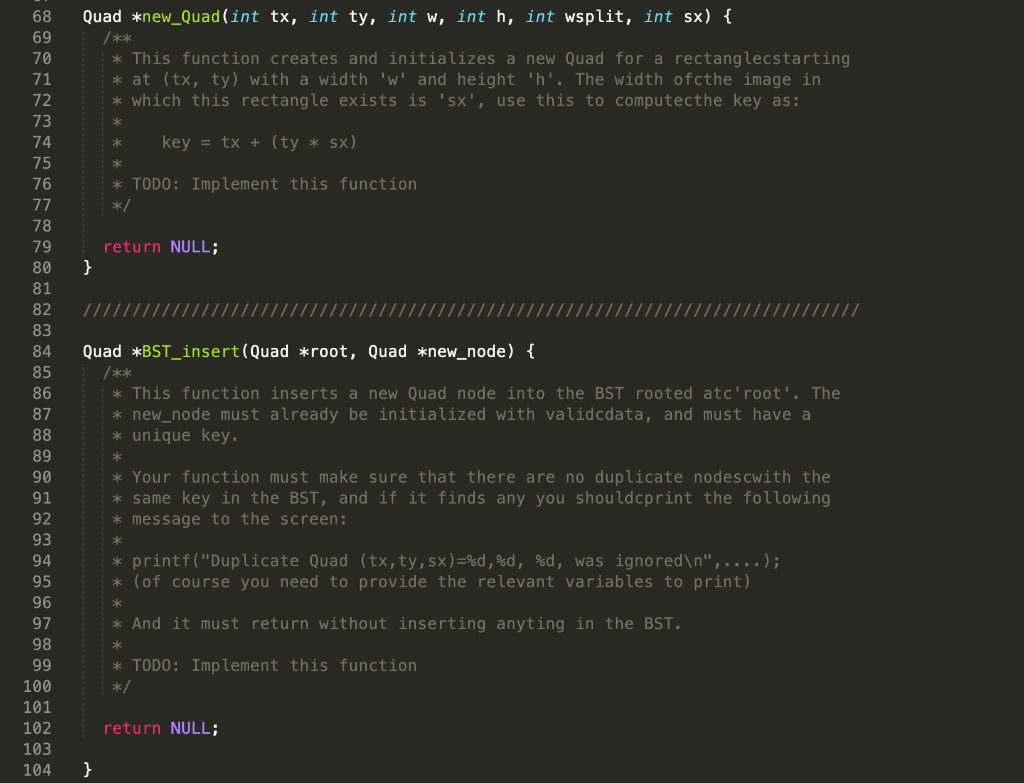
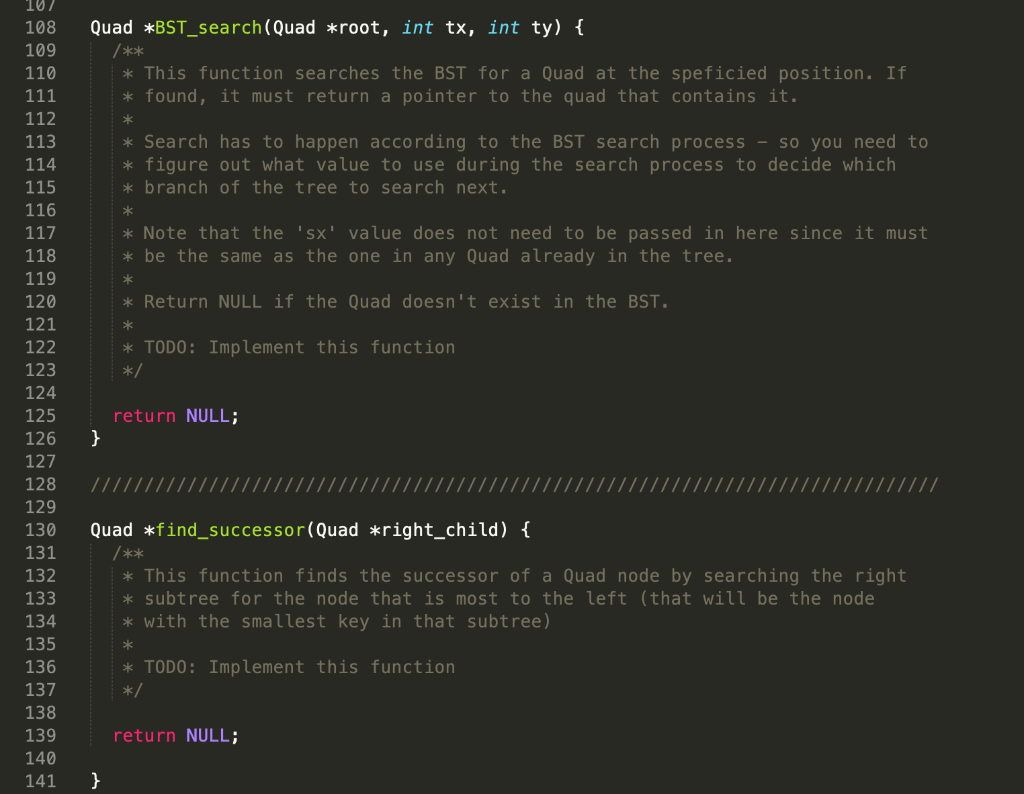
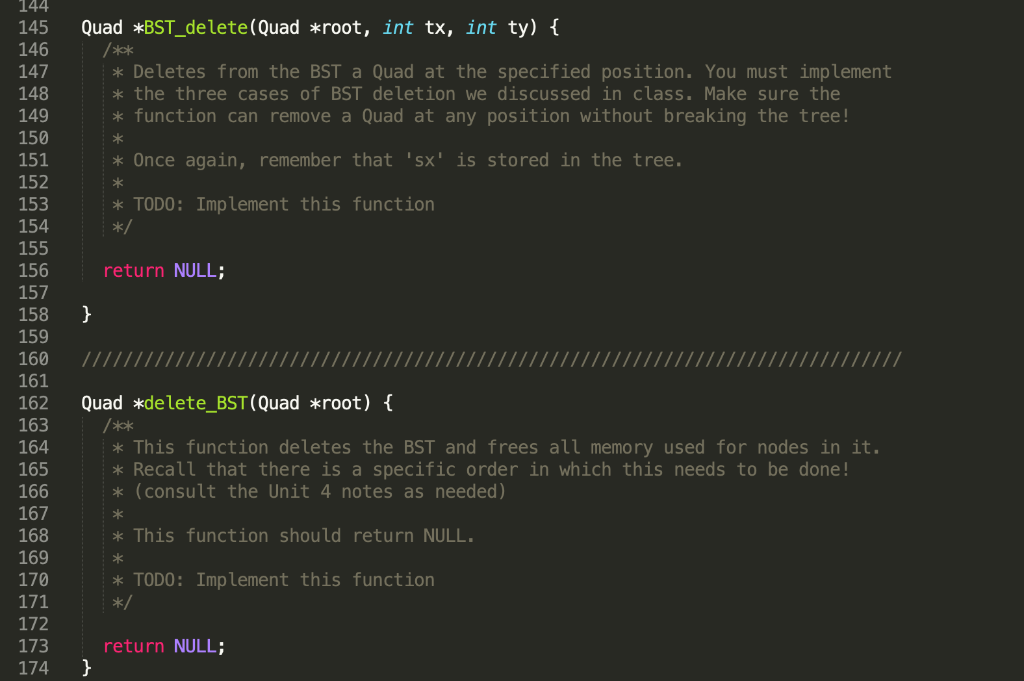
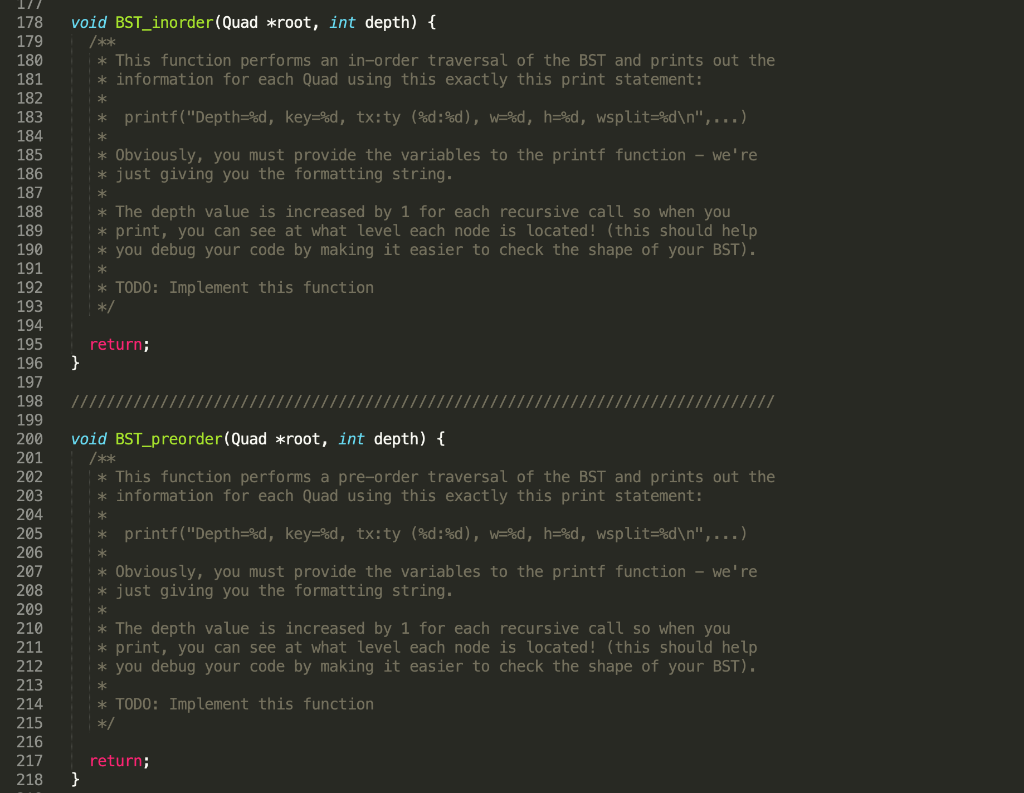
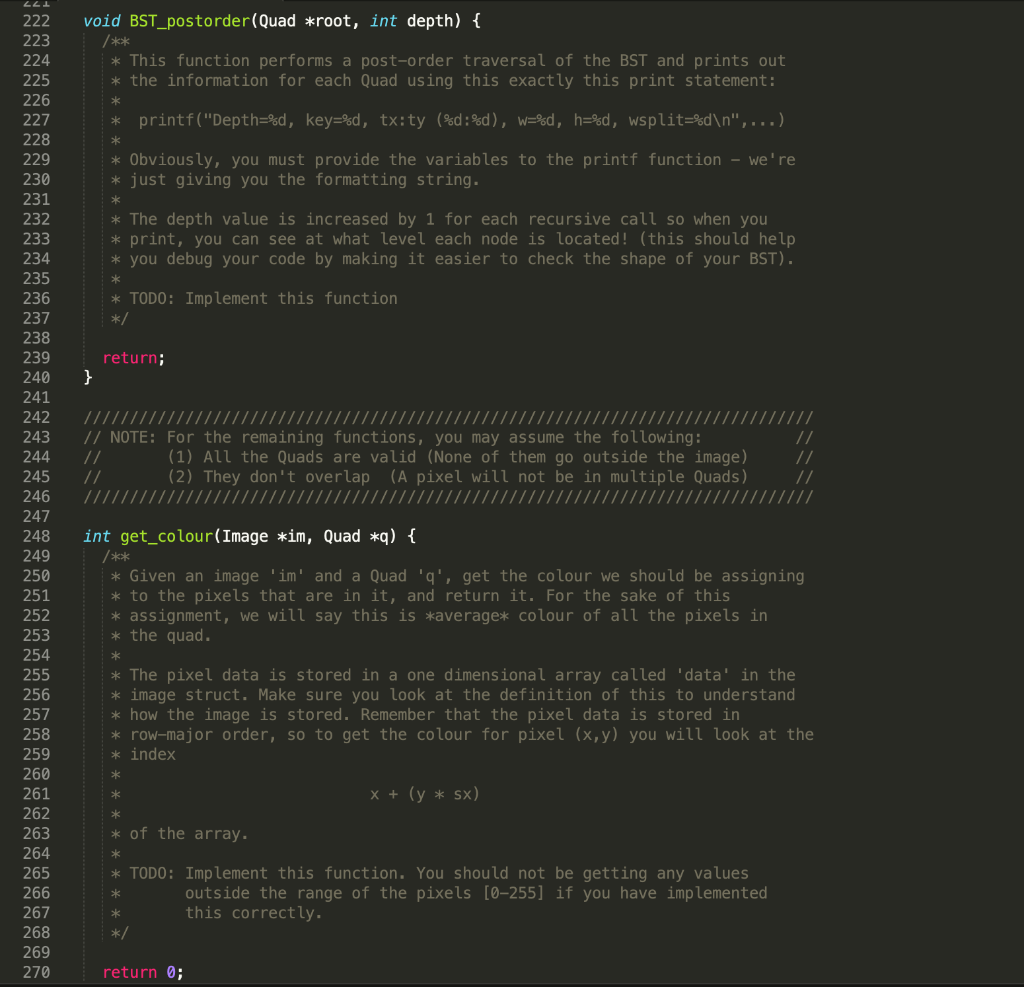
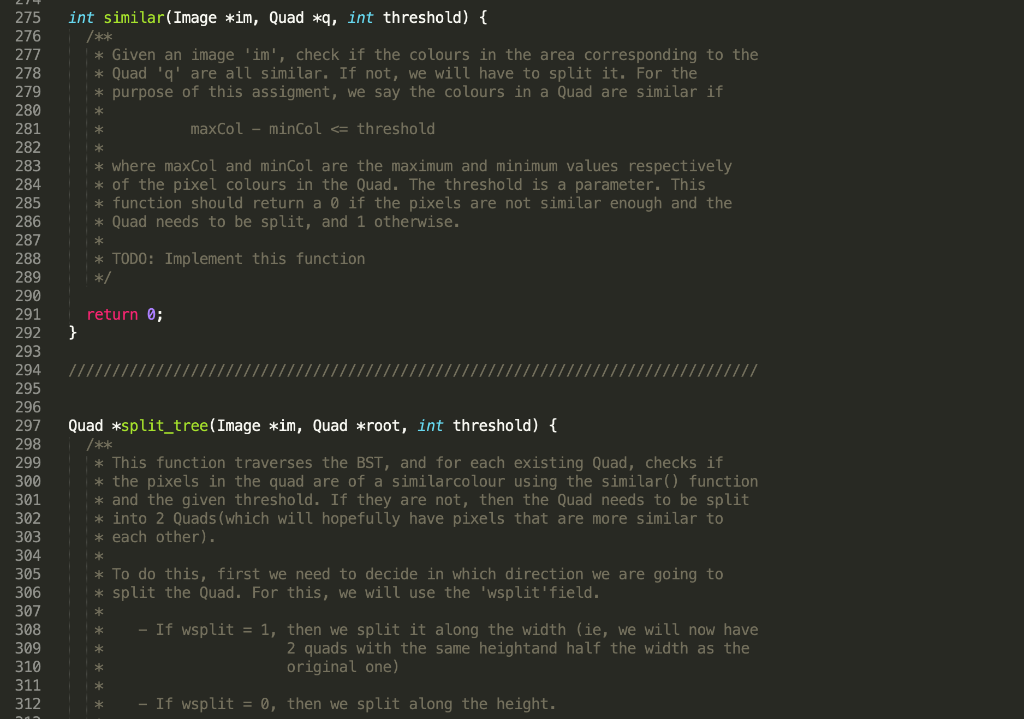
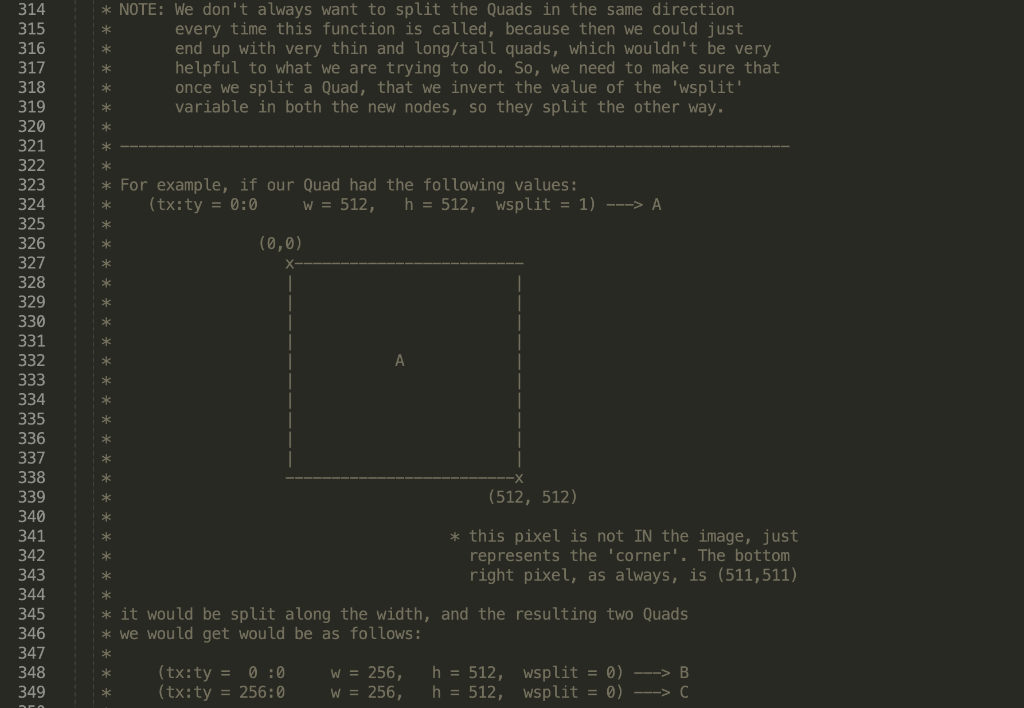
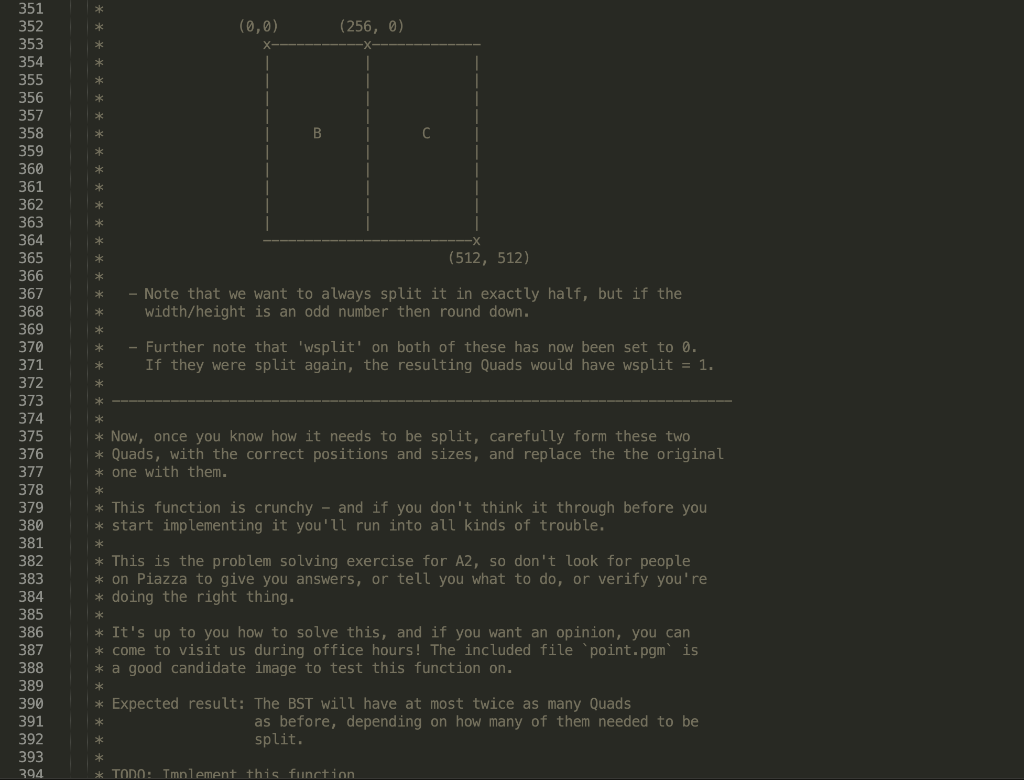
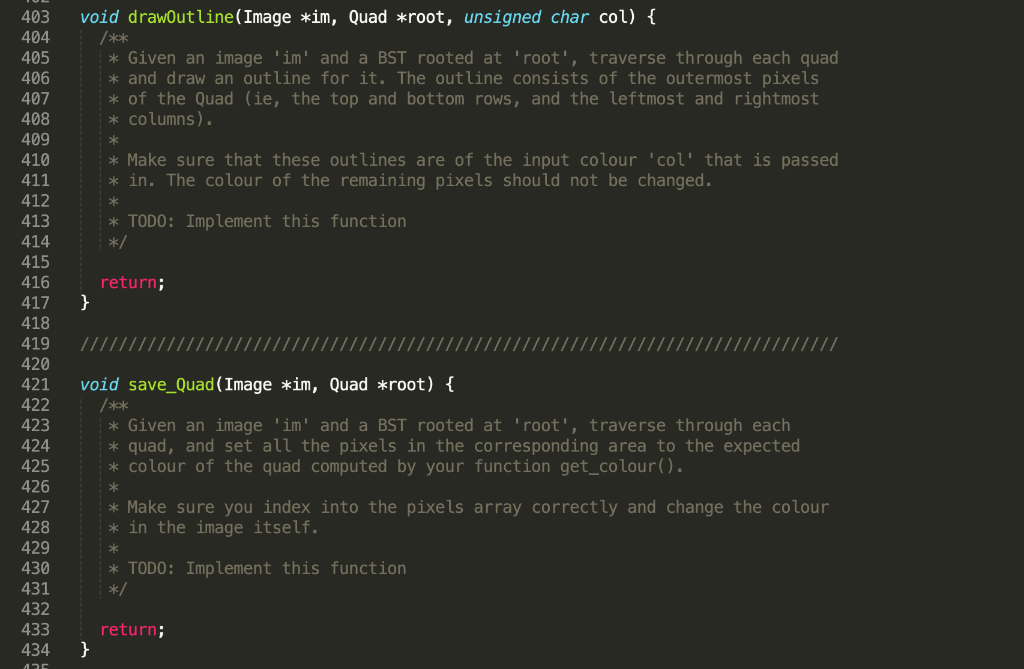
* W * * * * * * * * -X 19 #include "imgUtils.c" 20 21 /** 22 * This is the structure we are going to use to store each individual node of 23 * the BST. Remember that each Quad corresponds to a rectangular area on the 24 * image: 25 26 (tx, ty) 27 28 * 29 30 31 * 32 h Quad 33 key = tx+(ty*sx) 34 35 36 37 38 39 (tx + W, ty + h) 40 41 42 typedef struct quad { 43 int tx, ty; // The (x,y) coordinates of the top-left pixel in the quad 44 // How many pixels wide the quad is 45 int h; // How many pixels high the quad is 46 47 int sx; // Width of the original image, this is needed for the key. 48 // This *MUST* be the same for all nodes in the BST 49 50 v int key; // A unique identifier (remember we discussed BST nodes 51 // should have unique keys to identify each node). The 52 // key identifier here will be created as: 53 key = tx + (ty * sx) 54 // This means that only one quad can start at a specific 55 // pixel. 56 57 int wsplit; // 1 if this quad is supposed to be split along the width 58 // 0 if this quad is supposed to be split along the height 59 * * int w; 60 * TODO: Complete the definition of the Quad struct */ 61 62 63 64 } Quad; Quad *new_Quad(int tx, int ty, int w, int n, int wsplit, int sx) { /** * This function creates and initializes a new Quad for a rectanglecstarting * at (tx, ty) with a width 'W' and height 'h'. The width ofcthe image in * which this rectangle exists is 'sx', use this to computecthe key as: * * key = tx + (ty * sx) * * TODO: Implement this function */ return NULL; } 68 69 70 71 72 73 74 75 76 77 78 79 80 81 82 83 84 85 86 87 88 89 90 91 92 93 94 95 96 97 98 99 100 101 102 103 104 Quad *BST_insert(Quad *root, Quad *new_node) { /** * This function inserts a new Quad node into the BST rooted atc'root'. The * new_node must already be initialized with validcdata, and must have a * unique key. * Your function must make sure that there are no duplicate nodes cwith the * same key in the BST, and if it finds any you shouldcprint the following * message to the screen: * * printf("Duplicate Quad (tx, ty, sx) =%d,%d, %d, was ignored ", ...); * (of course you need to provide the relevant variables to print) * * And it must return without inserting anyting in the BST. * * TODO: Implement this function */ return NULL; } 107 108 109 Quad *BST_search(Quad *root, int tx, int ty) { /** * This function searches the BST for a Quad at the speficied position. If found, it must return a pointer to the quad that contains it. 110 111 112 113 114 115 116 * Search has to happen according to the BST search process so you need to * figure out what value to use during the search process to decide which * branch of the tree to search next. * 117 * Note that the 'sx' value does not need to be passed in here since it must be the same as the one in any Quad already in the tree. 118 * Return NULL if the Quad doesn't exist in the BST. 119 120 121 122 123 124 * TODO: Implement this function */ 125 return NULL; } 126 127 128 129 130 131 132 133 134 Quad *find_successor(Quad *right_child) { /** * This function finds the successor of a Quad node by searching the right * subtree for the node that is most to the left (that will be the node * with the smallest key in that subtree) 135 * TODO: Implement this function */ 136 137 138 139 140 return NULL; 141 } 144 145 Quad *BST_delete(Quad *root, int tx, int ty) { 146 * Deletes from the BST a Quad at the specified position. You must implement * the three cases of BST deletion we discussed in class. Make sure the * function can remove a Quad at any position without breaking the tree! * * Once again, remember that 'sx' is stored in the tree. * * TODO: Implement this function */ return NULL; 147 148 149 150 151 152 153 154 155 156 157 158 159 160 161 162 163 164 165 166 167 168 } Quad *delete_BST(Quad *root) { * This function deletes the BST and frees all memory used for nodes in it. * Recall that there is a specific order in which this needs to be done! * (consult the Unit 4 notes as needed) ** * This function should return NULL. 169 * * TODO: Implement this function */ 170 171 172 173 174 return NULL; } 17/ 178 void BST_inorder(Quad *root, int depth) { 179 * This function performs an in-order traversal of the BST and prints out the * information for each Quad using this exactly this print statement: * * printf("Depth=%d, key=%d, tx:ty (%d:%d), W=%d, h=%d, wsplit=%d ", ...) * Obviously, you must provide the variables to the printf function we're * just giving you the formatting string. 180 181 182 183 184 185 186 187 188 189 190 191 192 193 194 195 196 197 * The depth value is increased by 1 for each recursive call so when you * print, you can see at what level each node is located! (this should help * you debug your code by making it easier to check the shape of your BST). * * TODO: Implement this function return; } 198 void BST_preorder(Quad *root, int depth) { 199 200 201 202 203 204 205 206 207 208 209 * This function performs a pre-order traversal of the BST and prints out the * information for each Quad using this exactly this print statement: * printf("Depth=%d, key=%d, tx:ty (%d:%d), W=%d, h=%d, wsplit=%d ", ...) * * Obviously, you must provide the variables to the printf function we're * just giving you the formatting string. 210 211 212 * The depth value is increased by 1 for each recursive call so when you * print, you can see at what level each node is located! (this should help * you debug your code by making it easier to check the shape of your BST). 213 * * TODO: Implement this function */ 214 215 216 217 218 return; } void BST_postorder(Quad *root, int depth) { * This function performs a post-order traversal of the BST and prints out * the information for each Quad using this exactly this print statement: * printf("Depth=%d, key=%d, tx:ty (%d:%d), w=%d, h=%d, wsplit=%d ", ...) * * Obviously, you must provide the variables to the printf function - we're * just giving you the formatting string. 22 222 223 224 225 226 227 228 229 230 231 232 233 234 235 236 237 238 239 240 241 242 243 244 245 246 * The depth value is increased by 1 for each recursive call so when you * print, you can see at what level each node is located! (this should help * you debug your code by making it easier to check the shape of your BST). * TODO: Implement this function */ return; } // NOTE: For the remaining functions, you may assume the following: (1) All the Quads are valid (None of them go outside the image) (2) They don't overlap (A pixel will not be in multiple Quads) 247 int get_colour(Image *im, Quad *q) { * Given an image 'im' and a Quad 'q', get the colour we should be assigning * to the pixels that are in it, and return it. For the sake of this * assignment, we will say this is *average* colour of all the pixels in * the quad. * 248 249 250 251 252 253 254 255 256 257 258 259 260 261 262 263 264 265 266 267 268 269 270 * The pixel data is stored in a one dimensional array called 'data' in the * image struct. Make sure you look at the definition of this to understand * how the image is stored. Remember that the pixel data is stored in * row-major order, so to get the colour for pixel (x,y) you will look at the * index * * X + (y * sx) * * of the array. * * * TODO: Implement this function. You should not be getting any values outside the range of the pixels [0255] if you have implemented this correctly. */ * return 0; int similar(Image *im, Quad *q, int threshold) { 275 276 277 278 * Given an image 'im', check if the colours in the area corresponding to the * Quad 'q' are all similar. If not, we will have to split it. For the * purpose of this assigment, we say the colours in a Quad are similar if * maxCol - minCol A (0,0) 314 315 316 317 318 319 320 321 322 323 324 325 326 327 328 329 330 331 332 333 334 335 336 337 338 339 340 341 342 343 344 345 346 347 348 349 (512, 512) * this pixel is not IN the image, just represents the 'corner'. The bottom right pixel, as always, is (511,511) * it would be split along the width, and the resulting two Quads * We would get would be as follows: (tx:ty = 0 : 0 (tx:ty = 256:0 W = 256, W = 256, h = 512, wsplit = 0) ---> B h = 512, wsplit = 0) ---> C (0,0) (256, 0) B (512, 512) - Note that we want to always split it in exactly half, but if the width/height is an odd number then round down. * Further note that 'wsplit' on both of these has now been set to 0. If they were split again, the resulting Quads would have wsplit = 1. * 351 352 353 354 355 356 357 358 359 360 361 362 363 364 365 366 367 368 369 370 371 372 373 374 375 376 377 378 379 380 381 382 383 384 385 386 387 388 389 390 391 392 393 394 * Now, once you know how it needs to be split, carefully form these two * Quads, with the correct positions and sizes, and replace the the original * one with them. * This function is crunchy - and if you don't think it through before you * start implementing it you'll run into all kinds of trouble. * This is the problem solving exercise for A2, so don't look for people * on Piazza to give you answers, or tell you what to do, or verify you're * doing the right thing. * * It's up to you how to solve this, and if you want an opinion, you can * come to visit us during office hours! The included file 'point.pgm' is * a good candidate image to test this function on. * * Expected result: The BST will have at most twice as many Quads as before, depending on how many of them needed to be split. * TODO: Implement this function void drawoutline(Image *im, Quad *root, unsigned char col) { /** * Given an image 'im' and a BST rooted at 'root', traverse through each quad * and draw an outline for it. The outline consists of the outermost pixels * of the Quad (ie, the top and bottom rows, and the leftmost and rightmost * columns). * * Make sure that these outlines are of the input colour 'col' that is passed * in. The colour of the remaining pixels should not be changed. * 403 404 405 406 407 408 409 410 411 412 413 414 415 416 417 418 419 420 421 422 * TODO: Implement this function */ return; } 423 void save_Quad (Image *im, Quad *root) { * Given an image 'im' and a BST rooted at 'root', traverse through each * quad, and set all the pixels in the corresponding area to the expected * colour of the quad computed by your function get_colour(). * Make sure you index into the pixels array correctly and change the colour * in the image itself. * 424 425 426 427 428 429 430 431 432 433 434 * TODO: Implement this function */ return; } ADE * W * * * * * * * * -X 19 #include "imgUtils.c" 20 21 /** 22 * This is the structure we are going to use to store each individual node of 23 * the BST. Remember that each Quad corresponds to a rectangular area on the 24 * image: 25 26 (tx, ty) 27 28 * 29 30 31 * 32 h Quad 33 key = tx+(ty*sx) 34 35 36 37 38 39 (tx + W, ty + h) 40 41 42 typedef struct quad { 43 int tx, ty; // The (x,y) coordinates of the top-left pixel in the quad 44 // How many pixels wide the quad is 45 int h; // How many pixels high the quad is 46 47 int sx; // Width of the original image, this is needed for the key. 48 // This *MUST* be the same for all nodes in the BST 49 50 v int key; // A unique identifier (remember we discussed BST nodes 51 // should have unique keys to identify each node). The 52 // key identifier here will be created as: 53 key = tx + (ty * sx) 54 // This means that only one quad can start at a specific 55 // pixel. 56 57 int wsplit; // 1 if this quad is supposed to be split along the width 58 // 0 if this quad is supposed to be split along the height 59 * * int w; 60 * TODO: Complete the definition of the Quad struct */ 61 62 63 64 } Quad; Quad *new_Quad(int tx, int ty, int w, int n, int wsplit, int sx) { /** * This function creates and initializes a new Quad for a rectanglecstarting * at (tx, ty) with a width 'W' and height 'h'. The width ofcthe image in * which this rectangle exists is 'sx', use this to computecthe key as: * * key = tx + (ty * sx) * * TODO: Implement this function */ return NULL; } 68 69 70 71 72 73 74 75 76 77 78 79 80 81 82 83 84 85 86 87 88 89 90 91 92 93 94 95 96 97 98 99 100 101 102 103 104 Quad *BST_insert(Quad *root, Quad *new_node) { /** * This function inserts a new Quad node into the BST rooted atc'root'. The * new_node must already be initialized with validcdata, and must have a * unique key. * Your function must make sure that there are no duplicate nodes cwith the * same key in the BST, and if it finds any you shouldcprint the following * message to the screen: * * printf("Duplicate Quad (tx, ty, sx) =%d,%d, %d, was ignored ", ...); * (of course you need to provide the relevant variables to print) * * And it must return without inserting anyting in the BST. * * TODO: Implement this function */ return NULL; } 107 108 109 Quad *BST_search(Quad *root, int tx, int ty) { /** * This function searches the BST for a Quad at the speficied position. If found, it must return a pointer to the quad that contains it. 110 111 112 113 114 115 116 * Search has to happen according to the BST search process so you need to * figure out what value to use during the search process to decide which * branch of the tree to search next. * 117 * Note that the 'sx' value does not need to be passed in here since it must be the same as the one in any Quad already in the tree. 118 * Return NULL if the Quad doesn't exist in the BST. 119 120 121 122 123 124 * TODO: Implement this function */ 125 return NULL; } 126 127 128 129 130 131 132 133 134 Quad *find_successor(Quad *right_child) { /** * This function finds the successor of a Quad node by searching the right * subtree for the node that is most to the left (that will be the node * with the smallest key in that subtree) 135 * TODO: Implement this function */ 136 137 138 139 140 return NULL; 141 } 144 145 Quad *BST_delete(Quad *root, int tx, int ty) { 146 * Deletes from the BST a Quad at the specified position. You must implement * the three cases of BST deletion we discussed in class. Make sure the * function can remove a Quad at any position without breaking the tree! * * Once again, remember that 'sx' is stored in the tree. * * TODO: Implement this function */ return NULL; 147 148 149 150 151 152 153 154 155 156 157 158 159 160 161 162 163 164 165 166 167 168 } Quad *delete_BST(Quad *root) { * This function deletes the BST and frees all memory used for nodes in it. * Recall that there is a specific order in which this needs to be done! * (consult the Unit 4 notes as needed) ** * This function should return NULL. 169 * * TODO: Implement this function */ 170 171 172 173 174 return NULL; } 17/ 178 void BST_inorder(Quad *root, int depth) { 179 * This function performs an in-order traversal of the BST and prints out the * information for each Quad using this exactly this print statement: * * printf("Depth=%d, key=%d, tx:ty (%d:%d), W=%d, h=%d, wsplit=%d ", ...) * Obviously, you must provide the variables to the printf function we're * just giving you the formatting string. 180 181 182 183 184 185 186 187 188 189 190 191 192 193 194 195 196 197 * The depth value is increased by 1 for each recursive call so when you * print, you can see at what level each node is located! (this should help * you debug your code by making it easier to check the shape of your BST). * * TODO: Implement this function return; } 198 void BST_preorder(Quad *root, int depth) { 199 200 201 202 203 204 205 206 207 208 209 * This function performs a pre-order traversal of the BST and prints out the * information for each Quad using this exactly this print statement: * printf("Depth=%d, key=%d, tx:ty (%d:%d), W=%d, h=%d, wsplit=%d ", ...) * * Obviously, you must provide the variables to the printf function we're * just giving you the formatting string. 210 211 212 * The depth value is increased by 1 for each recursive call so when you * print, you can see at what level each node is located! (this should help * you debug your code by making it easier to check the shape of your BST). 213 * * TODO: Implement this function */ 214 215 216 217 218 return; } void BST_postorder(Quad *root, int depth) { * This function performs a post-order traversal of the BST and prints out * the information for each Quad using this exactly this print statement: * printf("Depth=%d, key=%d, tx:ty (%d:%d), w=%d, h=%d, wsplit=%d ", ...) * * Obviously, you must provide the variables to the printf function - we're * just giving you the formatting string. 22 222 223 224 225 226 227 228 229 230 231 232 233 234 235 236 237 238 239 240 241 242 243 244 245 246 * The depth value is increased by 1 for each recursive call so when you * print, you can see at what level each node is located! (this should help * you debug your code by making it easier to check the shape of your BST). * TODO: Implement this function */ return; } // NOTE: For the remaining functions, you may assume the following: (1) All the Quads are valid (None of them go outside the image) (2) They don't overlap (A pixel will not be in multiple Quads) 247 int get_colour(Image *im, Quad *q) { * Given an image 'im' and a Quad 'q', get the colour we should be assigning * to the pixels that are in it, and return it. For the sake of this * assignment, we will say this is *average* colour of all the pixels in * the quad. * 248 249 250 251 252 253 254 255 256 257 258 259 260 261 262 263 264 265 266 267 268 269 270 * The pixel data is stored in a one dimensional array called 'data' in the * image struct. Make sure you look at the definition of this to understand * how the image is stored. Remember that the pixel data is stored in * row-major order, so to get the colour for pixel (x,y) you will look at the * index * * X + (y * sx) * * of the array. * * * TODO: Implement this function. You should not be getting any values outside the range of the pixels [0255] if you have implemented this correctly. */ * return 0; int similar(Image *im, Quad *q, int threshold) { 275 276 277 278 * Given an image 'im', check if the colours in the area corresponding to the * Quad 'q' are all similar. If not, we will have to split it. For the * purpose of this assigment, we say the colours in a Quad are similar if * maxCol - minCol A (0,0) 314 315 316 317 318 319 320 321 322 323 324 325 326 327 328 329 330 331 332 333 334 335 336 337 338 339 340 341 342 343 344 345 346 347 348 349 (512, 512) * this pixel is not IN the image, just represents the 'corner'. The bottom right pixel, as always, is (511,511) * it would be split along the width, and the resulting two Quads * We would get would be as follows: (tx:ty = 0 : 0 (tx:ty = 256:0 W = 256, W = 256, h = 512, wsplit = 0) ---> B h = 512, wsplit = 0) ---> C (0,0) (256, 0) B (512, 512) - Note that we want to always split it in exactly half, but if the width/height is an odd number then round down. * Further note that 'wsplit' on both of these has now been set to 0. If they were split again, the resulting Quads would have wsplit = 1. * 351 352 353 354 355 356 357 358 359 360 361 362 363 364 365 366 367 368 369 370 371 372 373 374 375 376 377 378 379 380 381 382 383 384 385 386 387 388 389 390 391 392 393 394 * Now, once you know how it needs to be split, carefully form these two * Quads, with the correct positions and sizes, and replace the the original * one with them. * This function is crunchy - and if you don't think it through before you * start implementing it you'll run into all kinds of trouble. * This is the problem solving exercise for A2, so don't look for people * on Piazza to give you answers, or tell you what to do, or verify you're * doing the right thing. * * It's up to you how to solve this, and if you want an opinion, you can * come to visit us during office hours! The included file 'point.pgm' is * a good candidate image to test this function on. * * Expected result: The BST will have at most twice as many Quads as before, depending on how many of them needed to be split. * TODO: Implement this function void drawoutline(Image *im, Quad *root, unsigned char col) { /** * Given an image 'im' and a BST rooted at 'root', traverse through each quad * and draw an outline for it. The outline consists of the outermost pixels * of the Quad (ie, the top and bottom rows, and the leftmost and rightmost * columns). * * Make sure that these outlines are of the input colour 'col' that is passed * in. The colour of the remaining pixels should not be changed. * 403 404 405 406 407 408 409 410 411 412 413 414 415 416 417 418 419 420 421 422 * TODO: Implement this function */ return; } 423 void save_Quad (Image *im, Quad *root) { * Given an image 'im' and a BST rooted at 'root', traverse through each * quad, and set all the pixels in the corresponding area to the expected * colour of the quad computed by your function get_colour(). * Make sure you index into the pixels array correctly and change the colour * in the image itself. * 424 425 426 427 428 429 430 431 432 433 434 * TODO: Implement this function */ return; } ADE
Step by Step Solution
There are 3 Steps involved in it

Get step-by-step solutions from verified subject matter experts
 Study Help