







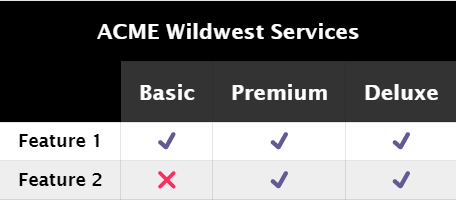
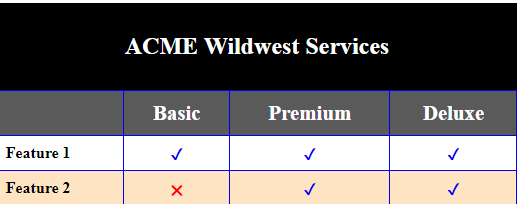
Question: How do I make the image on the right be the exact same as the one on the left? I need the ACME Wildwest Services
How do I make the image on the right be the exact same as the one on the left? I need the ACME Wildwest Services to wrap around the Basic, Premium and Deluxe th elemets as shown on the left. Mine is the one on the right. I have tried all i could do with the table, but never seemed to work. My HTML and CSS are below the image:
/*CSS*/
table {
width: 70%;
border: 1px solid #0000ee;
margin: 10% auto;
border-collapse: collapse;
caption-side: top;
}
td, th{
border: 1px solid #0000ee;
}
th {
background-color: #5a5a5a;
color: #fff;
}
.cancel {
color: red;
text-align: center;
}
.checkmark {
color: #0000ee;
text-align: center;
}
.row-heading {
font-weight: bolder;
padding: 8px;
}
.table-heading {
font-size: 1.3rem;
padding: 10px;
}
.main-caption {
padding: 30px;
font-size: 1.5rem;
font-weight: bolder;
background-color: black;
color: #fff;
}
.tfoot-caption {
text-align: center;
}
tbody tr:nth-child(even) {
background-color: bisque;
}
| Basic | Premium | Deluxe | |
|---|---|---|---|
| Feature 1 | ✔ | ✔ | ✔ |
| Feature 2 | ???? | ✔ | ✔ |
| Feature 3 | ???? | ???? | ✔ |
Table 1: Account Feature Comparison
ACME Wildwest Services Basic Premium Deluxe Feature 1 Feature 2 ACMIE Wildwest Services \begin{tabular}{|c|c|c|c} & Basic & Premium & Deluxe \\ \hline Feature 1 & & & \\ \hline Feature 2 & & & \\ \hline \end{tabular}
Step by Step Solution
There are 3 Steps involved in it

Get step-by-step solutions from verified subject matter experts
 Study Help