







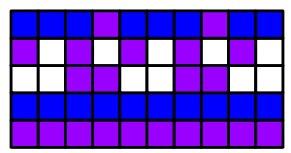
Question: how do I update my main method so that make a 5x10 square design? ( how do i continue my code to make it? output
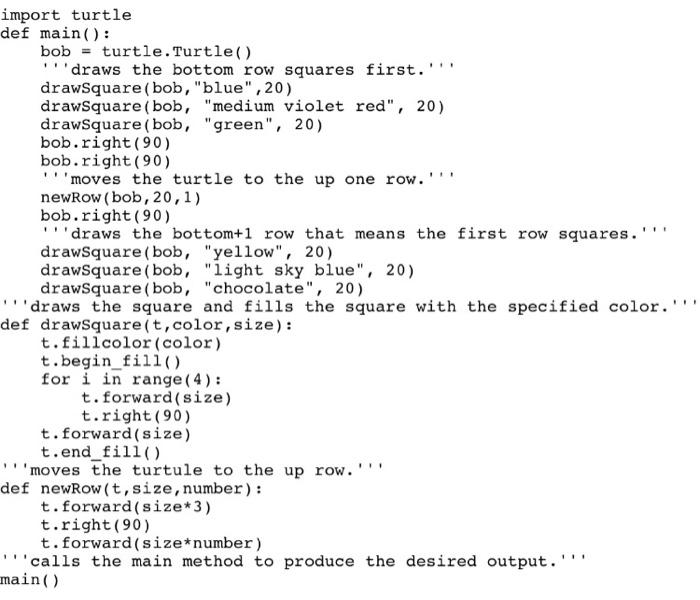
import turtle def main(): bob = turtle. Turtle() "draws the bottom row squares first.' drawSquare (bob, "blue", 20) drawSquare (bob, "medium violet red", 20) drawSquare ( bob, "green", 20) bob.right(90) bob.right (90) "'moves the turtle to the up one row.'' newrow (bob, 20,1) bob.right (90) "draws the bottom+1 row that means the first row squares.' drawSquare (bob, "yellow", 20) drawSquare(bob, "light sky blue", 20) drawSquare (bob, "chocolate", 20) "''draws the square and fills the square with the specified color.' def drawSquare(t, color, size): t.fillcolor (color) t.begin_fill() for i in range(4): t. forward(size) t.right (90) t.forward(size) t.end_fill() ''moves the turtule to the up row. def newRow(t, size, number): t.forward(size*3) t.right (90) t.forward(size*number) "''calls the main method to produce the desired output.'' main() 11
Step by Step Solution
There are 3 Steps involved in it

Get step-by-step solutions from verified subject matter experts
 Study Help