Question: Please help. I'm using jGRASP and I'm getting errors in my code. Please see code below ELLIPSOIDLIST.JAVA import java.util.ArrayList; import java.text.DecimalFormat; import java.util.Scanner; import java.io.File;
Please help. I'm using jGRASP and I'm getting errors in my code. Please see code below
ELLIPSOIDLIST.JAVA
import java.util.ArrayList; import java.text.DecimalFormat; import java.util.Scanner; import java.io.File; import java.io.FileNotFoundException;
/** * * * @author * @version */ public class EllipsoidList { /** * Instance Variables. * @param label sets the label * @param ellipsoidList establishes the array */ private String name; private ArrayList ellipsoidList; /** * Constructor. * @param nameIn accepts name string * @param ellipsoidListIn represends list of objects */ public EllipsoidList(String nameIn, ArrayList ellipsoidListIn) { name = nameIn; ellipsoidList = ellipsoidListIn; } /** * Methods. * @return label as String */ public String getName() { return name; } /** * Methods. * @return 0 if size
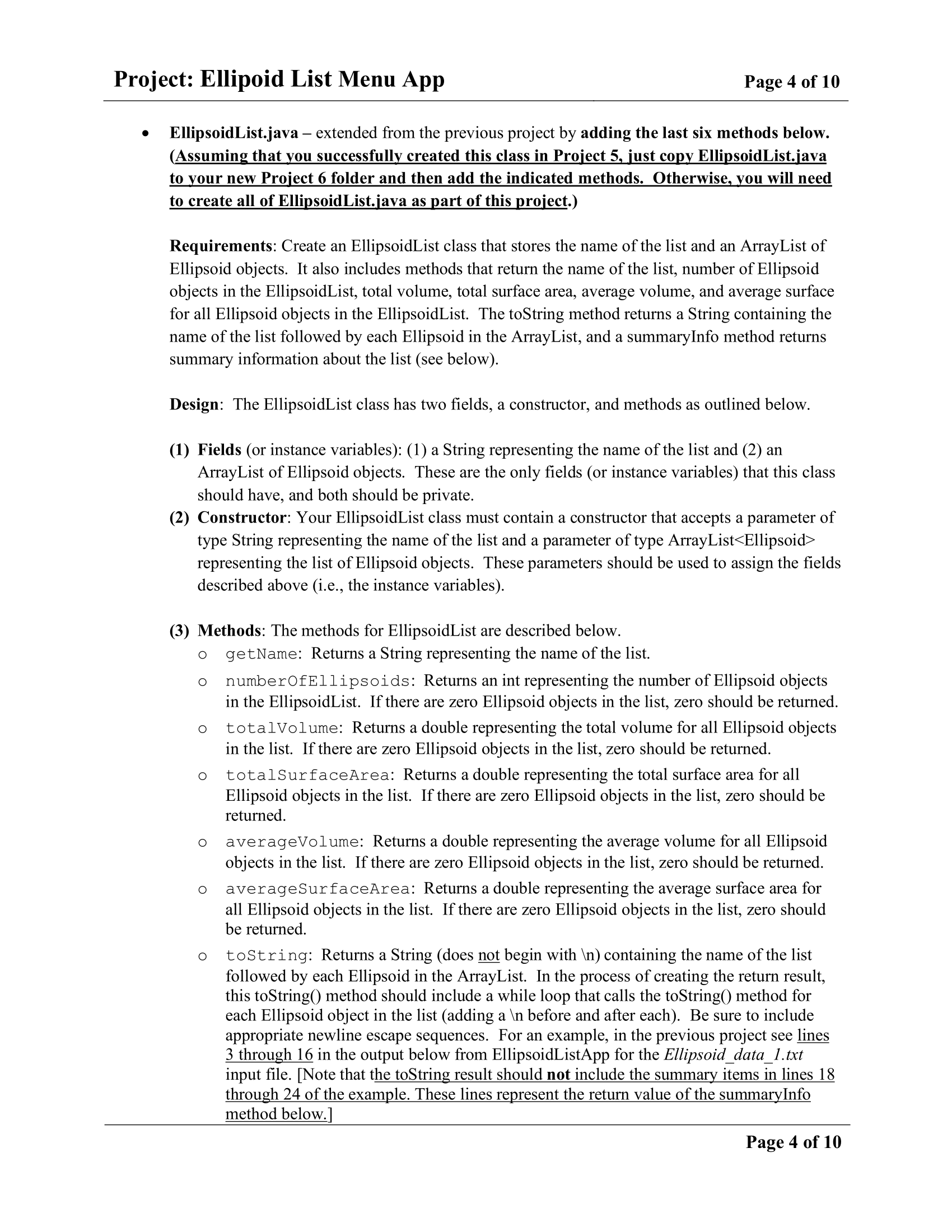
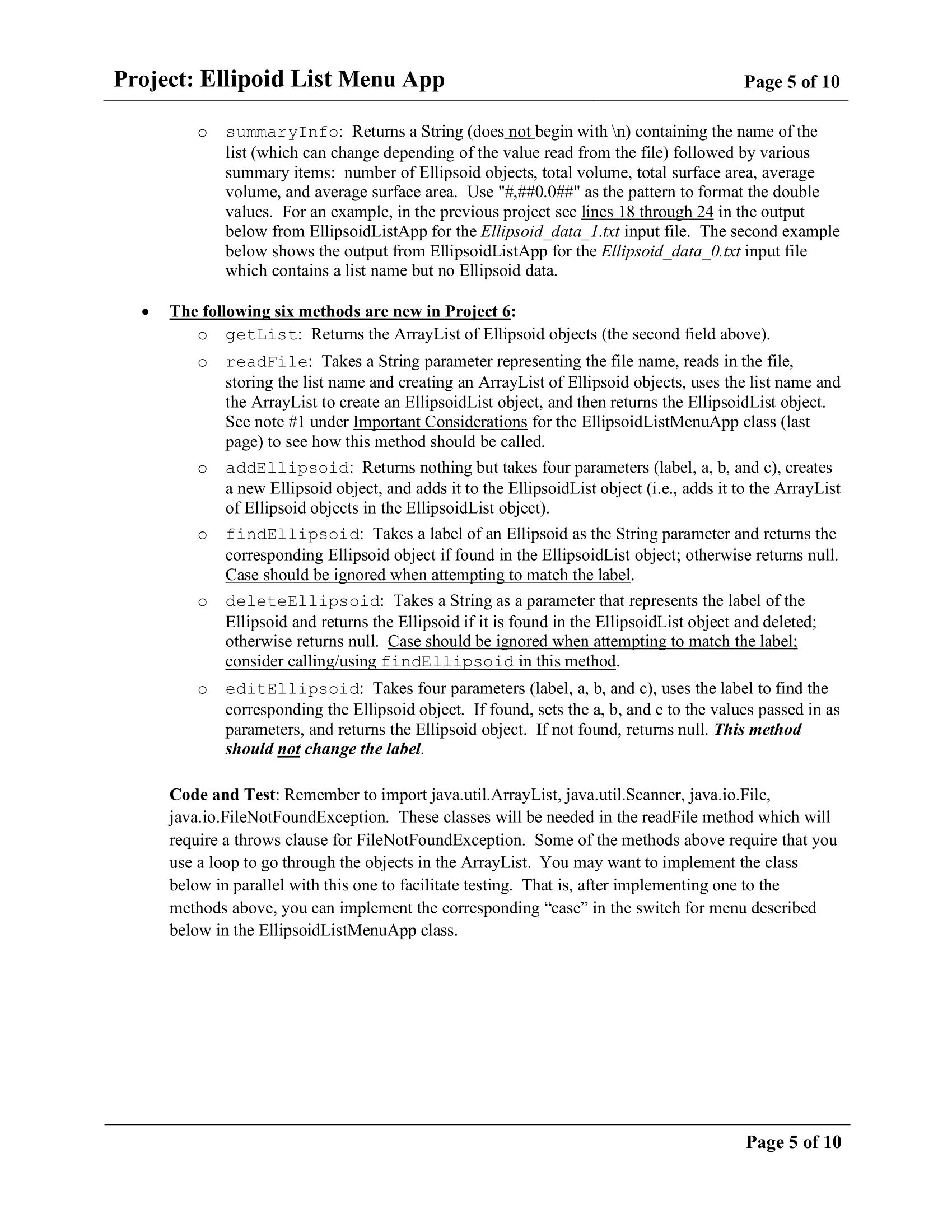
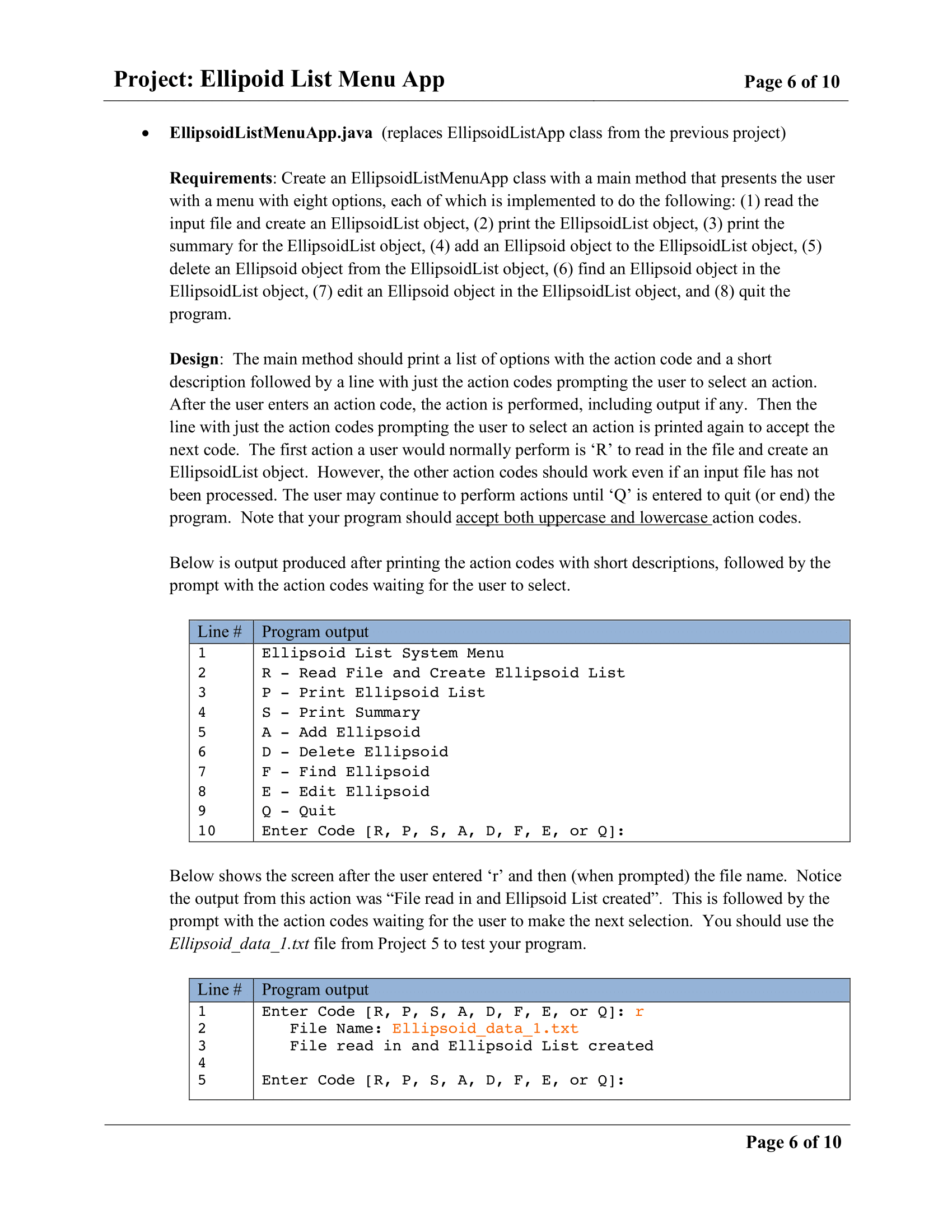
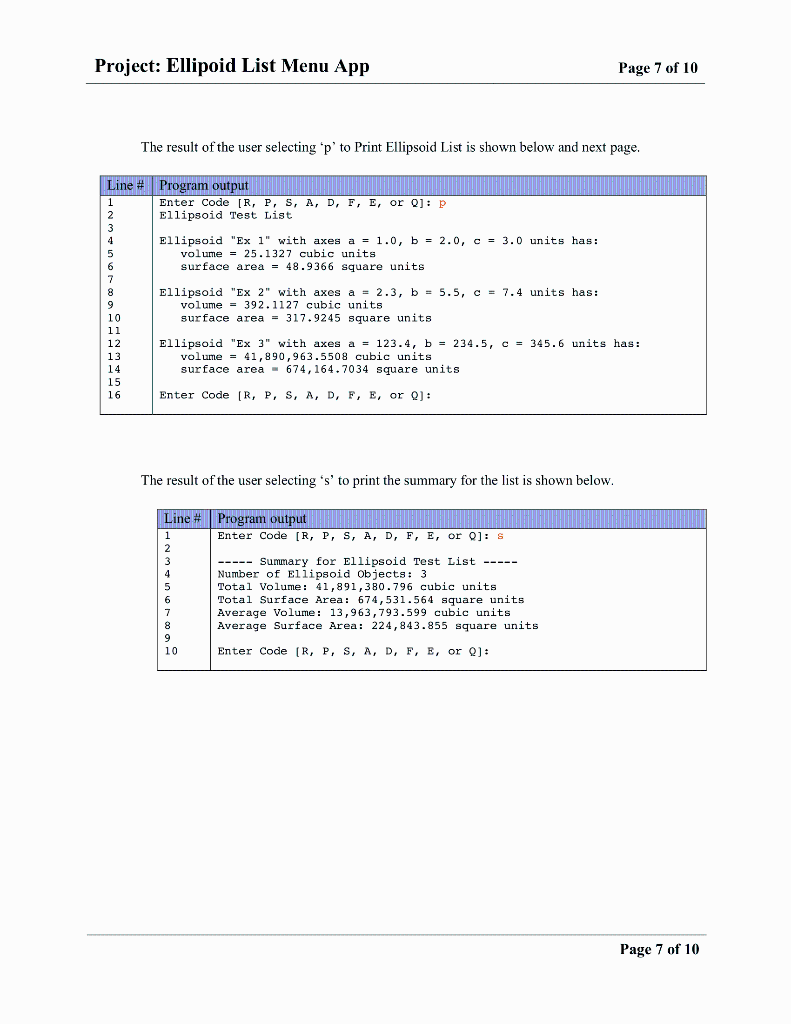
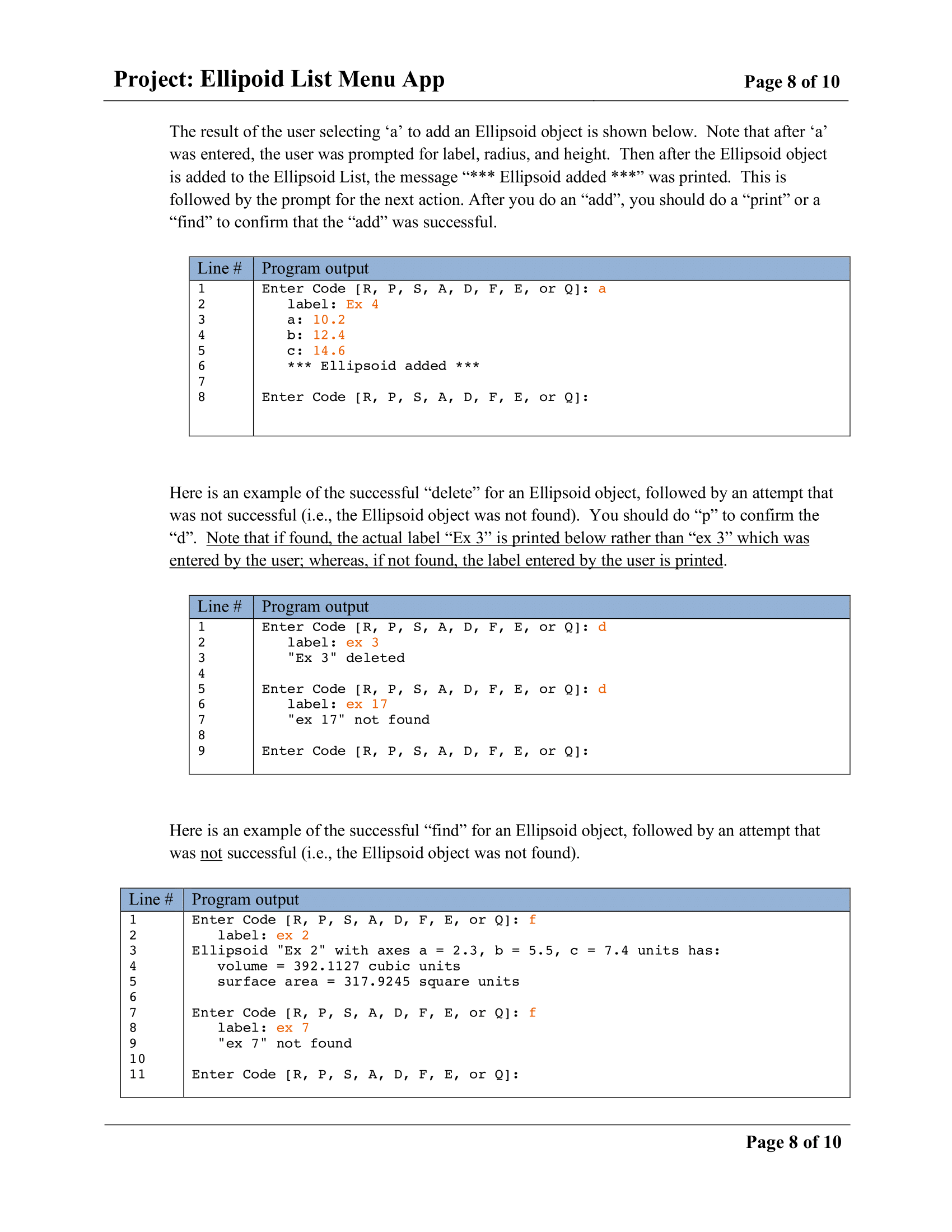
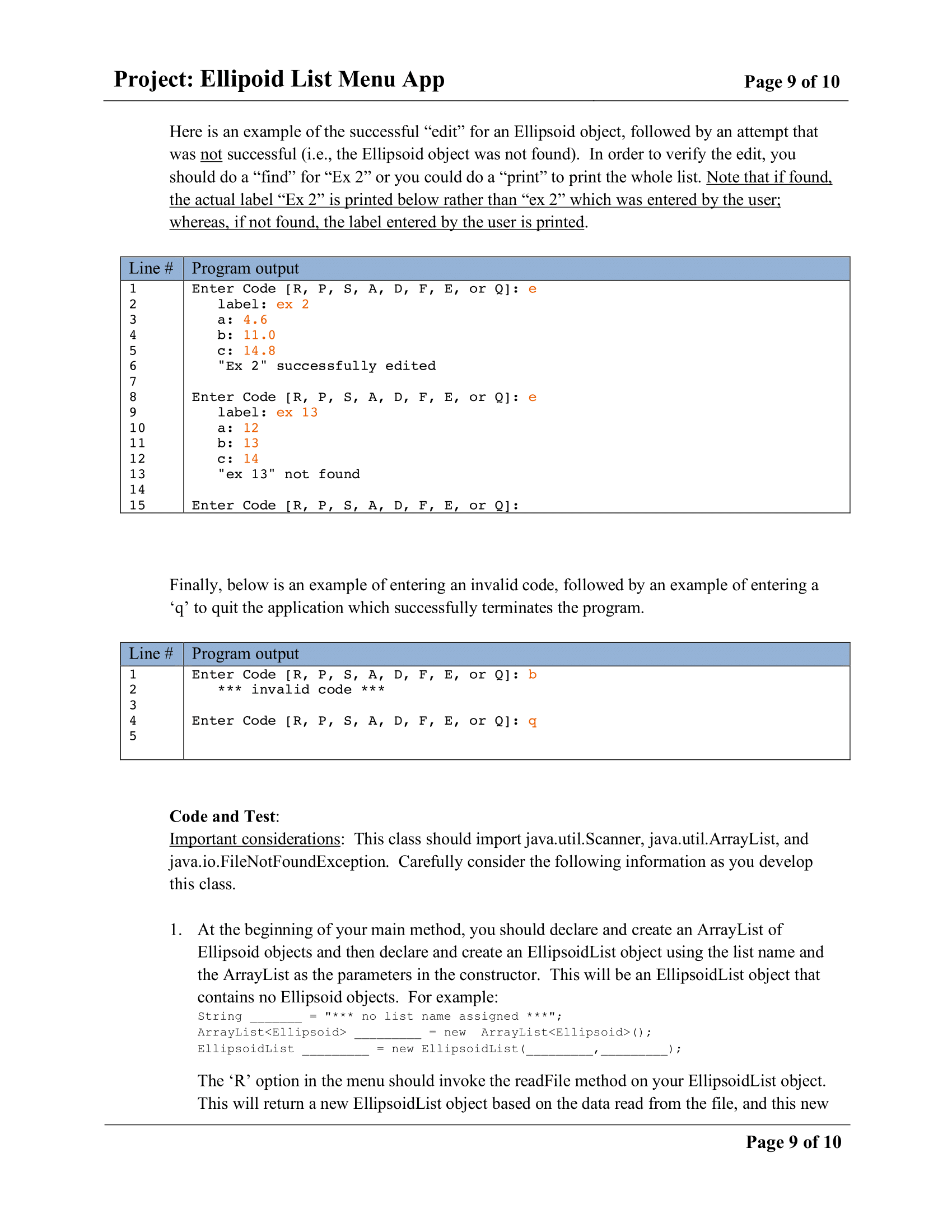
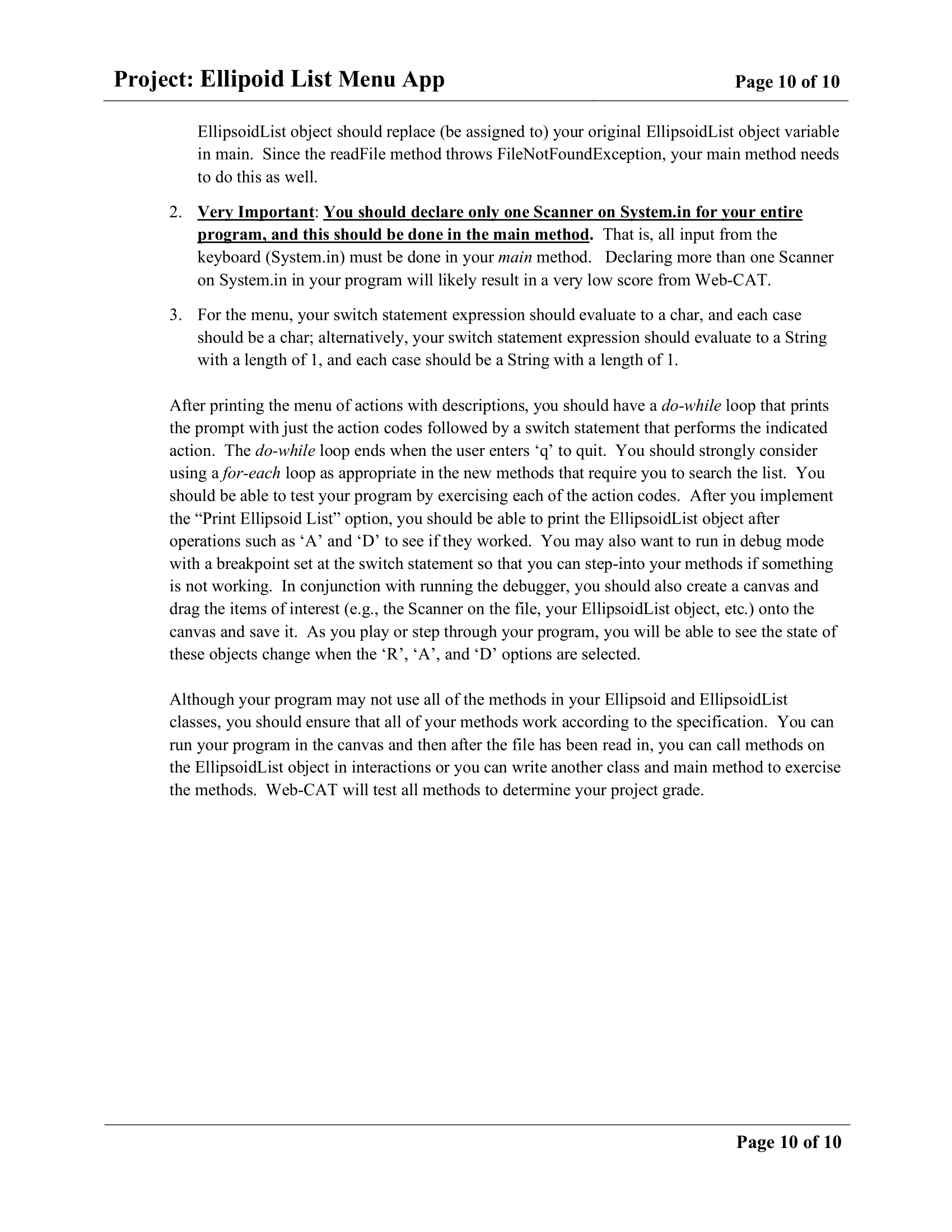
Project: Ellipoid List Menu App Page 4 of 10 EllipsoidList.java - extended from the previous project by adding the last six methods below. (Assuming that you successfully created this class in Project 5, just copy EllipsoidList.java to your new Project 6 folder and then add the indicated methods. Otherwise, you will need to create all of EllipsoidList.java as part of this project.) Requirements: Create an EllipsoidList class that stores the name of the list and an ArrayList of Ellipsoid objects. It also includes methods that return the name of the list, number of Ellipsoid objects in the EllipsoidList, total volume, total surface area, average volume, and average surface for all Ellipsoid objects in the EllipsoidList. The toString method returns a String containing the name of the list followed by each Ellipsoid in the ArrayList, and a summaryInfo method returns summary information about the list (see below). Design: The EllipsoidList class has two fields, a constructor, and methods as outlined below. (1) Fields (or instance variables): (1) a String representing the name of the list and (2) an ArrayList of Ellipsoid objects. These are the only fields (or instance variables) that this class should have, and both should be private. (2) Constructor: Your EllipsoidList class must contain a constructor that accepts a parameter of type String representing the name of the list and a parameter of type ArrayList representing the list of Ellipsoid objects. These parameters should be used to assign the fields described above (i.e., the instance variables). O O O O O (3) Methods: The methods for EllipsoidList are described below. getName: Returns a String representing the name of the list. numberOfEllipsoids: Returns an int representing the number of Ellipsoid objects in the EllipsoidList. If there are zero Ellipsoid objects in the list, zero should be returned. totalVolume: Returns a double representing the total volume for all Ellipsoid objects in the list. If there are zero Ellipsoid objects in the list, zero should be returned. totalSurfaceArea: Returns a double representing the total surface area for all Ellipsoid objects in the list. If there are zero Ellipsoid objects in the list, zero should be returned. averageVolume: Returns a double representing the average volume for all Ellipsoid objects in the list. If there are zero Ellipsoid objects in the list, zero should be returned. averageSurfaceArea: Returns a double representing the average surface area for all Ellipsoid objects in the list. If there are zero Ellipsoid objects in the list, zero should be returned. toString: Returns a String (does not begin with ) containing the name of the list followed by each Ellipsoid in the ArrayList. In the process of creating the return result, this toString() method should include a while loop that calls the toString() method for each Ellipsoid object in the list (adding a before and after each). Be sure to include appropriate newline escape sequences. For an example, in the previous project see lines 3 through 16 in the output below from EllipsoidListApp for the Ellipsoid_data_1.txt input file. [Note that the toString result should not include the summary items in lines 18 through 24 of the example. These lines represent the return value of the summary Info method below.] Page 4 of 10 O Project: Ellipoid List Menu App Page 5 of 10 O summaryInfo: Returns a String (does not begin with ) containing the name of the list (which can change depending of the value read from the file) followed by various summary items: number of Ellipsoid objects, total volume, total surface area, average volume, and average surface area. Use "###0.0##" as the pattern to format the double values. For an example, in the previous project see lines 18 through 24 in the output below from EllipsoidListApp for the Ellipsoid_data_1.txt input file. The second example below shows the output from EllipsoidListApp for the Ellipsoid_data_0.txt input file which contains a list name but no Ellipsoid data. O O O The following six methods are new in Project 6: getList: Returns the ArrayList of Ellipsoid objects (the second field above). readFile: Takes a String parameter representing the file name, reads in the file, storing the list name and creating an ArrayList of Ellipsoid objects, uses the list name and the ArrayList to create an EllipsoidList object, and then returns the EllipsoidList object. See note #1 under Important Considerations for the EllipsoidListMenuApp class (last page) to see how this method should be called. addEllipsoid: Returns nothing but takes four parameters (label, a, b, and c), creates a new Ell object, and adds it to the EllipsoidList object (i.e., adds it to the ArrayList of Ellipsoid objects in the EllipsoidList object). findEllipsoid: Takes a label of an Ellipsoid as the String parameter and returns the corresponding Ellipsoid object if found in the EllipsoidList object; otherwise returns null. Case should be ignored when attempting to match the label. deleteEllipsoid: Takes a String as a parameter that represents the label of the Ellipsoid and returns the Ellipsoid if it is found in the EllipsoidList object and deleted; otherwise returns null. Case should be ignored when attempting to match the label; consider calling/using findEllipsoid in this method. editEllipsoid: Takes four parameters (label, a, b, and c), uses the label to find the corresponding the Ellipsoid object. If found, sets the a, b, and c to the values passed in as parameters, and returns the Ellipsoid object. If not found, returns null. This method should not change the label. O O O Code and Test: Remember to import java.util.ArrayList, java.util.Scanner, java.io.File, java.io.FileNotFoundException. These classes will be needed in the readFile method which will require a throws clause for FileNotFoundException. Some of the methods above require that you use a loop to go through the objects in the ArrayList. You may want to implement the class below in parallel with this one to facilitate testing. That is, after implementing one to the methods above, you can implement the corresponding case in the switch for menu described below in the EllipsoidListMenuApp class. Page 5 of 10 Project: Ellipoid List Menu App Page 6 of 10 EllipsoidListMenu App.java (replaces EllipsoidListApp class from the previous project) Requirements: Create an EllipsoidListMenuApp class with a main method that presents the user with a menu with eight options, each of which is implemented to do the following: (1) read the input file and create an EllipsoidList object, (2) print the EllipsoidList object, (3) print the summary for the EllipsoidList object, (4) add an Ellipsoid object to the EllipsoidList object, (5) delete an Ellipsoid object from the EllipsoidList object, (6) find an Ellipsoid object in the Ellipsoid List object, (7) edit an Ellipsoid object in the EllipsoidList object, and (8) quit the program. Design: The main method should print a list of options with the action code and a short description followed by a line with just the action codes prompting the user to select an action. After the user enters an action code, the action is performed, including output if any. Then the line with just the action codes prompting the user to select an action is printed again to accept the next code. The first action a user would normally perform is 'R' to read in the file and create an Ellipsoid List object. However, the other action codes should work even if an input file has not been processed. The user may continue to perform actions until Q is entered to quit (or end) the program. Note that your program should accept both uppercase and lowercase action codes. Below is output produced after printing the action codes with short descriptions, followed by the prompt with the action codes waiting for the user to select. Line # 1 Program output Ellipsoid List System Menu R Read File and Create Ellipsoid List P Print Ellipsoid List S - Print Summary A - Add Ellipsoid D Delete Ellipsoid F - Find Ellipsoid E Edit Ellipsoid Q Quit Enter Code [R, P, S, A, D, F, E, or Q]: 7 8 9 10 Below shows the screen after the user entered r' and then (when prompted) the file name. Notice the output from this action was File read in and Ellipsoid List created. This is followed by the prompt with the action codes waiting for the user to make the next selection. You should use the Ellipsoid_data_1.txt file from Project 5 to test your program. Line # Program output Enter Code [R, P, S, A, D, F, E, or Q] : r File Name: Ellipsoid_data_1.txt File read in and Ellipsoid List created Enter Code [R, P, S, A, D, F, E, or Q]: Page 6 of 10 Project: Ellipoid List Menu App Page 7 of 10 The result of the user selecting 'p' to Print Ellipsoid List is shown below and next page. Line # Program output 1 Enter Code [R, P, S, A, D, F, E, or 0]: P 2 Ellipsoid Test List 3 Ellipsoid "Ex 1" with axes a = 1.0, b = 2.0, c = 3.0 units has: 5 volume = 25.1327 cubic units 6 surface area = 48.9366 square units 7 8 Ellipsoid "Ex 2" with axes a = 2.3, b = 5.5, C = 7.4 units has: 9 volume = 392.1127 cubic units 10 surface area - 317.9245 square units 11 12 Ellipsoid "Ex 3" with axes a = 123.4, b = 234.5, C = 345.6 units has: 13 volume = 41,890,963.5508 cubic units surface area - 674,164.7034 square units 15 16 Enter Code (R, P, S, A, D, F, E, or Q]: The result of the user selecting 's' to print the summary for the list is shown below. Line # Program output Enter Code [R, P, S, A, D, F, E, or 0]: S 3 4 5 ----- Summary for Ellipsoid Test List ----- Number of Ellipsoid Objects: 3 Total Volume: 41,891,380.796 cubic units Total Surface Area: 674,531.564 square units Average Volume: 13,963,793.599 cubic units Average Surface Area: 224,843.855 square units 7 8 9 10 Enter Code (R, P, S, A, D, F, E, or Q]: Page 7 of 10 Project: Ellipoid List Menu App Page 8 of 10 The result of the user selecting a to add an Ellipsoid object is shown below. Note that after a was entered, the user was prompted for label, radius, and height. Then after the Ellipsoid object is added to the Ellipsoid List, the message *** Ellipsoid added ***" was printed. This is followed by the prompt for the next action. After you do an add, you should do a print or a find to confirm that the add was successful. OUT A WNP Line # Program output Enter Code [R, P, S, A, D, F, E, or Q]: a label: Ex 4 a: 10.2. b: 12.4 C: 14.6 *** Ellipsoid added *** Enter Code [R, P, S, A, D, F, E, or Q]: Here is an example of the successful delete for an Ellipsoid object, followed by an attempt that was not successful (i.e., the Ellipsoid object was not found). You should do p to confirm the d. Note that if found, the actual label Ex 3 is printed below rather than ex 3 which was entered by the user; whereas, if not found, the label entered by the user is printed. Line # 1 2 3 4 Program output Enter Code [R, P, S, A, D, F, E, or Q]: d label: ex 3 "Ex 3" deleted 600 OUT AWN Enter Code [R, P, S, A, D, F, E, or Q]: d label: ex 17 "ex 17" not found Enter Code [R, P, S, A, D, F, E, or Q]: Here is an example of the successful find for an Ellipsoid object, followed by an attempt that was not successful (i.e., the Ellipsoid object was not found). Line # 1 2 3 4 Program output Enter Code [R, P, S, A, D, F, E, or Q]: f label: ex 2 Ellipsoid "Ex 2" with axes a = 2.3, b = 5.5, C = 7.4 units has: volume = 392.1127 cubic units surface area = 317.9245 square units 7 8 9 10 11 Enter Code [R, P, S, A, D, F, E, or 9]: f label: ex 7 "ex 7" not found Enter Code [R, P, S, A, D, F, E, or Q]: Page 8 of 10 Project: Ellipoid List Menu App Page 9 of 10 Here is an example of the successful edit for an Ellipsoid object, followed by an attempt that was not successful (i.e., the Ellipsoid object was not found). In order to verify the edit, you should do a find for Ex 2 or you could do a print to print the whole list. Note that if found, the actual label Ex 2 is printed below rather than ex 2 which was entered by the user; whereas, if not found, the label entered by the user is printed. Line # Program output 1 Enter Code [R, P, S, A, D, F, E, or Q]: e 2 label: ex 2 3 a: 4.6 b: 11.0 5 C: 14.8 "Ex 2" successfully edited 7 8 Enter Code [R, P, S, A, D, F, E, or Q]: e 9 label: ex 13 10 a: 12 11 b: 13 12 C: 14 13 ex 13" not found 14 15 Enter Code [R, P, S, A, D, F, E, or 9]: 11 Finally, below is an example of entering an invalid code, followed by an example of entering a q' to quit the application which successfully terminates the program. Line # Program output 1 Enter Code [R, P, S, A, D, F, E, or Q]: b 2 *** invalid code *** 3 4 nter Code [R, P, S, A, D, F, E, or Q]: 9 5 Code and Test: Important considerations: This class should import java.util.Scanner, java.util.ArrayList, and java.io.FileNotFoundException. Carefully consider the following information as you develop this class. 1. At the beginning of your main method, you should declare and create an ArrayList of Ellipsoid objects and then declare and create an EllipsoidList object using the list name and the ArrayList as the parameters in the constructor. This will be an EllipsoidList object that contains no Ellipsoid objects. For example: String no list name assigned ***"; ArrayList ArrayList(); EllipsoidList new EllipsoidList I! *** = new ); The 'R' option in the menu should invoke the readFile method on your EllipsoidList object. This will return a new EllipsoidList object based on the data read from the file, and this new Page 9 of 10 Project: Ellipoid List Menu App Page 10 of 10 EllipsoidList object should replace (be assigned to) your original EllipsoidList object variable in main. Since the readFile method throws FileNotFoundException, your main method needs to do this as well. 2. Very Important: You should declare only one Scanner on System.in for your entire program, and this should be done in the main method. That is, all input from the keyboard (System.in) must be done in your main method. Declaring more than one Scanner on System.in in your program will likely result in a very low score from Web-CAT. 3. For the menu, your switch statement expression should evaluate to a char, and each case should be a char; alternatively, your switch statement expression should evaluate to a String with a length of 1, and each case should be a String with a length of 1. After printing the menu of actions with descriptions, you should have a do-while loop that prints the prompt with just the action codes followed by a switch statement that performs the indicated action. The do-while loop ends when the user enters qto quit. You should strongly consider using a for-each loop as appropriate in the new methods that require you to search the list. You should be able to test your program by exercising each of the action codes. After you implement the Print Ellipsoid List option, you should be able to print the EllipsoidList object after operations such as Aand 'D' to see if they worked. You may also want to run in debug mode with a breakpoint set at the switch statement so that you can step-into your methods if something is not working. In conjunction with running the debugger, you should also create a canvas and drag the items of interest (e.g., the Scanner on the file, your EllipsoidList object, etc.) onto the canvas and save it. As you play or step through your program, you will be able to see the state of these objects change when the R, A, and D' options are selected. Although your program may not use all of the methods in your Ellipsoid and EllipsoidList classes, you should ensure that all of your methods work according to the specification. You can run your program in the canvas and then after the file has been read in, you can call methods on the EllipsoidList object in interactions or you can write another class and main method to exercise the methods. Web-CAT will test all methods to determine your project grade. Page 10 of 10









 Study Help