







Question: how do i write the cout to get the figures in 2 and 3? i provided the code the program already had in defualt. 5.

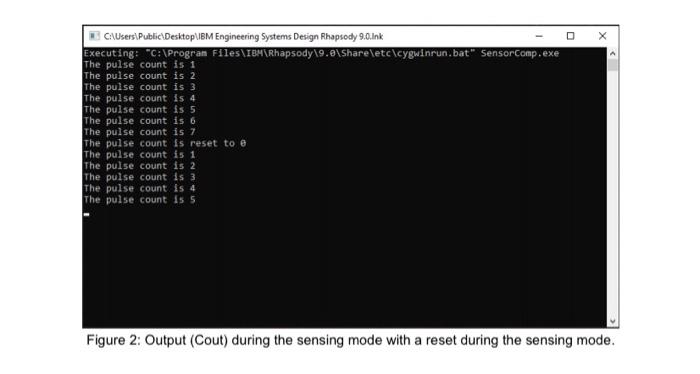
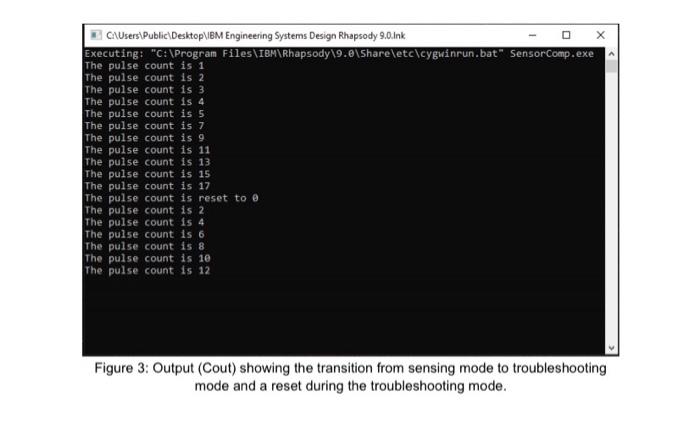
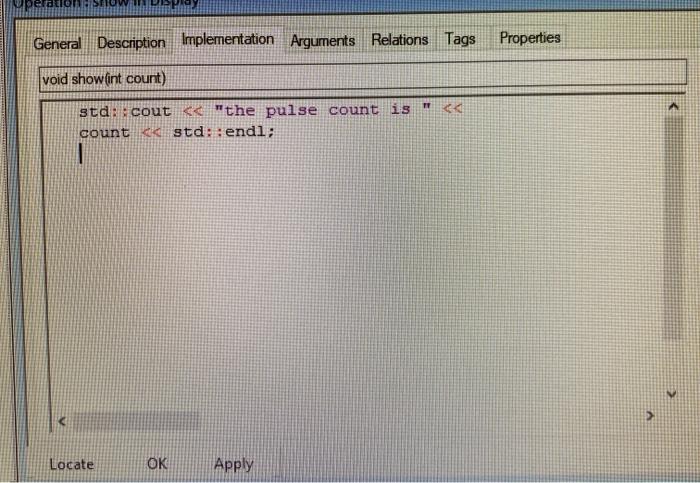
5. Double click and open the operation show(int count) under Packages-DesigPkg Classes-Display-Operations and modify code in the implementation tab to display the output as shown in Figures 2 and 3 6. Once all the changes are made save the project and clean the generated binaries by running CodeClean from the main menu 7. Re-generate the host config by running CodeRe Generate HostConfigDebug C:\Users\Public Desktop IBM Engineering Systems Design Rhapsody 9.0.Ink Executing: "C:\Program Files\IBM\Rhapsody\9.8\Share etc\cygwinrun bat" Sensor Comp.exe The pulse count is 1 The pulse count is 2 The pulse count is 3 The pulse count is 4 The pulse count is 5 The pulse count is 6 The pulse count is 7 The pulse count is reset to e The pulse count is 1 The pulse count is 2 The pulse count is 3 The pulse count is 4 The pulse count is 5 - Figure 2: Output (Cout) during the sensing mode with a reset during the sensing mode. O Users Public Desktop IBM Engineering Systems Design Rhapsody 9.0.link X Executing: "C:\Program Files\IBM\Rhapsody 9.@\Share etc\cyginrun.bat" Sensor Comp.exe The pulse count is 1 The pulse count is 2 The pulse count is 3 The pulse count is 4 The pulse count is 5 The pulse count is 7 The pulse count is 9 The pulse count is 11 The pulse count is 13 The pulse count is 15 The pulse count is 17 The pulse count is reset to e The pulse count is 2 The pulse count is 4 The pulse count is 6 The pulse count is 8 The pulse count is 10 The pulse count is 12 Figure 3: Output (Cout) showing the transition from sensing mode to troubleshooting mode and a reset during the troubleshooting mode. General Description Implementation Arguments Relations Tags Properties void showint count) TT std::cout
Step by Step Solution
There are 3 Steps involved in it

Get step-by-step solutions from verified subject matter experts
 Study Help