







Question: how do question 1. the dictonary is in the second picture please add code im very confused 33 34 35 36 37 38 # First,

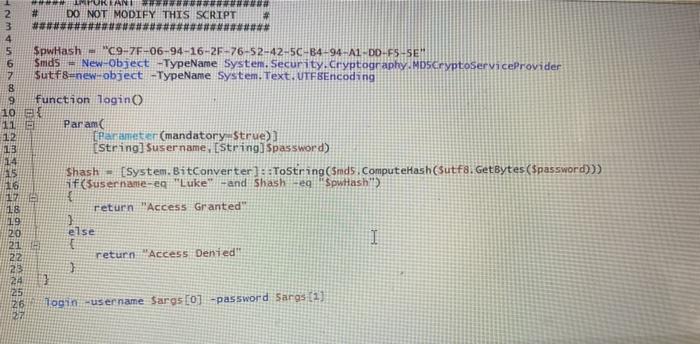
33 34 35 36 37 38 # First, you will need variable with a list of most commonly used passwords to iterate though when trying to hack the westwort # Create a variable that stores the content from the most commonly used password file #Important Use the file path . 10-ost-common-passwords.txt # YOUR CODE BELOW HERE Scommon PasswordList- 2 3 # ### TURLAND DO NOT MODIFY THIS SCRIPT **####****** 10 11 12 13 14 SpwHash - "C9-77-06-94-16-2F-76-52-42-5C-B4-94-A1-DD-F5-SE Smids - New-Object -TypeName System. Security.Cryptography.MDSCryptoServiceProvider Sutf8=new-object-TypeName System.Text. UTF8Encoding function login Param [Parameter(mandatory Strue)) String] Susername, [String] Spassword) Shash - [System. BitConverter]::ToString($nds. ComputeHash(Sutf8. GetBytes($password))) if(username-eg "Luke" -and Shash - "SpwHash" 16 17 18 19 return Access Granted else 1 return Access Denied!! } TUIN SERUL DVN Login -user name Saros [0] -password Saras (1) 33 34 35 36 37 38 # First, you will need variable with a list of most commonly used passwords to iterate though when trying to hack the westwort # Create a variable that stores the content from the most commonly used password file #Important Use the file path . 10-ost-common-passwords.txt # YOUR CODE BELOW HERE Scommon PasswordList- 2 3 # ### TURLAND DO NOT MODIFY THIS SCRIPT **####****** 10 11 12 13 14 SpwHash - "C9-77-06-94-16-2F-76-52-42-5C-B4-94-A1-DD-F5-SE Smids - New-Object -TypeName System. Security.Cryptography.MDSCryptoServiceProvider Sutf8=new-object-TypeName System.Text. UTF8Encoding function login Param [Parameter(mandatory Strue)) String] Susername, [String] Spassword) Shash - [System. BitConverter]::ToString($nds. ComputeHash(Sutf8. GetBytes($password))) if(username-eg "Luke" -and Shash - "SpwHash" 16 17 18 19 return Access Granted else 1 return Access Denied!! } TUIN SERUL DVN Login -user name Saros [0] -password Saras (1)
Step by Step Solution
There are 3 Steps involved in it

Get step-by-step solutions from verified subject matter experts
 Study Help