







Question: how do you do this on java This lab follows up the examples of hospital. Create a sub class named Administrator, which is also a
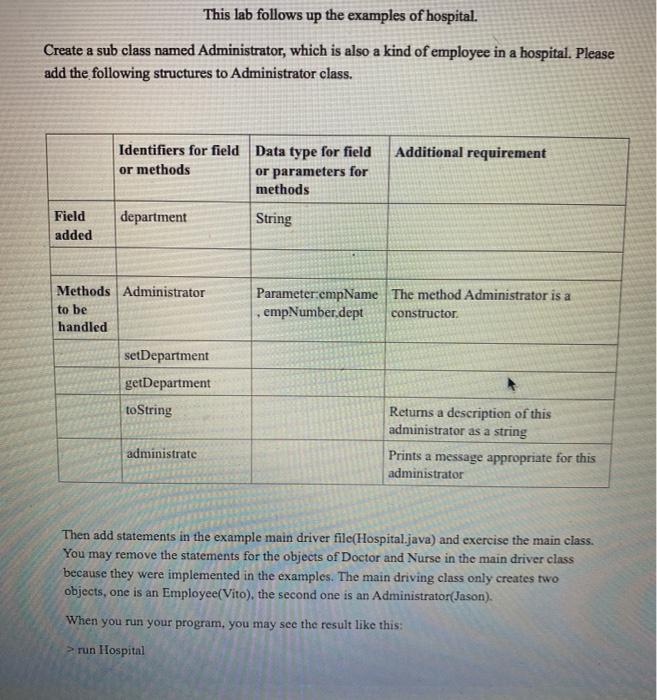
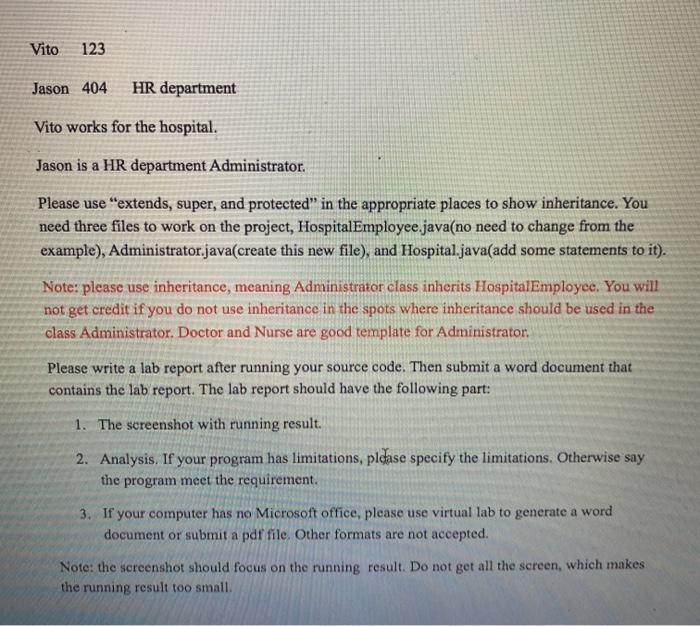
This lab follows up the examples of hospital. Create a sub class named Administrator, which is also a kind of employee in a hospital. Please add the following structures to Administrator class. Additional requirement Identifiers for field Data type for field or methods or parameters for methods Field added department String Methods Administrator to be handled Parameter:cmpName The method Administrator is a empNumber,dept constructor setDepartment getDepartment toString Returns a description of this administrator as a string Prints a message appropriate for this administrator administrate Then add statements in the example main driver file(Hospital.java) and exercise the main class. You may remove the statements for the objects of Doctor and Nurse in the main driver class because they were implemented in the examples. The main driving class only creates two objects, one is an Employee(Vito), the second one is an Administrator(Jason). When you run your program, you may see the result like this: run Hospital Vito 123 Jason 404 HR department Vito works for the hospital. Jason is a HR department Administrator. Please use "extends, super, and protected" in the appropriate places to show inheritance. You need three files to work on the project, Hospital Employee.java(no need to change from the example), Administrator.java(create this new file), and Hospital.java(add some statements to it). Note: please use inheritance, meaning Administrator class inherits Hospital Employee. You will not get credit if you do not use inheritance in the spots where inheritance should be used in the class Administrator. Doctor and Nurse are good template for Administrator. Please write a lab report after running your source code. Then submit a word document that contains the lab report. The lab report should have the following part: 1. The screenshot with running result. 2. Analysis. If your program has limitations, please specify the limitations. Otherwise say the program meet the requirement. 3. If your computer has no Microsoft office, please use virtual lab to generate a word document or submit a pdf file. Other formats are not accepted. Note: the screenshot should focus on the running result. Do not get all the screen, which makes the running result too small This lab follows up the examples of hospital. Create a sub class named Administrator, which is also a kind of employee in a hospital. Please add the following structures to Administrator class. Additional requirement Identifiers for field Data type for field or methods or parameters for methods Field added department String Methods Administrator to be handled Parameter:cmpName The method Administrator is a empNumber,dept constructor setDepartment getDepartment toString Returns a description of this administrator as a string Prints a message appropriate for this administrator administrate Then add statements in the example main driver file(Hospital.java) and exercise the main class. You may remove the statements for the objects of Doctor and Nurse in the main driver class because they were implemented in the examples. The main driving class only creates two objects, one is an Employee(Vito), the second one is an Administrator(Jason). When you run your program, you may see the result like this: run Hospital Vito 123 Jason 404 HR department Vito works for the hospital. Jason is a HR department Administrator. Please use "extends, super, and protected" in the appropriate places to show inheritance. You need three files to work on the project, Hospital Employee.java(no need to change from the example), Administrator.java(create this new file), and Hospital.java(add some statements to it). Note: please use inheritance, meaning Administrator class inherits Hospital Employee. You will not get credit if you do not use inheritance in the spots where inheritance should be used in the class Administrator. Doctor and Nurse are good template for Administrator. Please write a lab report after running your source code. Then submit a word document that contains the lab report. The lab report should have the following part: 1. The screenshot with running result. 2. Analysis. If your program has limitations, please specify the limitations. Otherwise say the program meet the requirement. 3. If your computer has no Microsoft office, please use virtual lab to generate a word document or submit a pdf file. Other formats are not accepted. Note: the screenshot should focus on the running result. Do not get all the screen, which makes the running result too small
Step by Step Solution
There are 3 Steps involved in it

Get step-by-step solutions from verified subject matter experts
 Study Help