







Question: how do you do this please add code im very confused im using powershell ISE ## DO NOT MODIFY # Write-Host 54 55 56 57
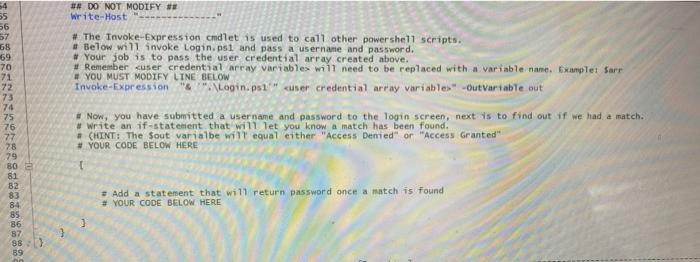
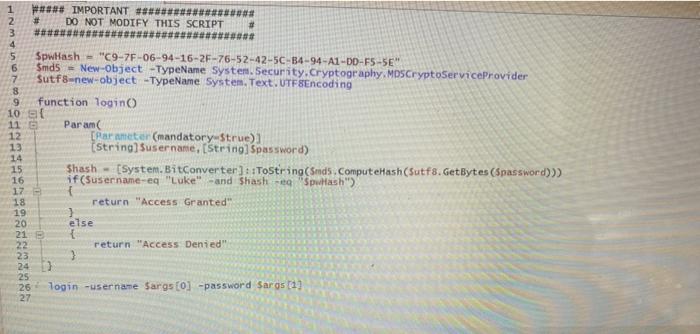
## DO NOT MODIFY # Write-Host 54 55 56 57 58 59 70 71 72 73 74 75 76 77 78 # The Invoke-Expression cmdlet is used to call other powershell scripts. #Below will invoke Login.psi and pass a username and password. # Your job is to pass the user credential array created above. # Remember user credential array variables will need to be replaced with a variable name. Examplet Sarr # YOU MUST MODIFY LINE BELOW Invoke-Expression & Login.p1" user credential array variables" Out Variable out # Now, you have submitted a user name and password to the login screen, next is to find out if we had a match. # write an if-statement that will let you know a match has been found. # CHINT: The Sout varialbe will equal either "Access Demed" or "Access Granted # YOUR CODE BELOW HERE + Add a statement that will return password once a match is found # YOUR CODE BELOW HERE 80 e 81 82 83 84 85 86 87 88 89 3 1 ### IMPORTANT ####### DO NOT MODIFY THIS SCRIPT #### #### VOV AWN SpwHash = "C9-7F-06-94-16-2F-76-52-42-5C-B4-94-A1-10-F5-5E Smdb - New-Object -TypeName System Security. Cryptography, MDSCryptoServiceProvider Sutf8-new-object -TypeName System.Text.UTF8Encoding 8 9 function login 10 11 Param 12 Carameter (mandatory Strue) 13 (string) Susername, [String Spassword) 14 15 Shash - (System.BitConvertersToString(Smds. ComputeHash (Sutf8.GetBytes(Spassword)) 16 if($username-eq "Luke" -and shash - "Spullash") 17 - 18 return "Access Granted 19 20 else 21 22 return "Access Denied 23 24 25 26 login -username Sargs[0] -password Saros (1) 27 ## DO NOT MODIFY # Write-Host 54 55 56 57 58 59 70 71 72 73 74 75 76 77 78 # The Invoke-Expression cmdlet is used to call other powershell scripts. #Below will invoke Login.psi and pass a username and password. # Your job is to pass the user credential array created above. # Remember user credential array variables will need to be replaced with a variable name. Examplet Sarr # YOU MUST MODIFY LINE BELOW Invoke-Expression & Login.p1" user credential array variables" Out Variable out # Now, you have submitted a user name and password to the login screen, next is to find out if we had a match. # write an if-statement that will let you know a match has been found. # CHINT: The Sout varialbe will equal either "Access Demed" or "Access Granted # YOUR CODE BELOW HERE + Add a statement that will return password once a match is found # YOUR CODE BELOW HERE 80 e 81 82 83 84 85 86 87 88 89 3 1 ### IMPORTANT ####### DO NOT MODIFY THIS SCRIPT #### #### VOV AWN SpwHash = "C9-7F-06-94-16-2F-76-52-42-5C-B4-94-A1-10-F5-5E Smdb - New-Object -TypeName System Security. Cryptography, MDSCryptoServiceProvider Sutf8-new-object -TypeName System.Text.UTF8Encoding 8 9 function login 10 11 Param 12 Carameter (mandatory Strue) 13 (string) Susername, [String Spassword) 14 15 Shash - (System.BitConvertersToString(Smds. ComputeHash (Sutf8.GetBytes(Spassword)) 16 if($username-eq "Luke" -and shash - "Spullash") 17 - 18 return "Access Granted 19 20 else 21 22 return "Access Denied 23 24 25 26 login -username Sargs[0] -password Saros (1) 27
Step by Step Solution
There are 3 Steps involved in it

Get step-by-step solutions from verified subject matter experts
 Study Help