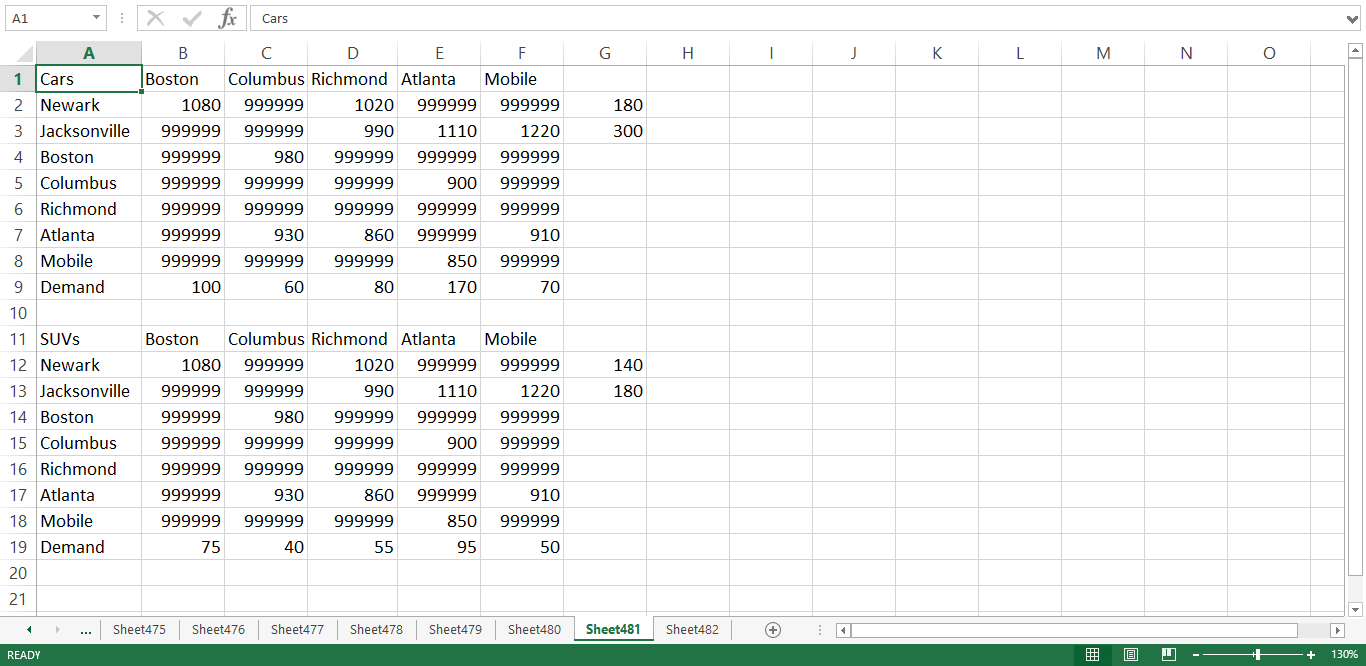
Question: How do you input the 999999 in sheet 481 to run the model? Every time I try to run it like this the values for
How do you input the "999999" in sheet 481 to run the model? Every time I try to run it like this the values for Cars SUVs and Total at the end comes back with a value of -0-. Sorry I mean when i insert all 0s instead of the 999999 value I get 0 for the final calculations; and if I insert the 999999 i get Cars: 959999040 SUVs: 624999375 Total: 1584998415 This is nothing like the answers excel solver gives back; I am using the Frontline Analytic Solver. Frontline also makes the built in Excel Solver that you are utilizing. I have now included the whole problem and I only need to explanation of the answer because every time I run it in Analytic Solver it does not give me the answers demonstrated in the answer but gives me either no answer or a unreasonable solution as explained above. Can someone please clarify the answer so that I can understand where I am going wrong?
Here is the problem I am referencing:
1. TAMUC manufacturers cars and SUVs wants to ship cars and SUVs globally. Presently, TAMUC has an inventory of 180 cars and 140 SUVs in Newark, NJ and 300 cars and 180 SUVs in Jacksonville, FL. These vehicles need to be transported in the cities summarized in the following table.
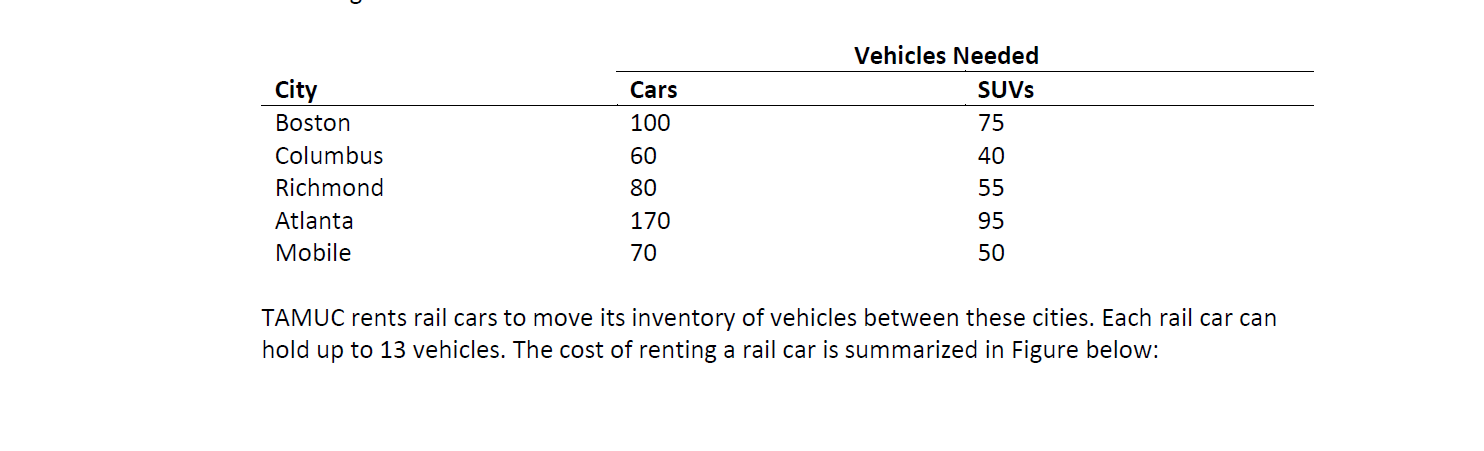
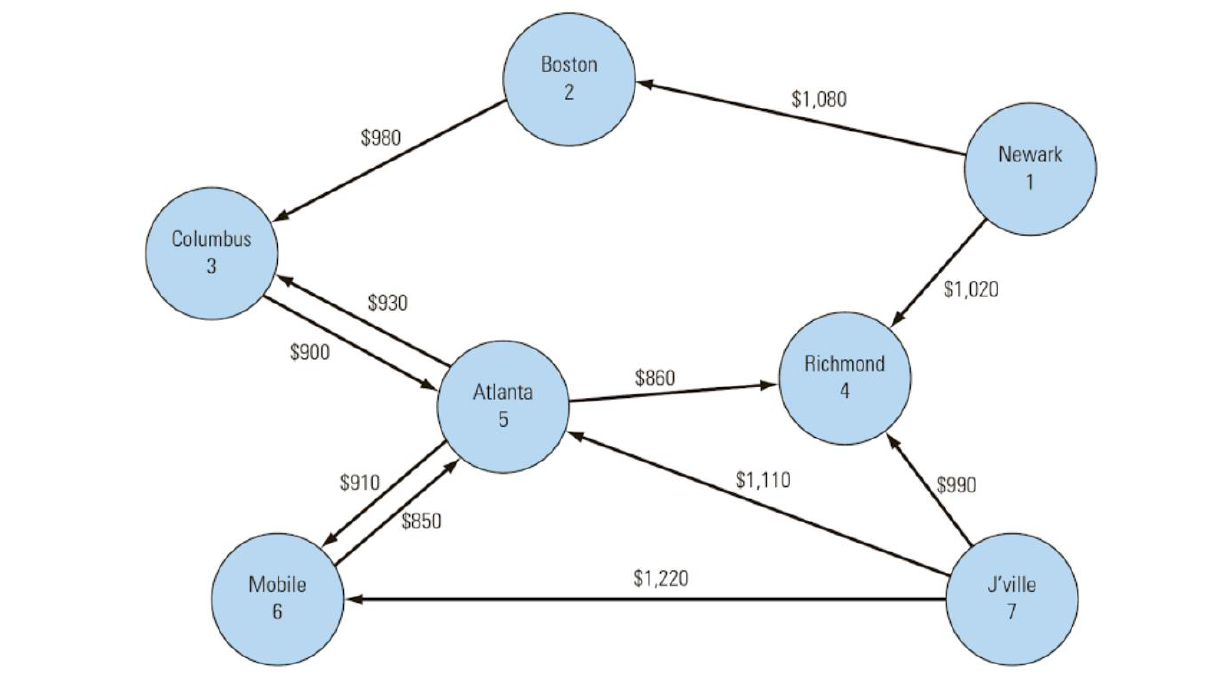
A. Formulate an integer linear programming model (10 points) B. Implement the model in Excel and solve in a separate tab. What is the optimal solution? (10 points
The information is shown below. it is in sheet 481
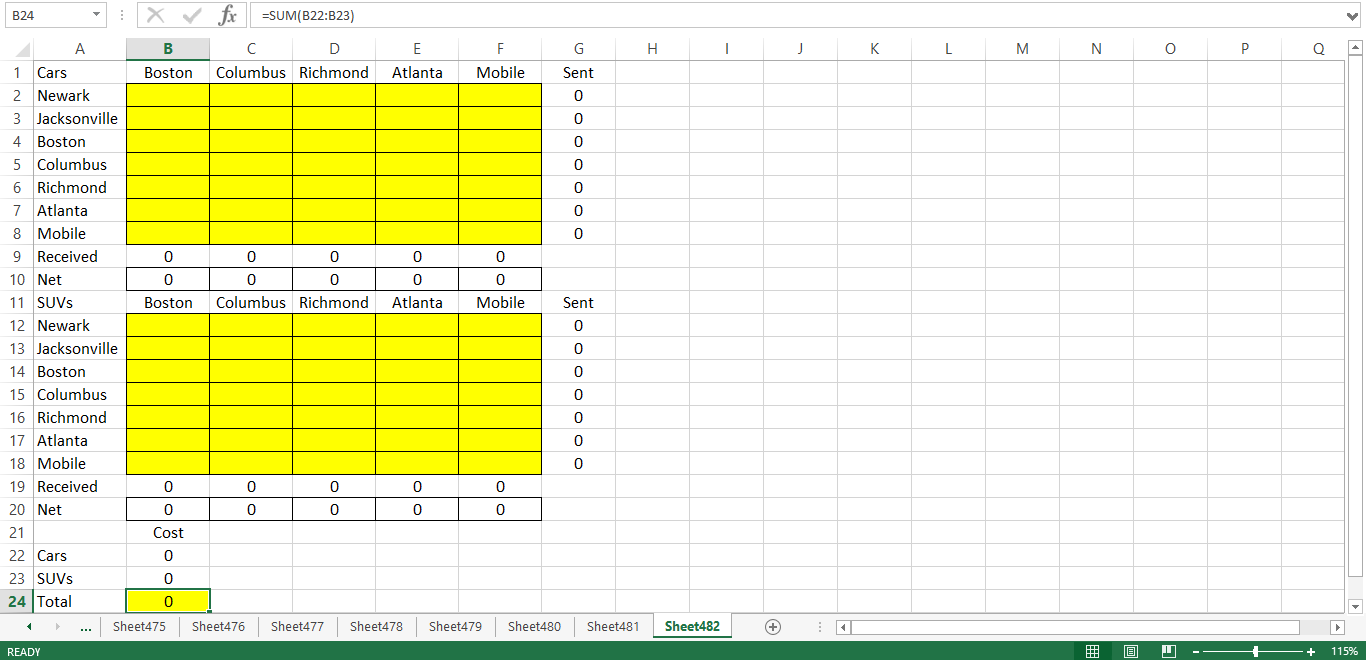
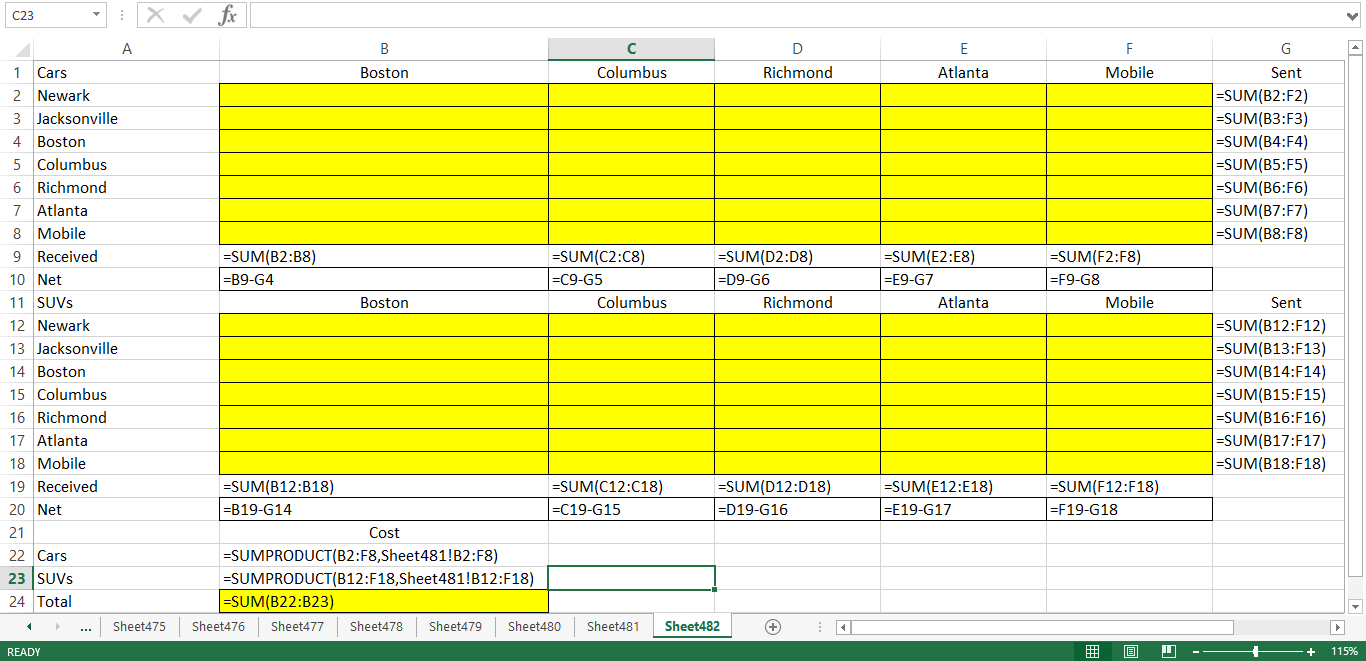
The model is shown below. It is in sheet 482
The formulas are shown below
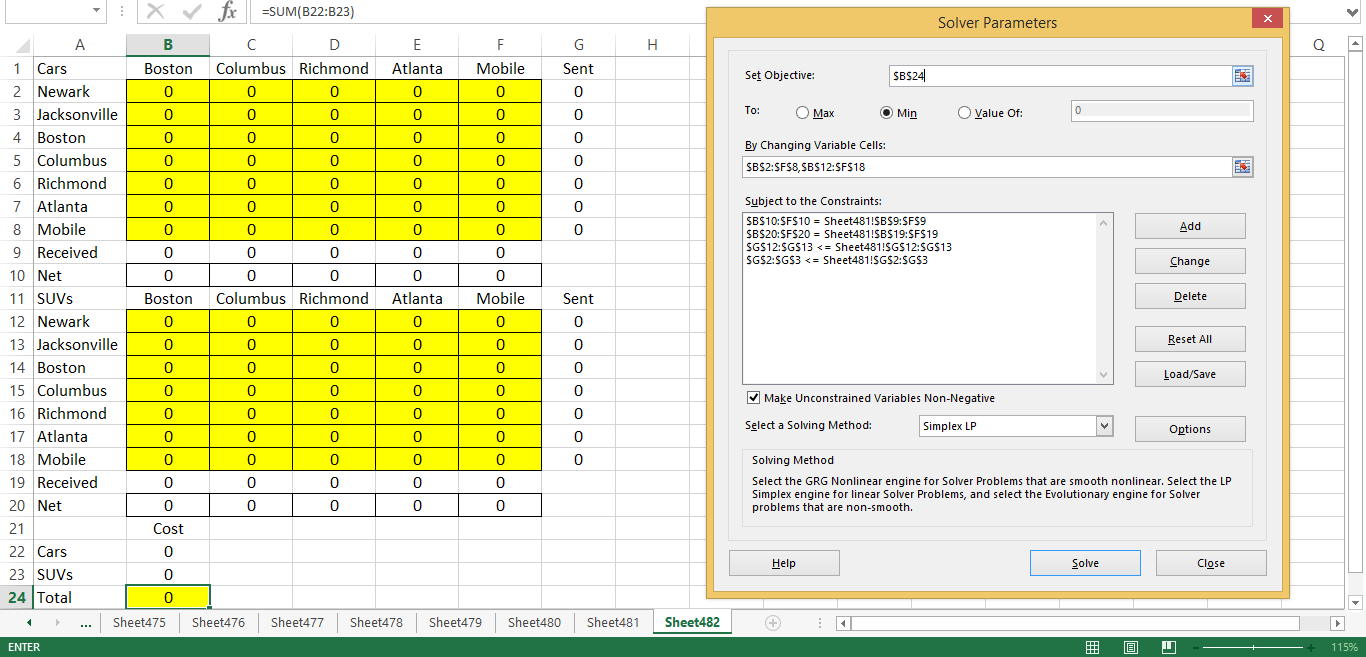
The solver parameters are shown below
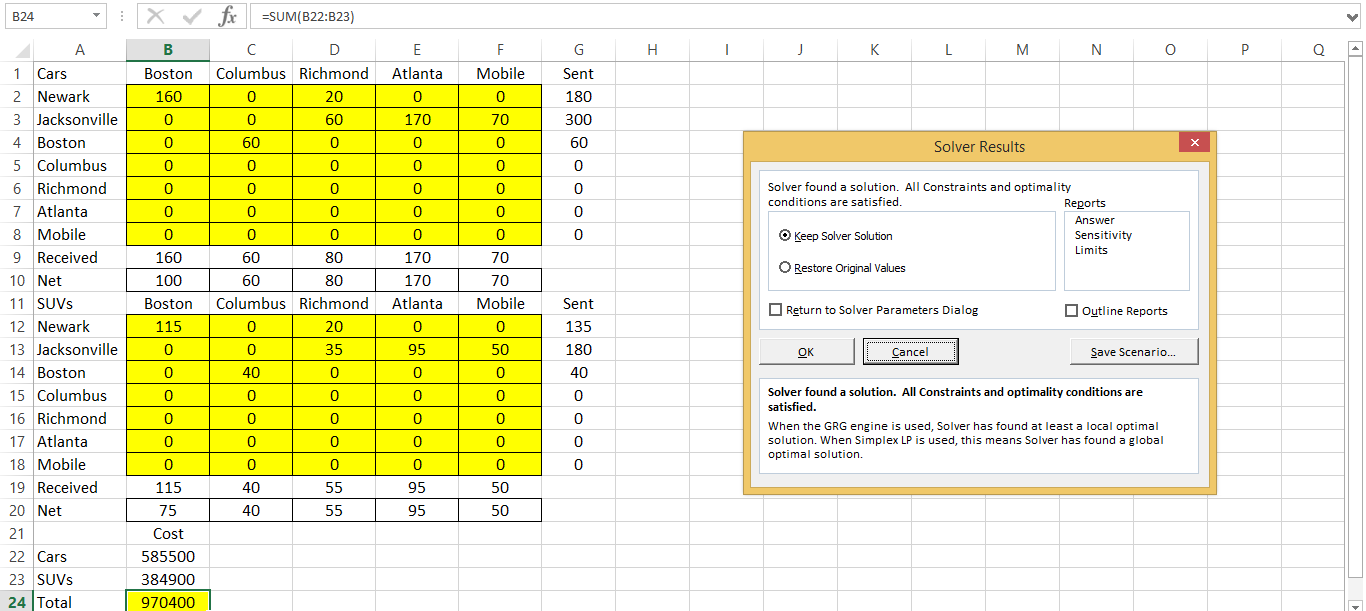
The result is shown below
Vehicles Needed SUVs city Cars 100 75 60 40 Boston Columbus Richmond Atlanta Mobile 80 55 170 70 TAMUC rents rail cars to move its inventory of vehicles between these cities. Each rail car can hold up to 13 vehicles. The cost of renting a rail car is summarized in Figure below: Boston $1,080 $980 Newark Columbus $1,020 $930 $900 Richmond $860 Atlanta $910 $1,110 $990 $850 Mobile $1,220 J'ville G H I J K L M N O A bu 180 300 A1 A 1 Cars 2 Newark 3 Jacksonville 4 Boston 5 Columbus 6 Richmond 7 Atlanta 8 Mobile 9 Demand 10 11 SUVs 12 Newark 13 Jacksonville 14 Boston 15 Columbus 16 Richmond 17 Atlanta 18 Mobile 19 Demand 20 X for Cars B C D E F Boston Columbus Richmond Atlanta Mobile 1080 999999 1020 999999999999 999999999999 990 1110 1220 999999 980 999999999999999999 999999999999999999 900 999999 999999999999999999999999999999 999999 860 999999 910 999999999999999999850 999999 100 60 80 170 70 930 140 180 1110 Boston Columbus Richmond Atlanta Mobile 1080 999999 1020 999999999999 999999999999 990 1110 1220 999999 980 999999999999999999 999999999999999999 900 999999 999999999999999999999999999999 999999 930 860 999999 910 999999999999999999 850 999999 75 40 55 95 50 ... Sheet475 Sheet476 Sheet477 Sheet478 Sheet479 Sheet480 Sheet 481 Sheet482 + 1 READY 9 -- + 130% I J K L M N O P Q A 0 B24 : X fx =SUM(B22:B23) A B C D E F G H 1 Cars Boston Columbus Richmond Atlanta Mobile Sent 2 Newark 3 Jacksonville 4 Boston 5 Columbus 6 Richmond 7 Atlanta 8 Mobile 9 Received 0 0 0 0 0 10 Net 0 0 0 0 0 11 SUVs Boston Columbus Richmond Atlanta Mobile Sent 12 Newark 13 Jacksonville 14 Boston 15 Columbus 16 Richmond 17 Atlanta 18 Mobile 19 Received 0 0 0 0 0 20 Net 0 0 0 0 0 21 Cost 22 Cars 0 23 SUVs 24 Total ... Sheet475 Sheet476 Sheet477 Sheet478 Sheet479 Sheet480 Sheet481 READY o 0 Sheet482 + 1 9 0 -- + 115% C23 - X fx B Boston Columbus Richmond Atlanta Mobile Sent =SUM(B2:F2) =SUM(B3:F3) =SUM(B4:F4) =SUM(B5:F5) =SUM(B6:F6) =SUM(B7:F7) =SUM(B8:F8) =SUM(B2:38) =B9-G4 1 Cars 2 Newark 3 Jacksonville 4 Boston 5 Columbus 6 Richmond 7 Atlanta 8 Mobile 9 Received 10 Net 11 SUVs 12 Newark 13 Jacksonville 14 Boston 15 Columbus 16 Richmond 17 Atlanta 18 Mobile 19 Received 20 Net 21 =SUM(C2:C8) =C9-65 Columbus =SUM(D2:08) =D9-G6 Richmond =SUM(E2:E8) =E9-G7 Atlanta =SUM(F2:F8) =F9-G8 Mobile Boston Sent =SUM(B12:F12) =SUM(B13:F13) =SUM(B14:F14) =SUM(B15:F15) =SUM(B16:F16) =SUM(B17:F17) =SUM(B18:F18) =SUM(E12:E18) =E19-617 =SUM(F12:F18) =F19-618 22 Cars =SUM(B12:B18) =SUM(C12:C18) =SUM(D12:D18) =B19-614 =C19-G15 =D19-616 Cost =SUMPRODUCT(B2:F8,Sheet481!B2:F8) =SUMPRODUCT(B12:F18,Sheet481!B12:F18) =SUM(B22:B23) Sheet476 Sheet477 Sheet478 Sheet479 Sheet480 Sheet481 Sheet482 + 23 SUVs 24 Total ... Sheet475 1 READY @ 0 -- + 115% Solver Parameters Set Objective: $B$24 To: O Max Min O Value Of: O 0 OOOO By Changing Variable Cells: $B$2:$F$8,5B$12:$F$18 O 0 Subject to the Constraints: $B$10:$F$10 = Sheet481!$B$9:$F$9 SB$20:$F$20 = Sheet481!SBS19:$F$19 SG$12:$G$13









 Study Help