







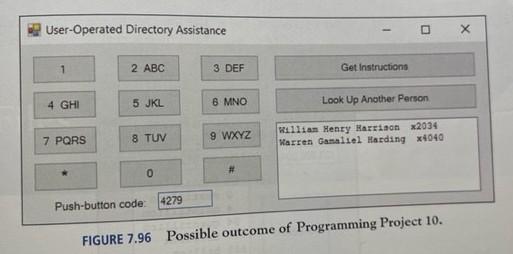
Question: How do you make the visual interface using the code thats given. And what names and properties do you give to the buttons and textbox
How do you make the visual interface using the code thats given. And what names and properties do you give to the buttons and textbox from the code already displayed here :
Dim fileext To As String
Dim code To As String
Dim lastname To As String
Dim firstname To As String
Dim pushbuttonButton As String
Dim codestring As String
Dim labelcode As String
Private Sub cmdExitClick
End
End Sub
Private Sub cmdInstructionClick
Dim instructions As String
instructions "Please enter the first three letters of the person's last name
instructions instructions & vbCrLf & "followed by the first letter of the first name."
MsgBox instructions vbInformation, Directory Assistance"
End Sub
Private Sub cmdKeyClickIndex As Integer
lblCodeNumber.Caption lblCodeNumber.Caption & RightStrIndex
If LenlblCodeNumberCaption Then
labelcode lblCodeNumber.Caption
For i To
If labelcode codei Then
picDisplay.Cls
picDisplay.Print lastnamei firstnamei fileexti
End If
picDisplay.Print lastnamei firstnamei fileexti
Next i
End If
If LenlblCodeNumberCaption Then
lblCodeNumber.Caption
End If
End Sub
Private Sub cmdLookUpClick
lblCodeNumber.Caption Clear
picDisplay.Cls
End Sub
Private Sub FormLoad
Dim i As Integer, c As Integer
j
Open c:employeetxt For Input As #
Do Until EOF
Input # lastnamej firstnamej fileextj
codestring Leftlastnamej
codestring codestring & Leftfirstnamej
For i To
Select Case Midcodestring i store
Case a To c
pushButton pushButton &
Case d To f
pushButton pushButton &
Case g To i
pushButton pushButton &
Case j To l
pushButton pushButton &
Case m To o
pushButton pushButton &
Case p To s
pushButton pushButton &
Case t To v
pushButton pushButton &
Case w To z
pushButton pushButton &
End Select
codej pushButton
Next i
pushButton
j j
Loop
Close #
End Sub
Step by Step Solution
There are 3 Steps involved in it
1 Expert Approved Answer
Step: 1 Unlock

Question Has Been Solved by an Expert!
Get step-by-step solutions from verified subject matter experts
Step: 2 Unlock
Step: 3 Unlock
 Study Help