







Question: How do you select a specific value in a listbox to display data from VB 2017 Here is mycode I am gradually working towards but
How do you select a specific value in a listbox to display data from VB 2017
Here is mycode I am gradually working towards but iam unsure where to put the selection method and to let me pick 15,20 25 30 in the listbox
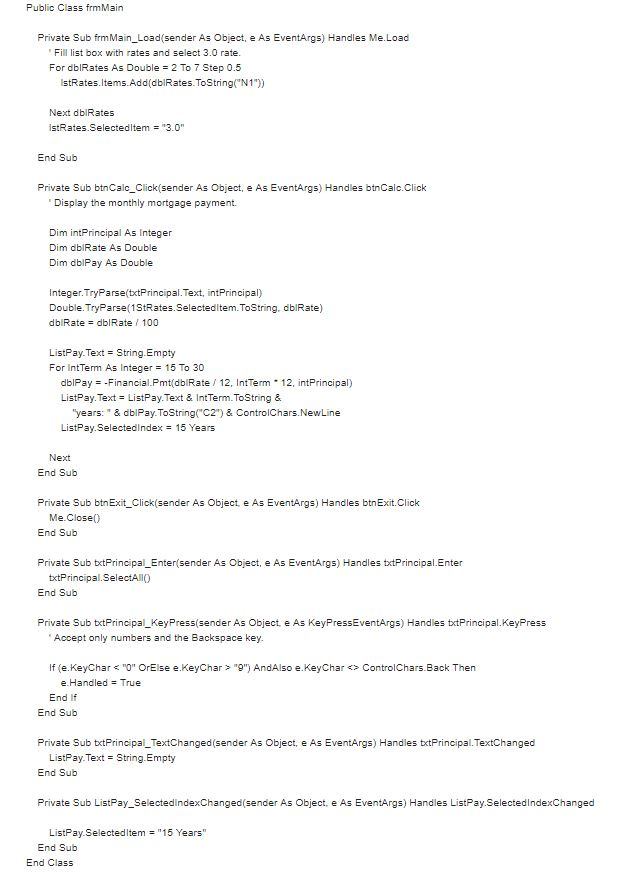
Public Class frmMain Private Sub frmMain Load(sender As Object, e As EventArgs) Handles Me Load Fill list box with rates and select 3.0 rate For dblRates As Double 2 To 7 Step 0.5 stRates.Items.Add(dblRates.ToString(N1)) Next dbIRates IstRates.Selectedltem"3.0" End Sub Private Sub btnCalc Click(sender As Object, e As EventArgs) Handles btnCalc.Click Display the monthly mortgage payment. Dim intPrincipal As Integer Dim dbIRate As Double Dim dblPay As Double Integer.TryParse(txtPrincipal.Text, intPrincipal) Double.TryParse(1StRates.Selectedltem. ToString, dblRate) db Rate-dblRate 100 ListPay-Text String. Empty For IntTerm As Integer 15 To 30 dblPay--Financial.Pmt(dbIRate 12, IntTerm 12, intPrincipal) ListPay-Text= ListPayText & IntTerm.ToString & "years: "& dblPay.ToString C2") & ControlChars.NewLine ListPay. SelectedIndex 15 Years Next End Sub Private Sub btnExit_Click(sender As Object e As EventArgs) Handles btnExit.Click Me Close End Sub Private Sub tetPrincipal_Enter(sender As Object, e As EventArgs) Handles txtPrincipal.Enter txtPrincipal.SelectAIO End Sub Private Sub tetPrincipal_KeyPress(sender As Object e As KeyPressEventArgs) Handles btPrincipal.KeyPress Accept only numbers and the Backspace key. If (e. KeyChar *"0" OrElse e.KeyChar> "") AndAlso e.KeyCharControlChars.Back Thern e. Handled True End If End Sub Private Sub tetPrincipal TextChanged(sender As Object, e As EventArgs) Handles txtPrincipal.TextChanged ListPay.Text String.Empty End Sub Private Sub ListPay SelectedindexChanged (sender As Object, e As EventArgs) Handles ListPay SelectedindexChanged ListPay Selectedltem"15 Years" End Sub End ClasS
Step by Step Solution
There are 3 Steps involved in it

Get step-by-step solutions from verified subject matter experts
 Study Help