







Question: How to format the launched_date and end_date columns to datetime format this is my code: campaign_df['launched_date'] = pd.to_datetime(campaign_df['launched_date'], format='%Y-%m-%d') campaign_df['end_date'] = pd.to_datetime(campaign_df['end_date'], format='%Y-%m-%d') campaign_df.head() but
How to format the launched_date and end_date columns to datetime format
this is my code:
campaign_df['launched_date'] = pd.to_datetime(campaign_df['launched_date'], format='%Y-%m-%d')
campaign_df['end_date'] = pd.to_datetime(campaign_df['end_date'], format='%Y-%m-%d')
campaign_df.head()
but the result is
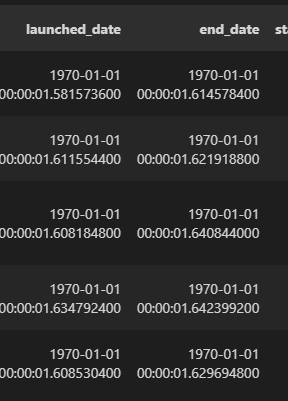
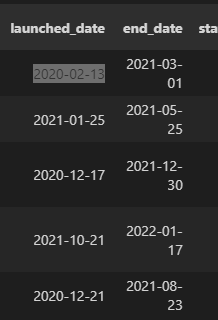
please help me that code.
the csv file line: https://drive.google.com/drive/folders/1ZSZiZspCGqKbYMcWrNsYxPxALDICYoP7?usp=sharing
launched_date end_date st 1970-01-01 1970-01-01 00:00:01.581573600 00:00:01.614578400 1970-01-01 00:00:01.611554400 1970-01-01 00:00:01.621918800 1970-01-01 1970-01-01 00:00:01.608184800 00:00:01.640844000 1970-01-01 1970-01-01 00:00:01.634792400 00:00:01.642399200 1970-01-01 1970-01-01 00:00:01.608530400 00:00:01.629694800
Step by Step Solution
There are 3 Steps involved in it

Get step-by-step solutions from verified subject matter experts
 Study Help