







Question: How to I convert an arraylist into an array, and implement this method? PlayList import java.io.File; import java.io.FileNotFoundException; import java.text.DecimalFormat; import java.util.ArrayList; import java.util.Scanner; /**
How to I convert an arraylist into an array, and implement this method?
PlayList
import java.io.File; import java.io.FileNotFoundException; import java.text.DecimalFormat; import java.util.ArrayList; import java.util.Scanner; /** * @author */ public class PlayList implements MyTunesPlayListInterface {
private String name;
private Song playing;
/**
* Creates a new array list
*/
private ArrayList
public PlayList(String name){
this.name= name;
this.playing = null;
songList = new ArrayList
}
/**
* @return returns the name
*/
public String getName(){
return name;
}
/**
* @return returns the song playing
*/
public Song getPlaying(){
return playing;
}
/**
* @param songList name of array list
* @return returns the list of the songs
*/
public ArrayList
return songList;
}
/**
* @param name sets the name of the song
*/
public void setName(String name){
this.name = name;
}
/**
* @param name adds a song to the play list
*/
public void addSong(Song name){
songList.add(name);
}
/**
* @param i is an integer for the index
* @return removes the song and returns null
*/
public Song removeSong(int i ){
if( i = songList.size()){
return null;
}
return songList.remove(i);
}
/**
* @return returns the number of songs within the play list
*/
public int getNumSongs(){
return songList.size();
}
/**
* @return returns the total play time of the songs
*/
public int getTotalPlayTime(){
int totalPlayT = 0;
for(int s = 0; s
Song s1 = songList.get(s);
s1.getPlayTime();
totalPlayT = totalPlayT + songList.get(s).getPlayTime();
}
return totalPlayT;
}
/**
* @param i is an integer for the index
* @return returns null and gets song for the play list
*/
public Song getSong(int i){
if( i = songList.size()){
return null;
}
return songList.get(i);
}
/**
* @param i is an integer for the index
* @return returns the song that is playing
*/
public void playSong(int i){
if(i >= 0 && i
songList.get(i).play();
playing = songList.get(i);
}else if(i
}else{
Song cSong = this.songList.get(i);
cSong.play();
this.playing = cSong;
}
}
/**
* @return returns various song information, such as the average, longest and shortest play time
*/
public String getInfo(){
String getInfo= "";
if( !songList.isEmpty()){
DecimalFormat df = new DecimalFormat("0.00");
double average = (double)getTotalPlayTime() / songList.size();
Song shortest = songList.get(0);
for(int i = 0; i
Song s2 = songList.get(i);
if(s2.getPlayTime()
shortest = s2;
}
}
Song longest = songList.get(0);
for(int p = 0; p
Song s3 = songList.get(p);
if(s3.getPlayTime() >= longest.getPlayTime()){
longest = s3;
}
}
int totalPlayT = 0;
for(int s = 0; s
Song s1 = songList.get(s);
s1.getPlayTime();
totalPlayT = totalPlayT + songList.get(s).getPlayTime();
}
getInfo += "The average play time is: " + df.format(average)+ " " + "seconds ";
getInfo += "The shortest song is: " + shortest + " ";
getInfo += "The longest song is: " + longest + " ";
getInfo += "Total play time: " + totalPlayT + " " + "seconds ";
} else {
getInfo += "There are no songs. ";
}
return getInfo;
}
/* (non-Javadoc)
* @see java.lang.Object#toString()
*/
public String toString(){
String getInfo = "";
getInfo += "------------------ ";
getInfo += this.getName() + " (" + songList.size() + " songs) ";
getInfo += "------------------ ";
if(!songList.isEmpty()){
for( Song s: songList){
getInfo += "(" + songList.indexOf(s) + ")" + s.toString() + " ";
}
getInfo += "------------------ ";
}else{
getInfo += "There are no songs. ";
getInfo += "------------------ ";
}
return getInfo;
}
@Override
public void loadFromFile(File file) {
songList = new ArrayList
if(file.exists()) {
try {
Scanner scan = new Scanner(file);
while(scan.hasNextLine()) {
String songName = scan.nextLine().trim();
String artist = scan.nextLine().trim();
String inputTime = scan.nextLine();
int semi = inputTime.indexOf(':');
String min = inputTime.substring(0,semi);
String sec = inputTime.substring(semi+1);
int playTime = (Integer.parseInt(min)*60)+ Integer.parseInt(sec);
String songFile = scan.nextLine().trim();
Song song1 = new Song(songName, artist, playTime, songFile);
System.out.println(song1);
addSong(song1);
}
scan.close();
} catch(FileNotFoundException e) {
System.err.println("Could not read album file: " + e.getMessage());
}
} else {
System.err.println("Album not found:: " + file);
}
}
@Override
public void playSong(Song song) {
// TODO Auto-generated method stub
}
@Override
public void stop() {
// TODO Auto-generated method stub
}
@Override
public Song[] getSongArray() {
// TODO Auto-generated method stub
Song[] copy = new Song[songList.size()];
for(int i =0; i
copy[i]= songList.get(i);
}
return songList.toArray(new Song[0]);
}
@Override
public int moveUp(int index) {
// TODO Auto-generated method stub
return 0;
}
@Override
public int moveDown(int index) {
// TODO Auto-generated method stub
return 0;
}
@Override
public Song[][] getSongSquare() {
// TODO Auto-generated method stub
int songSquareDim = (int)Math.ceil(Math.sqrt(songList.size()));
Song[][] songSquare = new Song [songSquareDim][songSquareDim];
final int MAXVAL = songList.size();
for(int row = 0; row
for(int col = 0; col
songSquare[row][col]= songList.get((row +col) % (MAXVAL +1));
}
}
System.out.println("Songs" + songSquare);
return songSquare;
}
MyTunesGUIInterface
import java.io.File;
/**
* Defines the interface for a MyTunesGUI PlayList class. You may have already
* implemented some of the methods in your previous projects, but are responsible
* for implementing the additional methods outlined below. Make sure to add the
* implements keyword to the top of your PlayList class header.
*
* @author CS121 Instructors
* @version Spring 2017
*/
public interface MyTunesPlayListInterface
{
/**
* Loads songs from specified file into this PlayList. The file must have the
* following format:
*
* Song 1 Title
* Song 1 Artist
* Song 1 Play time (mm:ss)
* Song 1 File path
* Song 2 Title
* Song 2 Artist
* Song 2 Play time (mm:ss)
* Song 2 File path
* etc.
*
* @param file The file to read the songs from.
*/
public void loadFromFile(File file);
/**
* Sets the name of this PlayList.
* @param name The name.
*/
public void setName(String name);
/**
* Returns the name of this PlayList.
* @return The name.
*/
public String getName();
/**
* Returns the song that is currently playing.
* @return The song that is currently playing.
*/
public Song getPlaying();
/**
* Adds the given song to the end of this PlayList.
* @param s The song to add.
*/
public void addSong(Song s);
/**
* Returns the song with the given index from this PlayList, or null
* if the index is invalid.
* @param index The index of the song to retrieve.
* @return The song at index or null if none exists.
*/
public Song getSong(int index);
/**
* Removes the song with the given index from this PlayList, or null
* if the index is invalid.
* @param index The index of the song to remove.
* @return The song at index or null if none exists.
*/
public Song removeSong(int index);
/**
* Returns the number of songs in this PlayList.
* @return The number of songs.
*/
public int getNumSongs();
/**
* Returns the total PlayList of all the songs in this PlayList.
* @return The total play time in seconds.
*/
public int getTotalPlayTime();
/**
* Plays the song at the specified index.
* @param index The index of the song to play.
*/
public void playSong(int index);
/**
* Added for P5.
* Plays the given song (only if the song list contains the song). If it doesn't, then
* it does nothing.
* @param the song to play.
*/
public void playSong(Song song);
/**
* Added for P5.
* Stops the currently playing song (if any) and sets playing song to null.
*/
public void stop();
/**
* Added for P5.
* Returns an array of all the songs in the playlist.
* @return An array of songs.
*/
public Song[] getSongArray();
/**
* Added for P5.
* Moves the song at the given index to the previous index in the list (index - 1). All other elements
* in the list will be shifted. If the index given is zero, it will wrap around and move the song to the
* end of the list.
*
* @param index The index of the song to move.
* @return The new index of the song (after the move). If a song at the given index does not exist,
* or could not be moved for some other reason, returns the original index.
*
*/
// Song[] copy = new Song[songList.size()];
//
// for(int i =0; i
// copy[i]= songList.get(i);
//
// }
public int moveUp(int index);
/**
* Added for P5.
* Moves the song at the given index to the next index in the list (index + 1). All other elements
* in the list will be shifted. If the given index is the last song in the list, it will wrap around
* and move the song to the beginning of the list.
* @param index The index of the song to move.
* @return The new index of the song (after the move). If a song at the given index does not exist,
* or could not be moved for some other reason, returns the original index.
*/
public int moveDown(int index);
/**
* Added for P5.
* Returns a 2 dimensional musical square. The dimension of the square is calculated based on the number of
* songs in the PlayList. If the number of songs in the list are not a square number, then the remaining slots
* are filled starting with the first song.
*
*
* For example, if the PlayList contains 7 songs, the generated array would contain songs in the following
* order.
*
*
*
* song0 song1 song2
* song3 song4 song5
* song6 song0 song1
*
* @return - the 2 dimensional array of songs.
*/
public Song[][] getSongSquare();
}
MyTunesGUIPanel
import java.awt.BorderLayout;
import java.awt.GridLayout;
import java.awt.event.ActionEvent;
import java.awt.event.ActionListener;
import java.io.File;
import java.io.IOException;
import javax.imageio.ImageIO;
import javax.swing.BoxLayout;
import javax.swing.ImageIcon;
import javax.swing.JButton;
import javax.swing.JLabel;
import javax.swing.JList;
import javax.swing.JOptionPane;
import javax.swing.JPanel;
import javax.swing.JScrollPane;
import javax.swing.event.ListSelectionEvent;
import javax.swing.event.ListSelectionListener;
import PhotoAlbumGUIPanel.ControlListener;
import PhotoAlbumGUIPanel.PhotoListListener;
import PhotoAlbumGUIPanel.PhotoSquareListener;
public class MyTunesGUIPanel extends JPanel{
private PlayList list;
private JList
private JLabel songLabel;
private JLabel statLabel;
private JButton nextButton;
private JButton upButton;
private JButton backButton;
private JButton playPauseButton;
private JButton downButton;
private JButton addButton;
private JButton remButton;
private JScrollPane scroll;
private Song[][] songSquare;
private JButton[][] songSquareButtons;
public MyTunesGUIPanel(){
setLayout(new BorderLayout());
JPanel leftPanel = new JPanel();
leftPanel.setLayout(new BoxLayout(leftPanel, BoxLayout.Y_AXIS));
add(leftPanel,BorderLayout.WEST);
list = new PlayList("PlayList");
String filePath = System.getProperty("user.dir")+File.separator + "playlist.txt";
File lFile = new File(filePath);
list.loadFromFile(lFile);
System.out.println(list);
String songStats = list.getNumSongs() + " "+ "Songs " + " " + list.getTotalPlayTime() + " " + " Minutes ";
JPanel statPanel = new JPanel();
statLabel = new JLabel(songStats);
statPanel.add(statLabel);
leftPanel.add(statPanel,BorderLayout.NORTH);
songList = new JList
songList.setListData(list.getSongArray());
songList.setSelectedIndex(0);
scroll = new JScrollPane(songList, JScrollPane.VERTICAL_SCROLLBAR_AS_NEEDED, JScrollPane.HORIZONTAL_SCROLLBAR_AS_NEEDED);
leftPanel.add(scroll);
Song current = songList.getSelectedValue();
String currentSong = current.getTitle() + " By " + current.getArtist();
JPanel cPanel = new JPanel();
songLabel = new JLabel(currentSong);
cPanel.add(songLabel);
leftPanel.add(cPanel);
JPanel aPanel = new JPanel();
addButton = new JButton("Add Song");
remButton = new JButton("Remove Song");
aPanel.add(addButton);
aPanel.add(remButton);
leftPanel.add(aPanel);
JPanel lPanel = new JPanel();
upButton = new JButton("Up");
downButton = new JButton("Down");
upButton.addActionListener(new UpDownListener());
downButton.addActionListener(new UpDownListener());
lPanel.add(upButton);
lPanel.add(downButton);
leftPanel.add(lPanel, BorderLayout.WEST);
JPanel sPanel = new JPanel();
backButton = new JButton("
playPauseButton = new JButton("Play");
nextButton = new JButton(">");
backButton.addActionListener(new NextPrevListener());
// playPauseButton.addActionListener(new ControlListener());
nextButton.addActionListener(new NextPrevListener());
sPanel.add(backButton);
sPanel.add(playPauseButton);
sPanel.add(nextButton);
leftPanel.add(sPanel);
displaySong(songList.getSelectedValue());
songSquare = list.getSongSquare();
songSquareButtons = new JButton[songSquare.length][songSquare.length];
JPanel rightPanel = new JPanel();
rightPanel.setLayout(new GridLayout(songSquare.length, songSquare.length));
for (int row = 0; row
for (int col = 0; col
songSquareButtons[row][col] = new JButton();
songSquareButtons[row][col].addActionListener(new SongSquareListener());
rightPanel.add(songSquareButtons[row][col]);
}
}
add(rightPanel,BorderLayout.CENTER);
}
public class SongSquareListener implements ActionListener {
public void actionPerformed(ActionEvent event) {
for (int row = 0; row
for (int col = 0; col
if (event.getSource() == songSquareButtons[row][col]) {
displaySong(songSquare[row][col]);
songList.setSelectedValue(songSquare[row][col], true);
}
}
}
}
}
private class UpDownListener implements ActionListener {
@Override
public void actionPerformed(ActionEvent event) {
int index = songList.getSelectedIndex();
// JOptionPane.showInputDialog("AddSong");
if (event.getSource().equals(upButton)) {
index--;
if (index
index = list.getNumSongs() - 1;
}
songList.setSelectedIndex(index);
} else if (event.getSource().equals(downButton)) {
index++;
if (index >= list.getNumSongs()) {
index = 0;
}
songList.setSelectedIndex(index);
}
songList.setSelectedIndex(index);
}
}
private class NextPrevListener implements ActionListener {
@Override
public void actionPerformed(ActionEvent event) {
int index = songList.getSelectedIndex();
if (event.getSource().equals(backButton)) {
index--;
if (index
index = list.getNumSongs() - 1;
}
songList.setSelectedIndex(index);
} else if (event.getSource().equals(nextButton)) {
index++;
if (index >= list.getNumSongs()) {
index = 0;
}
songList.setSelectedIndex(index);
}
songList.setSelectedIndex(index);
}
}
private void displaySong(Song selectedValue) {
// TODO Auto-generated method stub
}
}
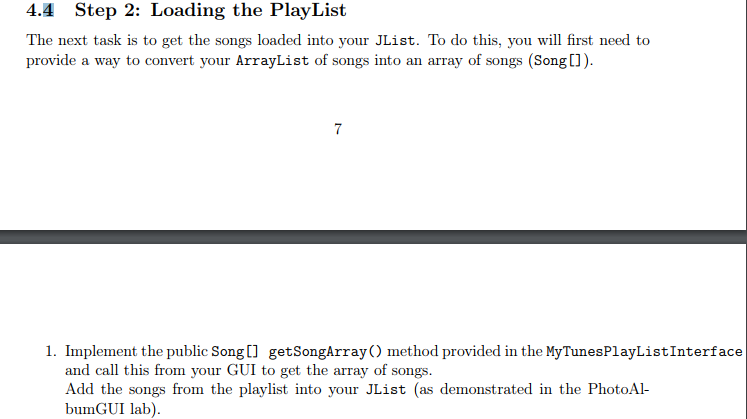
4.4 Step 2: Loading the PlayList The next task is to get the songs loaded into your JList. To do this, you will first need to provide a way to convert your ArrayList of songs into an array of songs (SongC]). 1. Implement the public Songl] getSongArray method provided in the MyTunesPlayListInterface al al ihis rn your I to i the array of s Add the songs from the playlist into your JList (as demonstrated in the PhotoAl- bumGUI lab)
Step by Step Solution
There are 3 Steps involved in it

Get step-by-step solutions from verified subject matter experts
 Study Help