







Question: how to recreate this google page using tkinter gui. dont use chat gpt Problem H2 (30 points): Learn about the fundamentals of thnter widgets and
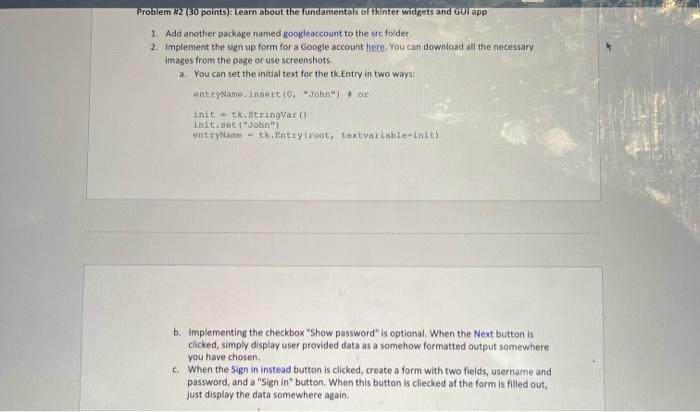
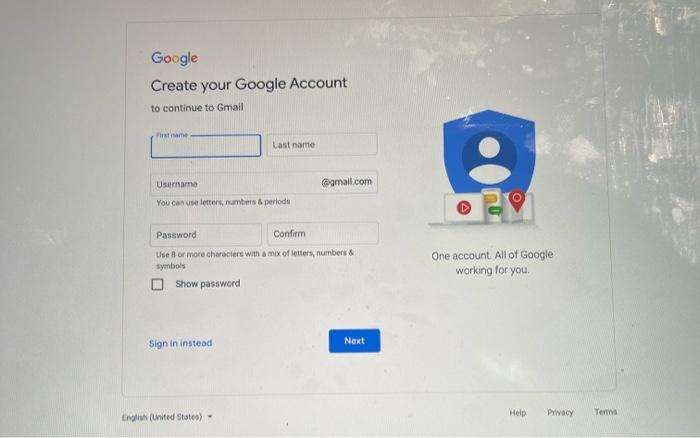
Problem H2 (30 points): Learn about the fundamentals of thnter widgets and GUI app 1. Add another package named googleaccount to the src folder. 2. Implement the sign up form for a Google account here. You can downioad all the necessary images from the page or use screenshots. a. You can set the initial text for the tk. Entry in two ways: entryName.inaert (O, "John") of init = tk.StringVar () init. aec ("John") entrywame - tk.tentry (root, textvarLable-Init) b. Implementing the checkbox "Show password" is optional. When the Next button is clicked, simply display user provided data as a somehow formatted output somewhere you have chosen. c. When the S ign in instead button is clicked, create a form with two fields, username and password, and a "Sign in" button. When this button is cliecked af the form is filled out, just display the data somewhere again. Create your Google Account to continue to Gmail You cas use letters, Nambers 8 periods Use 8 or more characters with a mix of letters, numbers & One account. All of Google syenbols working for you. Show password Problem H2 (30 points): Learn about the fundamentals of thnter widgets and GUI app 1. Add another package named googleaccount to the src folder. 2. Implement the sign up form for a Google account here. You can downioad all the necessary images from the page or use screenshots. a. You can set the initial text for the tk. Entry in two ways: entryName.inaert (O, "John") of init = tk.StringVar () init. aec ("John") entrywame - tk.tentry (root, textvarLable-Init) b. Implementing the checkbox "Show password" is optional. When the Next button is clicked, simply display user provided data as a somehow formatted output somewhere you have chosen. c. When the S ign in instead button is clicked, create a form with two fields, username and password, and a "Sign in" button. When this button is cliecked af the form is filled out, just display the data somewhere again. Create your Google Account to continue to Gmail You cas use letters, Nambers 8 periods Use 8 or more characters with a mix of letters, numbers & One account. All of Google syenbols working for you. Show password
Step by Step Solution
There are 3 Steps involved in it

Get step-by-step solutions from verified subject matter experts
 Study Help