







Question: re create this google sign in page use python and tkinter Create your Google Account to continue to Gmail You can use lefters, numbers 8
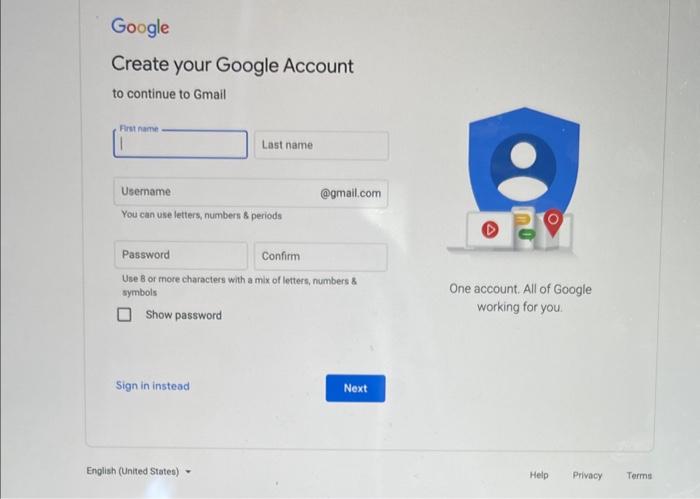
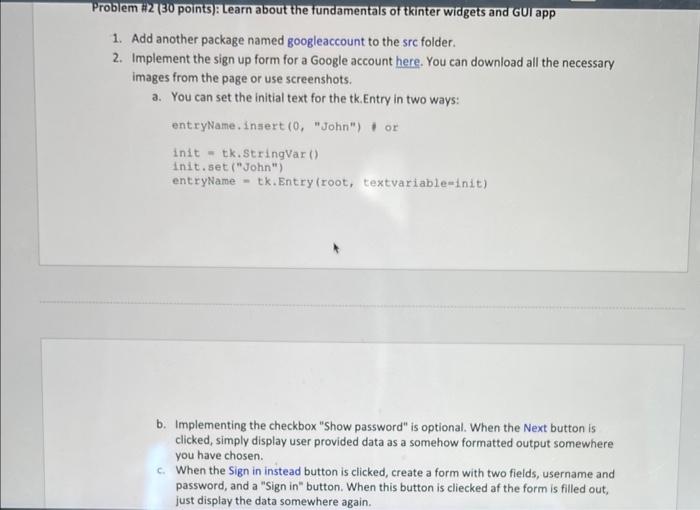
Create your Google Account to continue to Gmail You can use lefters, numbers 8 periods Use 8 or fnore characters with a mix of letters, numbers 8 symbols One account. All of Google Show password working for you. Problem H2 (30 points): Learn about the fundamentals of tkinter widgets and GU app 1. Add another package named googleaccount to the src folder. 2. Implement the sign up form for a Google account here. You can download all the necessary images from the page or use screenshots. a. You can set the initial text for the tk. Entry in two ways: entryName. insert (0, "John") or init = tk.StringVar () Init.set ("John") entryName - tk. Entry (root, textvariable=init) b. Implementing the checkbox "Show password" is optional. When the Next button is clicked, simply display user provided data as a somehow formatted output somewhere you have chosen. c. When the Sign in instead button is clicked, create a form with two fields, username and password, and a "Sign in" button. When this button is cliecked af the form is filled out, just display the data somewhere again
Step by Step Solution
There are 3 Steps involved in it

Get step-by-step solutions from verified subject matter experts
 Study Help