







Question: How to solve such a task? In this project, you are required to write a python script that suggests course schedules for university students. In
How to solve such a task?
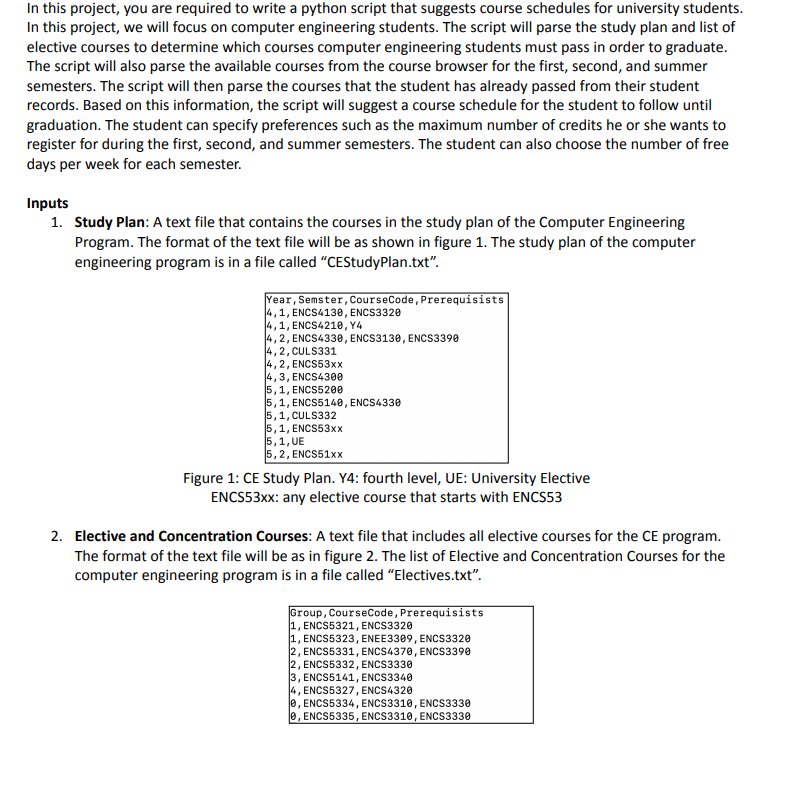
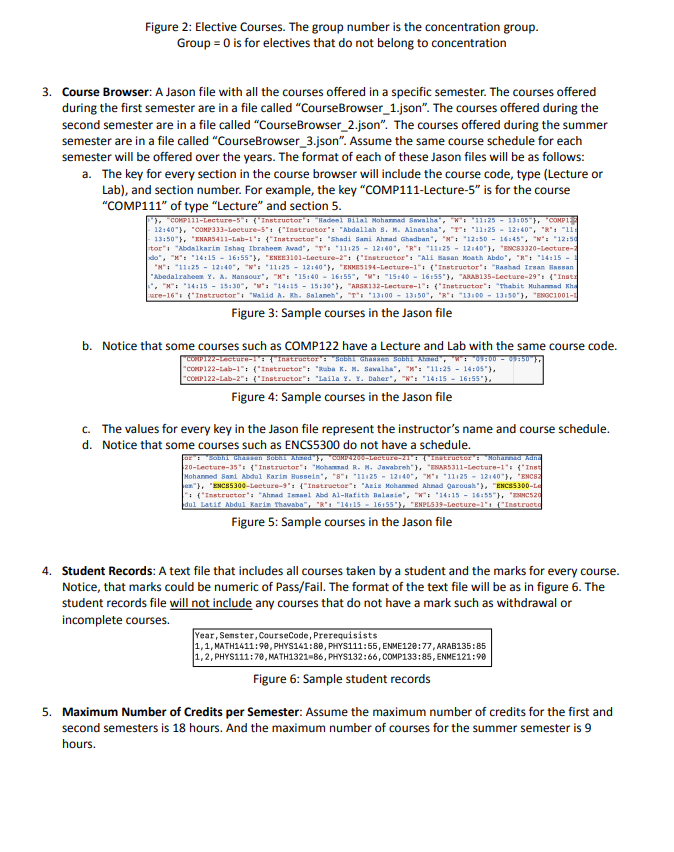
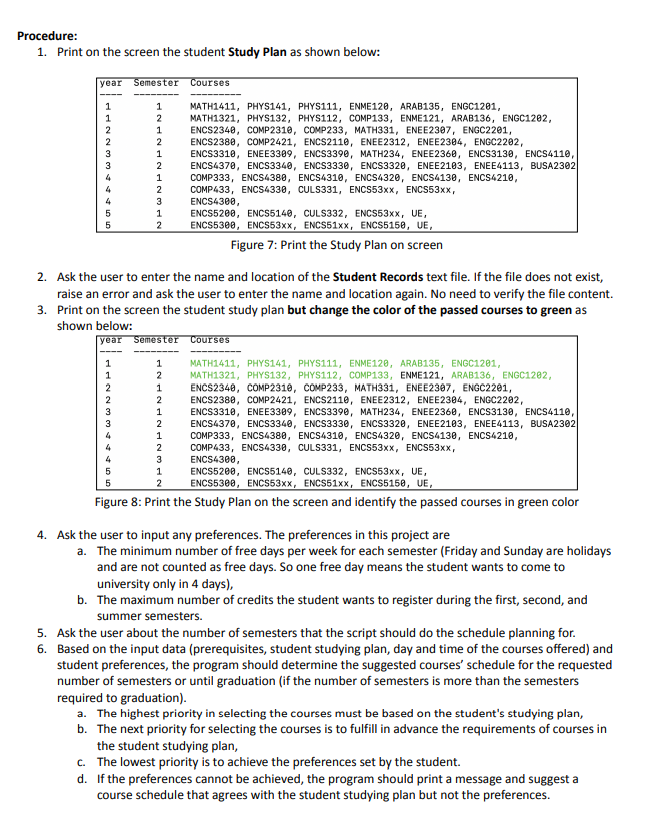
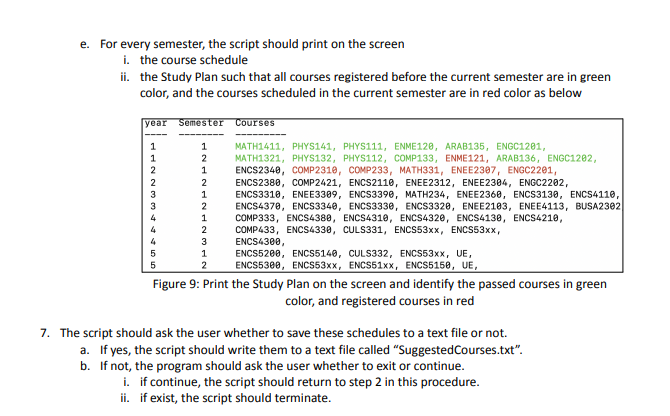
In this project, you are required to write a python script that suggests course schedules for university students. In this project, we will focus on computer engineering students. The script will parse the study plan and list of elective courses to determine which courses computer engineering students must pass in order to graduate. The script will also parse the available courses from the course browser for the first, second, and summer semesters. The script will then parse the courses that the student has already passed from their student records. Based on this information, the script will suggest a course schedule for the student to follow until graduation. The student can specify preferences such as the maximum number of credits he or she wants to register for during the first, second, and summer semesters. The student can also choose the number of free days per week for each semester. Inputs 1. Study Plan: A text file that contains the courses in the study plan of the Computer Engineering Program. The format of the text file will be as shown in figure 1 . The study plan of the computer engineering program is in a file called "CEStudyPlan.txt". Figure 1: CE Study Plan. Y4: fourth level, UE: University Elective ENCS53xx: any elective course that starts with ENCS53 2. Elective and Concentration Courses: A text file that includes all elective courses for the CE program. The format of the text file will be as in figure 2. The list of Elective and Concentration Courses for the computer engineering program is in a file called "Electives.txt". Figure 2: Elective Courses. The group number is the concentration group. Group =0 is for electives that do not belong to concentration 3. Course Browser: A Jason file with all the courses offered in a specific semester. The courses offered during the first semester are in a file called "CourseBrowser_1.json". The courses offered during the second semester are in a file called "CourseBrowser_2.json". The courses offered during the summer semester are in a file called "CourseBrowser_3.json". Assume the same course schedule for each semester will be offered over the years. The format of each of these Jason files will be as follows: a. The key for every section in the course browser will include the course code, type (Lecture or Lab), and section number. For example, the key "COMP111-Lecture- 5 " is for the course "COMP111" of type "Lecture" and section 5. Figure 3: Sample courses in the Jason file b. Notice that some courses such as COMP122 have a Lecture and Lab with the same course code. Figure 4: Sample courses in the Jason file c. The values for every key in the Jason file represent the instructor's name and course schedule. d. Notice that some courses such as ENCS5300 do not have a schedule. Figure 5: Sample courses in the Jason file 4. Student Records: A text file that includes all courses taken by a student and the marks for every course. Notice, that marks could be numeric of Pass/Fail. The format of the text file will be as in figure 6 . The student records file will not include any courses that do not have a mark such as withdrawal or incomplete courses. Year, Senster, CourseCode, Prerequisists 1, 1, MATH1411:96, PHYS141:86, PHYS111:55, ENME120:77, ARAB135:85 1,2, PHYS111:70,MATH1321=86, PHYS132:66, COMP133:85, ENME121:90 Figure 6: Sample student records 5. Maximum Number of Credits per Semester: Assume the maximum number of credits for the first and second semesters is 18 hours. And the maximum number of courses for the summer semester is 9 hours. Procedure: 1. Print on the screen the student Study Plan as shown below: Figure 7: Print the Study Plan on screen 2. Ask the user to enter the name and location of the Student Records text file. If the file does not exist, raise an error and ask the user to enter the name and location again. No need to verify the file content. 3. Print on the screen the student study plan but change the color of the passed courses to green as shown below: Figure 8: Print the Study Plan on the screen and identify the passed courses in green color 4. Ask the user to input any preferences. The preferences in this project are a. The minimum number of free days per week for each semester (Friday and Sunday are holidays and are not counted as free days. So one free day means the student wants to come to university only in 4 days), b. The maximum number of credits the student wants to register during the first, second, and summer semesters. 5. Ask the user about the number of semesters that the script should do the schedule planning for. 6. Based on the input data (prerequisites, student studying plan, day and time of the courses offered) and student preferences, the program should determine the suggested courses' schedule for the requested number of semesters or until graduation (if the number of semesters is more than the semesters required to graduation). a. The highest priority in selecting the courses must be based on the student's studying plan, b. The next priority for selecting the courses is to fulfill in advance the requirements of courses in the student studying plan, c. The lowest priority is to achieve the preferences set by the student. d. If the preferences cannot be achieved, the program should print a message and suggest a course schedule that agrees with the student studying plan but not the preferences. e. For every semester, the script should print on the screen i. the course schedule ii. the Study Plan such that all courses registered before the current semester are in green color, and the courses scheduled in the current semester are in red color as below Figure 9: Print the Study Plan on the screen and identify the passed courses in green color, and registered courses in red 7. The script should ask the user whether to save these schedules to a text file or not. a. If yes, the script should write them to a text file called "SuggestedCourses.txt". b. If not, the program should ask the user whether to exit or continue. i. if continue, the script should return to step 2 in this procedure. ii. if exist, the script should terminate
Step by Step Solution
There are 3 Steps involved in it

Get step-by-step solutions from verified subject matter experts
 Study Help