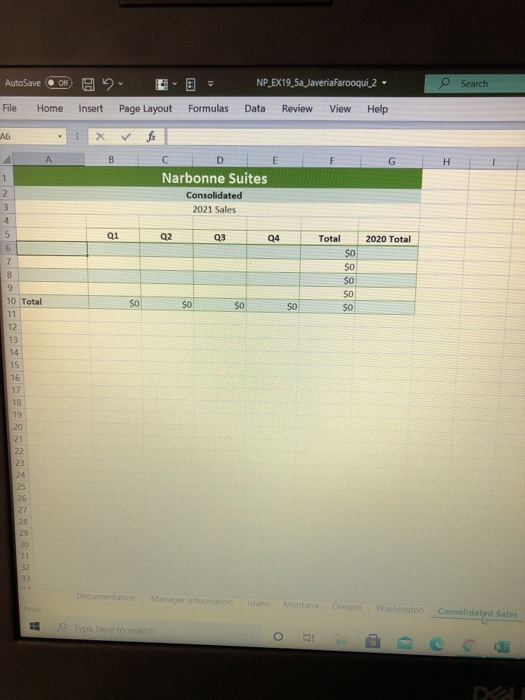
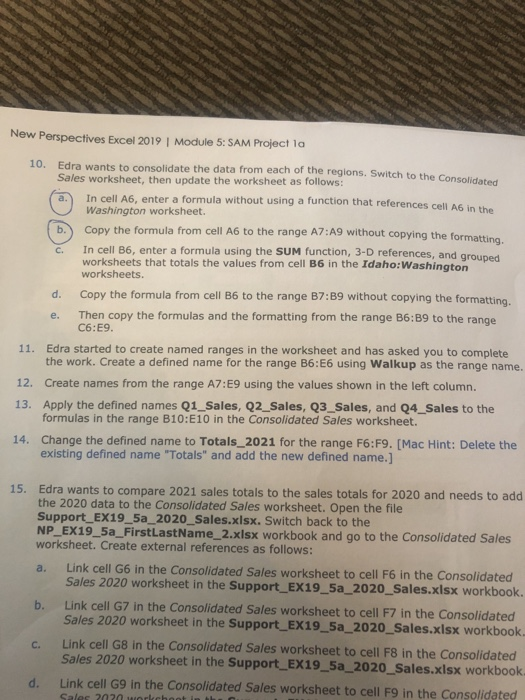
Question: how to to do 10a & 10b? a. b. c. New Perspectives Excel 2019 | Module 5: SAM Project la 10. Edra wants to consolidate
how to to do 10a & 10b? a. b. c. New Perspectives
how to to do 10a & 10b?
how to to do 10a & 10b? a. b. c. New Perspectives
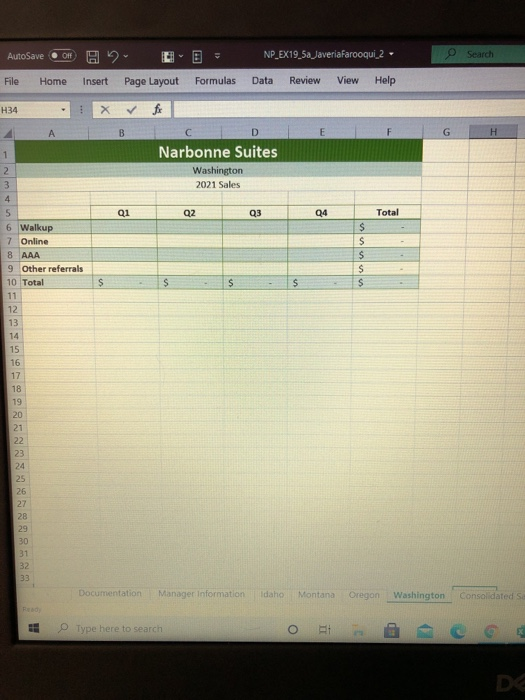
a. b. c. New Perspectives Excel 2019 | Module 5: SAM Project la 10. Edra wants to consolidate the data from each of the regions. Switch to the Consolidated Sales worksheet, then update the worksheet as follows: In cell A6, enter a formula without using a function that references cell A6 in the Washington worksheet. Copy the formula from cell A6 to the range A7:A9 without copying the formatting. In cell B6, enter a formula using the SUM function, 3-D references, and grouped worksheets that totals the values from cell B6 in the Idaho:Washington worksheets. d. Copy the formula from cell B6 to the range B7:39 without copying the formatting. Then copy the formulas and the formatting from the range B6:39 to the range C6:E9. 11. Edra started to create named ranges in the worksheet and has asked you to complete the work. Create a defined name for the range B6:E6 using Walkup as the range name. 12. Create names from the range A7:E9 using the values shown in the left column. 13. Apply the defined names Q1_Sales, Q2_Sales, Q3_Sales, and Q4_Sales to the formulas in the range B10:10 in the Consolidated Sales worksheet. 14. Change the defined name to Totals_2021 for the range F6:F9. [Mac Hint: Delete the existing defined name "Totals" and add the new defined name.] e. 15. Edra wants to compare 2021 sales totals to the sales totals for 2020 and needs to add the 2020 data to the Consolidated Sales worksheet. Open the file Support_EX19_5a_2020_Sales.xlsx. Switch back to the NP_EX19_5a_FirstLastName_2.xlsx workbook and go to the Consolidated Sales worksheet. Create external references as follows: a. Link cell G6 in the Consolidated Sales worksheet to cell F6 in the Consolidated Sales 2020 worksheet in the Support_EX19_5a_2020_Sales.xlsx workbook. b. Link cell G7 in the Consolidated Sales worksheet to cell F7 in the Consolidated Sales 2020 worksheet in the Support_EX19_5a_2020_Sales.xlsx workbook. C. Link cell G8 in the Consolidated Sales worksheet to cell F8 in the Consolidated Sales 2020 worksheet in the Support_EX19_5a_2020_Sales.xlsx workbook. d. Link cell G9 in the Consolidated Sales worksheet to cell F9 in the Consolidated Sales 2020 work AutoSave Off NP_EX19_5a JaveriaFarooqui 2 Search File Home Insert Page Layout Formulas Data Review View Help H34 X fi B D H 1 Narbonne Suites 2 3 Washington 2021 Sales 4 5 Q1 Q2 Q3 Q4 Total $ $ $ $ $ $ 6 Walkup 7 Online 8 AAA 9 Other referrals 10 Total 11 12 13 14 15 16 17 18 19 20 21 22 23 24 25 26 27 28 29 30 31 32 33 Documentation Manager Information Idaho Montana Oregon Washington Consolidated sa E Type here to search IT DC AutoSave OF H NP_EX19_5a Javeria Farooqui_2 - Search File Home Insert Page Layout Formulas Data Review View Help A6 B G H 1 2. 3 4 Narbonne Suites Consolidated 2021 Sales Q1 Q2 Q3 24 2020 Total 5 6 7 8 9 Total $0 $0 SO SO $0 $o SO $o SO 10 Total 11 12 13 14 15 16 17 18 19 20 21 22 23 24 25 26 27 29 30 31 32 23 Documentation Manager information Idaho Montana Oregon Washington Consolidated Sales Type here to search o DO

Step by Step Solution

There are 3 Steps involved in it

1 Expert Approved Answer
Step: 1 Unlock blur-text-image

Question Has Been Solved by an Expert!

Get step-by-step solutions from verified subject matter experts

Step: 2 Unlock
Step: 3 Unlock

Students Have Also Explored These Related General Management Questions!