



Question: in Protected View Enable Editing Veritate Online MANAGE YOUR DATA WITH DATA TOOLS . GETTING STARTED Open the file NP_EX19_EOM6-1_FirstLastName_1.xlsx, available for download from the
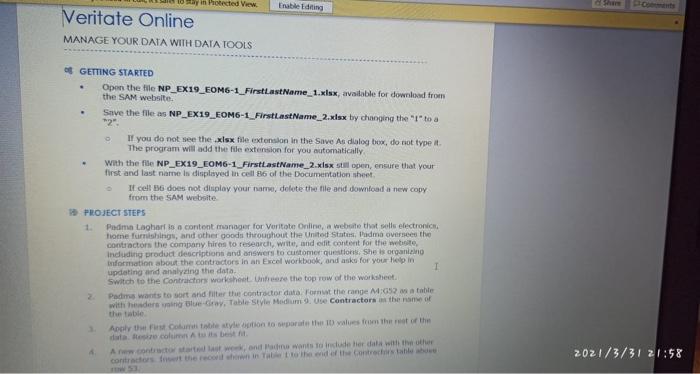
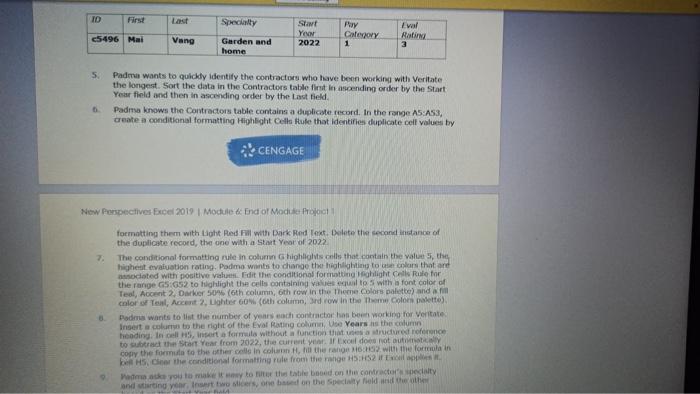
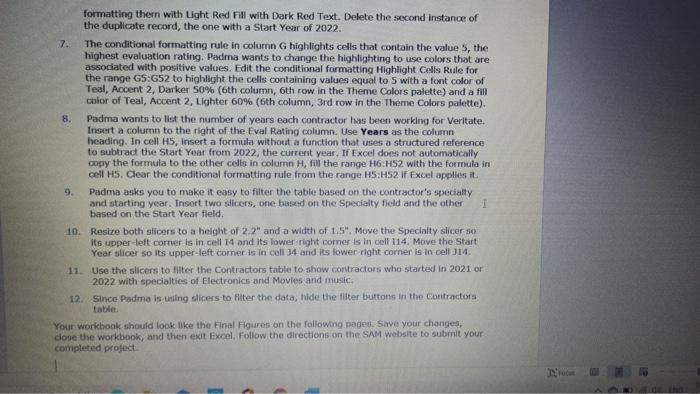
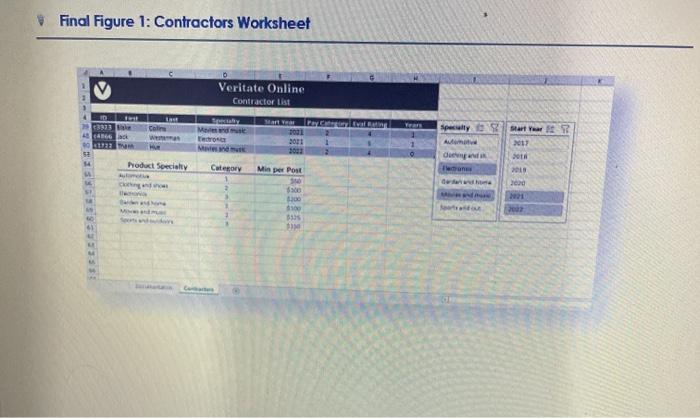
in Protected View Enable Editing Veritate Online MANAGE YOUR DATA WITH DATA TOOLS . GETTING STARTED Open the file NP_EX19_EOM6-1_FirstLastName_1.xlsx, available for download from the SAM website Save the file as NP_EX19_EOM6-1_FirstLastName_2.xlsx by changing the "Ito a 12" If you do not see the .xlsx file extension in the Save As dialog box, do not type it The program will add the file extension for you automatically With the file NP_EX19_EOM6-1_FirstLastName_2.xlsx stl open, ensure that your first and last name in displayed in cell 6 of the Documentation sheet It celles does not duplay your name, delete the file and download a new copy from the SAM website PROJECT STEPS 1. Padma Laghart is a content manager for Voritate Online, a website that sells electronic Home furnishings, and other goods throughout the United States, Padma oversees the contractors the company hires to research witte, and edit content for the website, including product description and answers to customer questions. She is organizing Information about the contractors in an Excel Workbook, and asks for your helpin 1 updating and analyzing the data Switch to the Contractors worksheet Unter the top row of the worksheet Padma wants to sort and filter the contractor data on the range M:652 a table with headers and Blu-ray Table Style Medium 9. De Contractors the name of Analyst Contabile style into sport the values from the rest of the Ancontro and wants to include her data with the other contractors there in the end of the contractable 2021/3/31 21:58 ID Specialty 45496 Mai Vang Stav Yen 2022 Puy Category 1 val Rating 3 Garden and home 5 Padma wants to quickly identify the contractors who have been working with Veritate the longest Sort the data in the Contractors table first in ascending order by the Start Year field and then in ascending order by the last field Padme knows the Contractors table contains a duplicate record. In the range A5 A53, create a conditional formatting Highlight Cello Bute that identifies duplicate cell values by CENGAGE New Perspectives Excel 2019 Module & End of Module Pool 2. formatting them with light Red with Dark Red Text.Delete the second instance of the duplicate record, the one with a Start Year of 2022 The conditional formatting rule in column G highlights ones that contain the vals, the highest evaluation rating. Padma wants to change the holing tools that are sociated with positive value. Edit the conditional formatting flight Cells Rule for the range G5:652 to highlight the cells containing values equal tos with a font color of Teol, Accent Darker 50% (oth column, 6th row in the Thorne Color palette) and color of Teal Accent 2. Lighter 60% (oth columnard row in the theme Color palette Padma wants to list the number of years each contractor has been working for Veritate Insert a column to the right of the Eval Rating column, Do Years in the column headingIn cell insert a formula without a function that a structured ference to subtract the Start Year from 2022, the current year. If ou do not out copy the formule to the other cells in column the range with the formula in 5. Cor the conditional formatting role from the age 552 if Had you to make it to the title bed on the contractory and terting your insert two sicers, one bed on the speciality field and the formatting them with Light Red Fill with Dark Red Text. Delete the second instance of the duplicate record, the one with a Start Year of 2022 7. The conditional formatting rule in column G highlights cells that contain the value 5, the highest evaluation rating. Padma wants to change the highlighting to use colors that are associated with positive values. Edit the conditional formatting Highlight Cells Rule for the range GS:652 to highlight the cells containing values equal to 5 with a font color of Teal, Accent 2, Darker 50% (6th column, 6th row in the Theme Colors palette) and a fill color of Teal, Accent 2, Lighter 60% (6th column, 3rd row in the Theme Colors palette). 8. Padma wants to list the number of years each contractor has been working for Veritate. Insert a column to the right of the Eval Rating column. Use Years as the column heading. In cell H5, Insert a formula without a function that uses a structured reference to subtract the Start Year from 2022, the current year. If Excel does not automatically copy the formula to the other cells in column H, fill the range H6:H52 with the formula in cell HS. Clear the conditional formatting rule from the range H5:52 if Excel applies it Padma asks you to make it easy to filter the table based on the contractor's specially and starting year. Insert two sicers, one based on the Specialty field and the other 1 based on the Start Year field. 10. Resize both slicers to a height of 2.2" and a width of 1.5". Move the Specialty slicer so its upper-left corner is in cell 14 and its lower right corner is in cell 114. Move the Start Year slicer so its upper left comer is in cell 34 and its lower right corner is in cell 114 11. Use the slicers to filter the Contractors table to show contractors who started in 2021 or 2022 with specialties of Electronics and Movies and music, 12. Since Padma is using slicers to filter the data, hide the filter buttons in the Contractors table Your workbook should look like the Final Figures on the following pages. Save your changes, close the workbook, and then exit Excel Follow the directions on the SAM website to submit your completed project Final Figure 1: Contractors Worksheet Veritate Online Contractor List ID Colin specially 1466 More Tero Toul Bori Start Year 2 2017 53 de Product Specialty Category Min per Post SP $300 100 2000 21 3935 41 in Protected View Enable Editing Veritate Online MANAGE YOUR DATA WITH DATA TOOLS . GETTING STARTED Open the file NP_EX19_EOM6-1_FirstLastName_1.xlsx, available for download from the SAM website Save the file as NP_EX19_EOM6-1_FirstLastName_2.xlsx by changing the "Ito a 12" If you do not see the .xlsx file extension in the Save As dialog box, do not type it The program will add the file extension for you automatically With the file NP_EX19_EOM6-1_FirstLastName_2.xlsx stl open, ensure that your first and last name in displayed in cell 6 of the Documentation sheet It celles does not duplay your name, delete the file and download a new copy from the SAM website PROJECT STEPS 1. Padma Laghart is a content manager for Voritate Online, a website that sells electronic Home furnishings, and other goods throughout the United States, Padma oversees the contractors the company hires to research witte, and edit content for the website, including product description and answers to customer questions. She is organizing Information about the contractors in an Excel Workbook, and asks for your helpin 1 updating and analyzing the data Switch to the Contractors worksheet Unter the top row of the worksheet Padma wants to sort and filter the contractor data on the range M:652 a table with headers and Blu-ray Table Style Medium 9. De Contractors the name of Analyst Contabile style into sport the values from the rest of the Ancontro and wants to include her data with the other contractors there in the end of the contractable 2021/3/31 21:58 ID Specialty 45496 Mai Vang Stav Yen 2022 Puy Category 1 val Rating 3 Garden and home 5 Padma wants to quickly identify the contractors who have been working with Veritate the longest Sort the data in the Contractors table first in ascending order by the Start Year field and then in ascending order by the last field Padme knows the Contractors table contains a duplicate record. In the range A5 A53, create a conditional formatting Highlight Cello Bute that identifies duplicate cell values by CENGAGE New Perspectives Excel 2019 Module & End of Module Pool 2. formatting them with light Red with Dark Red Text.Delete the second instance of the duplicate record, the one with a Start Year of 2022 The conditional formatting rule in column G highlights ones that contain the vals, the highest evaluation rating. Padma wants to change the holing tools that are sociated with positive value. Edit the conditional formatting flight Cells Rule for the range G5:652 to highlight the cells containing values equal tos with a font color of Teol, Accent Darker 50% (oth column, 6th row in the Thorne Color palette) and color of Teal Accent 2. Lighter 60% (oth columnard row in the theme Color palette Padma wants to list the number of years each contractor has been working for Veritate Insert a column to the right of the Eval Rating column, Do Years in the column headingIn cell insert a formula without a function that a structured ference to subtract the Start Year from 2022, the current year. If ou do not out copy the formule to the other cells in column the range with the formula in 5. Cor the conditional formatting role from the age 552 if Had you to make it to the title bed on the contractory and terting your insert two sicers, one bed on the speciality field and the formatting them with Light Red Fill with Dark Red Text. Delete the second instance of the duplicate record, the one with a Start Year of 2022 7. The conditional formatting rule in column G highlights cells that contain the value 5, the highest evaluation rating. Padma wants to change the highlighting to use colors that are associated with positive values. Edit the conditional formatting Highlight Cells Rule for the range GS:652 to highlight the cells containing values equal to 5 with a font color of Teal, Accent 2, Darker 50% (6th column, 6th row in the Theme Colors palette) and a fill color of Teal, Accent 2, Lighter 60% (6th column, 3rd row in the Theme Colors palette). 8. Padma wants to list the number of years each contractor has been working for Veritate. Insert a column to the right of the Eval Rating column. Use Years as the column heading. In cell H5, Insert a formula without a function that uses a structured reference to subtract the Start Year from 2022, the current year. If Excel does not automatically copy the formula to the other cells in column H, fill the range H6:H52 with the formula in cell HS. Clear the conditional formatting rule from the range H5:52 if Excel applies it Padma asks you to make it easy to filter the table based on the contractor's specially and starting year. Insert two sicers, one based on the Specialty field and the other 1 based on the Start Year field. 10. Resize both slicers to a height of 2.2" and a width of 1.5". Move the Specialty slicer so its upper-left corner is in cell 14 and its lower right corner is in cell 114. Move the Start Year slicer so its upper left comer is in cell 34 and its lower right corner is in cell 114 11. Use the slicers to filter the Contractors table to show contractors who started in 2021 or 2022 with specialties of Electronics and Movies and music, 12. Since Padma is using slicers to filter the data, hide the filter buttons in the Contractors table Your workbook should look like the Final Figures on the following pages. Save your changes, close the workbook, and then exit Excel Follow the directions on the SAM website to submit your completed project Final Figure 1: Contractors Worksheet Veritate Online Contractor List ID Colin specially 1466 More Tero Toul Bori Start Year 2 2017 53 de Product Specialty Category Min per Post SP $300 100 2000 21 3935 41
Step by Step Solution
There are 3 Steps involved in it

Get step-by-step solutions from verified subject matter experts