







Question: How would I edit/form these queries--that is, which fields should i add, what criteria should i put, which expressions etc. The table names are agencynumber,
How would I edit/form these queries--that is, which fields should i add, what criteria should i put, which expressions etc. The table names are agencynumber, agencyname, cardholdername, vendor, amount, transactiondate, posteddate, description, and merchantcategorycode(MCC). Any help would be greatly appreciated!!!!!
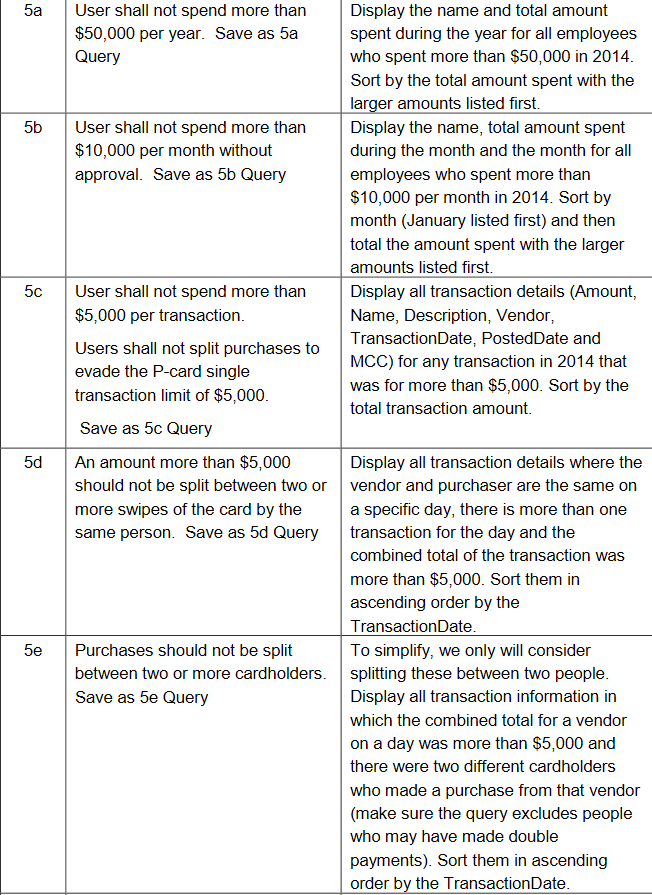
5a User shall not spend more than $50,000 per year. Save as 5a Query 5b User shall not spend more than $10,000 per month without approval. Save as 5b Query Display the name and total amount spent during the year for all employees who spent more than $50,000 in 2014. Sort by the total amount spent with the larger amounts listed first. Display the name, total amount spent during the month and the month for all employees who spent more than $10,000 per month in 2014. Sort by month (January listed first) and then total the amount spent with the larger amounts listed first. Display all transaction details (Amount, Name, Description, Vendor, TransactionDate, PostedDate and MCC) for any transaction in 2014 that was for more than $5,000. Sort by the total transaction amount. 50 User shall not spend more than $5,000 per transaction. Users shall not split purchases to evade the P-card single transaction limit of $5,000. Save as 5c Query 5d 5e An amount more than $5,000 Display all transaction details where the should not be split between two or vendor and purchaser are the same on more swipes of the card by the a specific day, there is more than one same person. Save as 5d Query transaction for the day and the combined total of the transaction was more than $5,000. Sort them in ascending order by the TransactionDate. Purchases should not be split To simplify, we only will consider between two or more cardholders. splitting these between two people. Save as 5e Query Display all transaction information in which the combined total for a vendor on a day was more than $5,000 and there were two different cardholders who made a purchase from that vendor (make sure the query excludes people who may have made double payments). Sort them in ascending order by the TransactionDate. 5a User shall not spend more than $50,000 per year. Save as 5a Query 5b User shall not spend more than $10,000 per month without approval. Save as 5b Query Display the name and total amount spent during the year for all employees who spent more than $50,000 in 2014. Sort by the total amount spent with the larger amounts listed first. Display the name, total amount spent during the month and the month for all employees who spent more than $10,000 per month in 2014. Sort by month (January listed first) and then total the amount spent with the larger amounts listed first. Display all transaction details (Amount, Name, Description, Vendor, TransactionDate, PostedDate and MCC) for any transaction in 2014 that was for more than $5,000. Sort by the total transaction amount. 50 User shall not spend more than $5,000 per transaction. Users shall not split purchases to evade the P-card single transaction limit of $5,000. Save as 5c Query 5d 5e An amount more than $5,000 Display all transaction details where the should not be split between two or vendor and purchaser are the same on more swipes of the card by the a specific day, there is more than one same person. Save as 5d Query transaction for the day and the combined total of the transaction was more than $5,000. Sort them in ascending order by the TransactionDate. Purchases should not be split To simplify, we only will consider between two or more cardholders. splitting these between two people. Save as 5e Query Display all transaction information in which the combined total for a vendor on a day was more than $5,000 and there were two different cardholders who made a purchase from that vendor (make sure the query excludes people who may have made double payments). Sort them in ascending order by the TransactionDate
Step by Step Solution
There are 3 Steps involved in it

Get step-by-step solutions from verified subject matter experts
 Study Help