







Question: How would i implement a track addnew() into my controller? The add new use case Implement the add new use case for the Track entity.
How would i implement a track addnew() into my controller?
The "add new" use case
Implement the "add new" use case for theTrackentity. ItsTrackAddFormViewModelclass will needSelectListproperties for bothAlbumandMediaType. Remember to follow the naming rule forSelectListproperties.
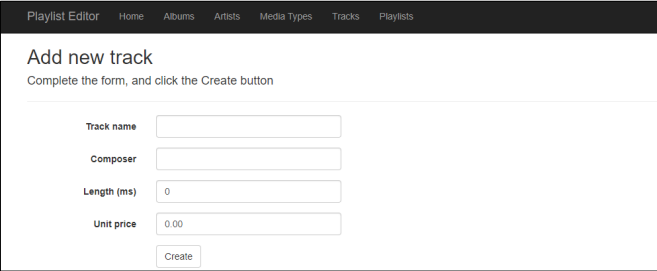
After you write the GET method (for the "add new" use case), scaffold a view. It should look something like the following:
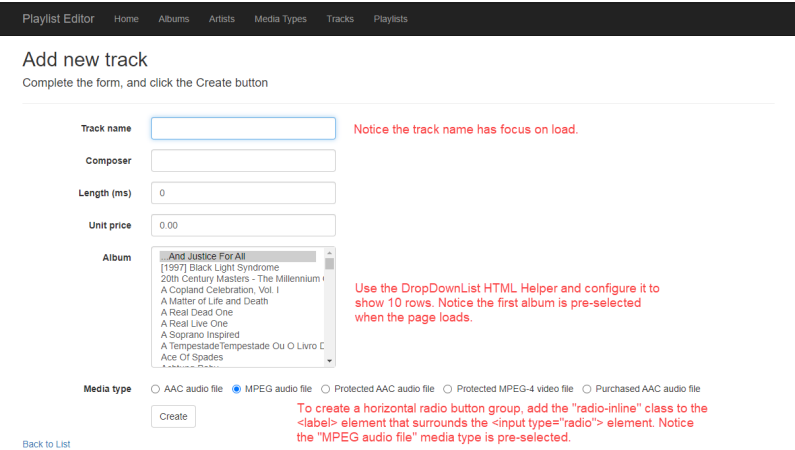
Next, edit the view. Add the item-selection elements for the Album and MediaType. It is suggested that you use a DropDownList HTML Helper for the Album (make its size 10, so that it renders as a ListBox). Pre-select the first album.
Use a radio button group for the MediaType and ensure you render it as a horizontal radio button group. Pre-select the "MPEG audio file" option.
It should look something like the following. Notice all controls have been styled using BootStrap, even the radio buttons. Also, notice the track name is focused on page load.
TrackAddViewModel and the controller POST method
The TrackAddViewModel class will be like the TrackAddFormViewModel class however you must replace the SelectList properties with int properties named
Write the controller POST method next. After a successful "add new" result, redirect to the Details view.
This is what I have in my manager class:
public IEnumerable
{
//validate incoming data
if (newTrack == null) { return null; }
//locate the associated Album and MediaType objs
var album = ds.Albums.Find(newTrack.AlbumId);
var mediaType = ds.MediaTypes.Find(newTrack.MediaTypeId);
//createand configure a new track obj
var addedItem = new Track
{
AlbumId = album.AlbumId,
Album = album,
GenreId = mediaType.MediaTypeId,
//Genre = mediaType,
Name = newTrack.Name,
Composer = newTrack.Composer,
Milliseconds = newTrack.Milliseconds,
Bytes = newTrack.Bytes,
UnitPrice = newTrack.UnitPrice
};
//Add the new object to the data context
ds.Tracks.Add(addedItem);
ds.SaveChanges();
//Return the obj
return mapper.Map
}
Please help on how to implement this!
Playlist Editor Home Albums Artists Media Types Add new track Complete the form, and click the Create button Track name Composer Length (ms) Unit price 0 0.00 Create Tracks Playlists
Step by Step Solution
3.34 Rating (154 Votes )
There are 3 Steps involved in it
To implement the add new use case for the Track entity in your controller you can follow these steps ... View full answer

Get step-by-step solutions from verified subject matter experts
 Study Help