







Question: HTML and JavaScript please 2) Change 7 Styles When the Click this text is clicked (no button this time), change the innerHTML of a div
 HTML and JavaScript please
2) Change 7 Styles When the
Click this text"
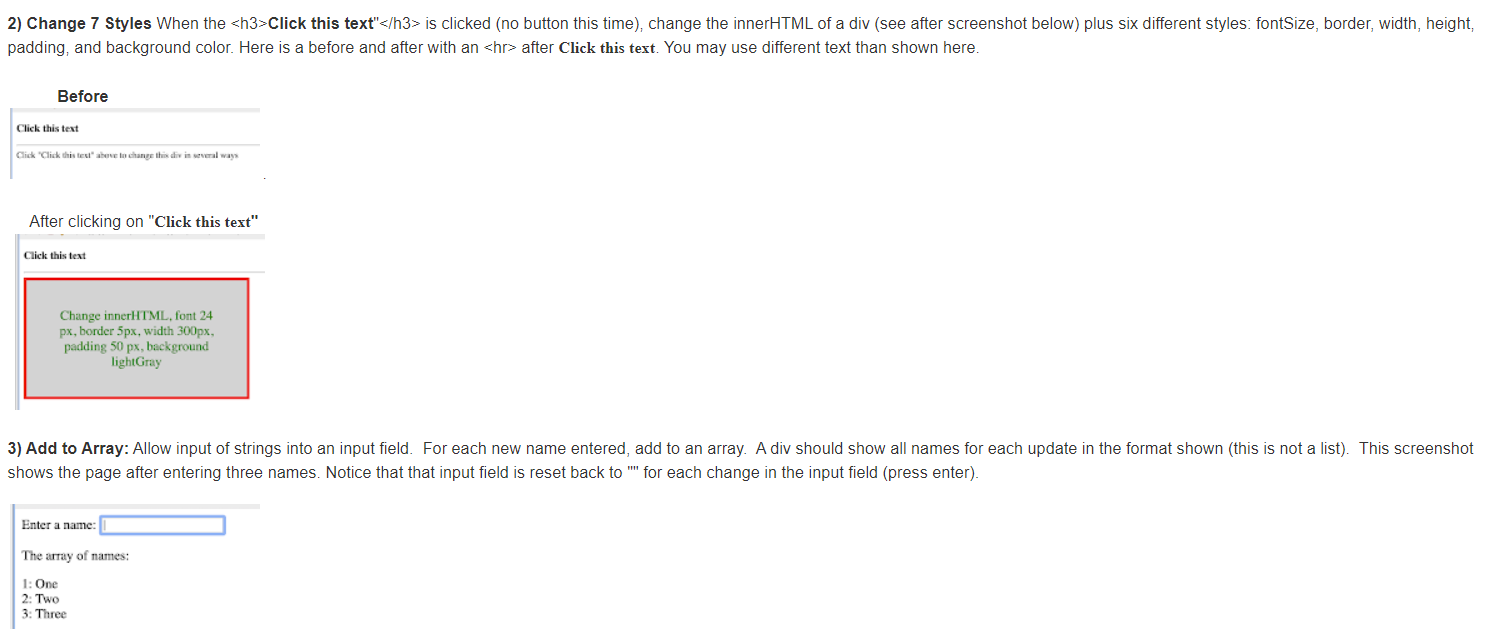
is clicked (no button this time), change the innerHTML of a div (see after screenshot below) plus six different styles: fontSize, border, width, height, padding, and background color. Here is a before and after with an
after Click this text. You may use different text than shown here. Before Click this text Click Click this text to change this divin everal ways After clicking on "Click this text" Click this text Change innerHTML, font 24 px, border 5px, width 300px, padding 50 px, background light Gray 3) Add to Array: Allow input of strings into an input field. For each new name entered, add to an array. A div should show all names for each update in the format shown (this is not a list). This screenshot shows the page after entering three names. Notice that that input field is reset back to "for each change in the input field (press enter) Enter a name: The array of names: 1: One 2: Two 3: Three
Step by Step Solution
There are 3 Steps involved in it

Get step-by-step solutions from verified subject matter experts
 Study Help