







Question: HTML code: {{ header }} {{ row.id }} {{ row.name }} {{ row.phone }} CSS code: table { text-align: left; font-family: Open Sans, sans-serif; width:
HTML code:
| {{ header }} | ||
|---|---|---|
| {{ row.id }} | {{ row.name }} | {{ row.phone }} |
CSS code:
table {
text-align: left;
font-family: "Open Sans", sans-serif;
width: 500px;
border-collapse: collapse;
border: 2px solid #444777;
margin: 10px;
}
table th {
background: #444777;
color: #fff;
padding: 5px;
min-width: 30px;
}
table td {
padding: 5px;
border-right: 2px solid #444777;
}
table tbody tr:nth-child(2n) {
background: #d4d8f9;
}
JS code:
var app = new Vue({
el: "#app",
data: {
column: {
id: "ID",
name: "Full Name",
phone: "Phone",
},
rows: [],
},
methods: {
async fetchData() {
const response = await fetch(
"https://jsonplaceholder.typicode.com/users"
);
const finalRes = await response.json();
this.rows = finalRes;
},
},
mounted() {
this.fetchData();
},
});
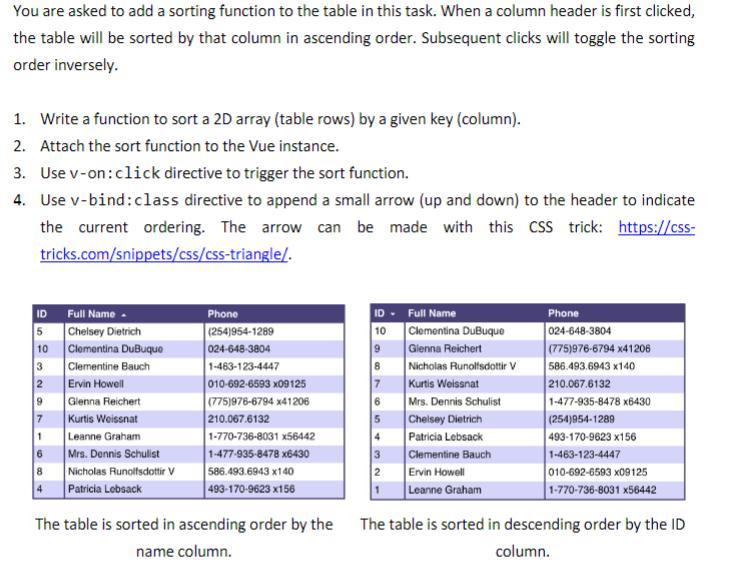
You are asked to add a sorting function to the table in this task. When a column header is first clicked, the table will be sorted by that column in ascending order. Subsequent clicks will toggle the sorting order inversely. 1. Write a function to sort a 2D array (table rows) by a given key (column). 2. Attach the sort function to the Vue instance. 3. Use v-on: click directive to trigger the sort function. 4. Use v-bind: class directive to append a small arrow (up and down) to the header to indicate the current ordering. The arrow can be made with this CSS trick: https://csstricks.com/snippets/css/css-triangle/. The table is sorted in ascending order by the The table is sorted in descending order by the ID name column. column
Step by Step Solution
There are 3 Steps involved in it

Get step-by-step solutions from verified subject matter experts
 Study Help