







Question: HTML Given the template below, create a file called MyFirstHTMLFORM.html Gross Pay Calculator Enhance the file with the following items in the order given: Add
HTML
Given the template below, create a file called MyFirstHTMLFORM.html
Gross Pay Calculator
Enhance the file with the following items in the order given:
Add a
tag that says "Gross Pay Calculator".
Add text label "Wage" and a text input field for "Wage".
Add text label "Hours" and a text input field for "Hours".
Add text label "OT" and a text input field for "OT".
Add text label "OT Pay factor" and a text input field for "OT Pay factor".
Add a button with the name of "Calculate".
Add a
tag.
Add text label "Gross" and a text input field for "Gross".
When completed you will have an input form that we will use in the Javascript section of the course next week. We will use Javascript to calculate the Gross based on the input from your HTML FORM page.
Tip: If you want your HTML Form items to line up nicely, you'll have to embed them within table (td tags) within a table structure ... if you don't figure it out, no problem, as I'll give that to you in next week's JavaScript homework.
Create the three files as specified above, but add the following information:
Add five new form elements to your HTML form (myFirstHTMLFORM.html). In addition to another text field, include at least one field using a radio button, one field that is a pick list, one field that is a large text area, and one field that is a check box.
It should look something like this in the end:
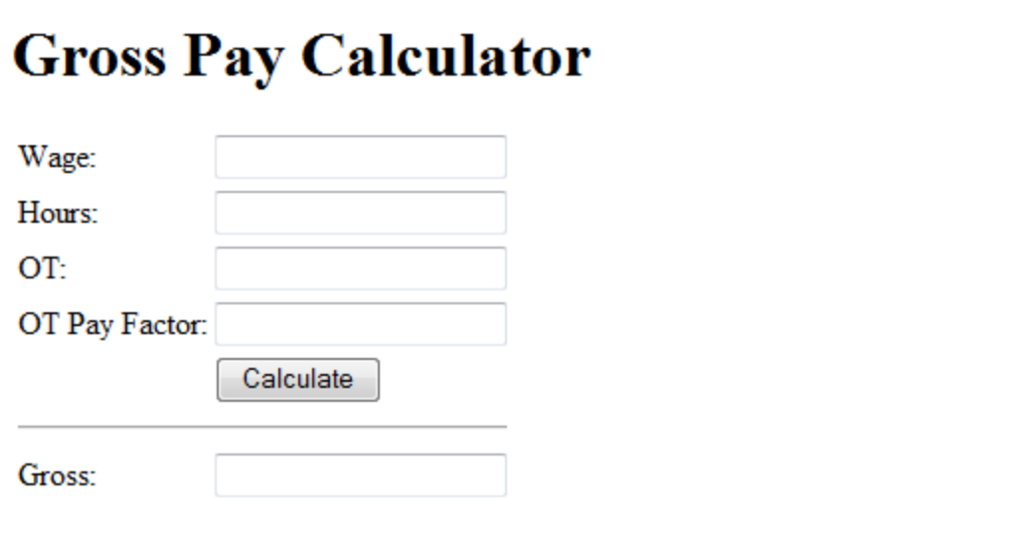
Gross Pay Calculator Wage Hours: ??: OT Pay Factor Calculate Gross
Step by Step Solution
There are 3 Steps involved in it

Get step-by-step solutions from verified subject matter experts
 Study Help