







Question: HTML: jQuery Effects Get Wx JQuery Weather Underground API CSS: body { background: black; margin: 0 auto; } .container { background: black; border: 10px solid
HTML:
JQuery Weather Underground API
CSS:
body {
background: black;
margin: 0 auto;
}
.container {
background: black;
border: 10px solid #4b2e83;
width: 480px;
margin: 20px auto;
}
.panel {
margin: 10px auto;
width: 400px;
}
#uw {
background-color: #4b2e83;
color: white;
}
#uw-gold {
background-color: #b7a57a;
color: #4b2e83;
}
button {
width: 100%;
}
.control {
margin: 5px auto;
/* border: 2px solid red; */
}
h3 {
text-align: center;
}
#reset {
border: 1px solid red;
}
JS:
// Shorthand for $( document ).ready()
$(function() {
// weather update button click
$('button').on('click', function(e) {
$('ul li').each(function() {
console.log("this:" + this);
$(this).remove();
});
$.ajax({
url: "http://api.wunderground.com/api/58ab95c2b5f162e8/geolookup/conditions/q/WA/Bothell.json",
dataType: "jsonp",
success: function(parsed_json) {
var city = parsed_json['location']['city'];
var state = parsed_json['location']['state'];
var temp_f = parsed_json['current_observation']['temp_f'];
var rh = parsed_json['current_observation']['relative_humidity'];
var str = "
";
console.log("Current temperature in " + city + " is: " + temp_f);
// Update list items with data from above...
// $('ul').append(str);
// $('ul li:last').attr('class', 'list-group-item');
// str = "
";
// $('ul').append(str);
// $('ul li:last').attr('class', 'list-group-item');
// str = "
";
// $('ul').append(str);
// $('ul li:last').attr('class', 'list-group-item');
}
});
});
});
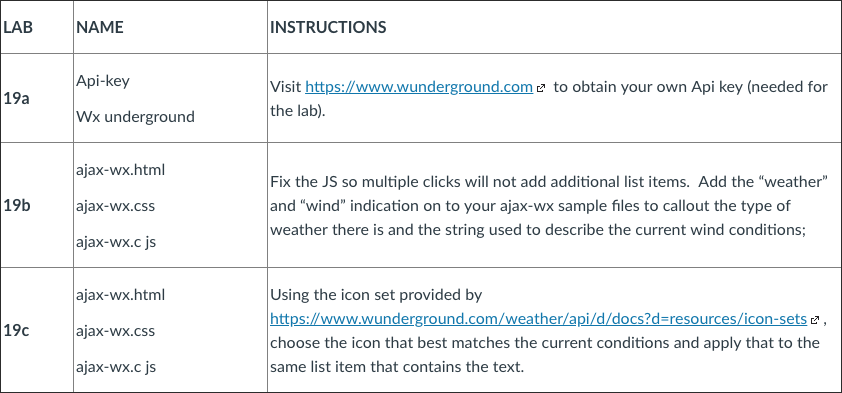
LAB NAME INSTRUCTIONS Api-key Visit https://www.wunderground.com? to obtain your own Api key (needed for the lab) 19a Wx underground ajax-wx.html ajax-wx.css ajax-wX.c Js Fix the JS so multiple clicks will not add additional list items. Add the "weather" and "wind" indication on to your ajax-wx sample files to callout the type of weather there is and the string used to describe the current wind conditions; 19b ajax-wx.html ?ajax-wx.css ajax-wX.c Js Using the icon set provided by 19c choose the icon that best matches the current conditions and apply that to the same list item that contains the text. LAB NAME INSTRUCTIONS Api-key Visit https://www.wunderground.com? to obtain your own Api key (needed for the lab) 19a Wx underground ajax-wx.html ajax-wx.css ajax-wX.c Js Fix the JS so multiple clicks will not add additional list items. Add the "weather" and "wind" indication on to your ajax-wx sample files to callout the type of weather there is and the string used to describe the current wind conditions; 19b ajax-wx.html ?ajax-wx.css ajax-wX.c Js Using the icon set provided by 19c choose the icon that best matches the current conditions and apply that to the same list item that contains the text
Step by Step Solution
There are 3 Steps involved in it

Get step-by-step solutions from verified subject matter experts
 Study Help