







Question: html Please keep it simple, will give thumbs up thank you:)! 1. Write an HTML form to display the login form shown below. 2. Use
html
Please keep it simple, will give thumbs up thank you:)!
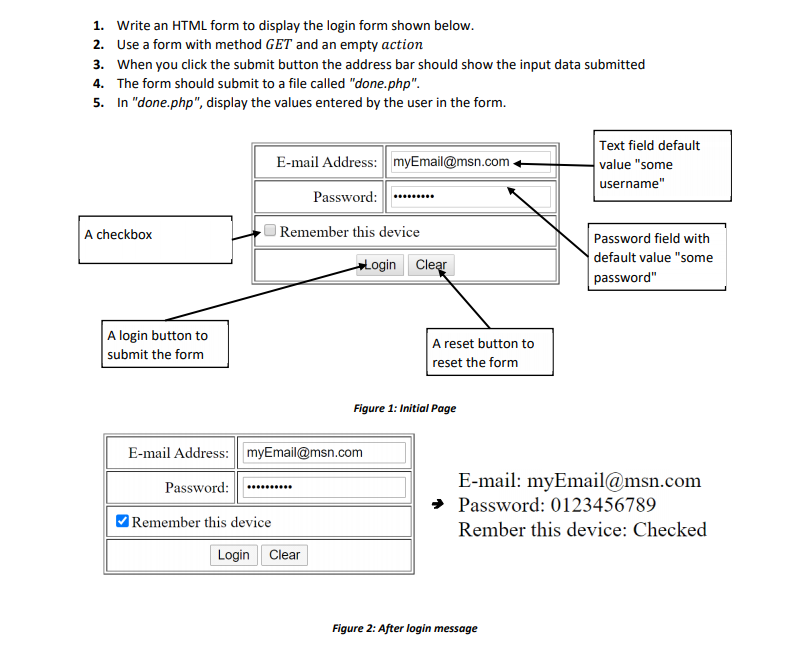
1. Write an HTML form to display the login form shown below. 2. Use a form with method GET and an empty action 3. When you click the submit button the address bar should show the input data submitted 4. The form should submit to a file called "done.php". 5. In "done.php", display the values entered by the user in the form. E-mail Address: myEmail@msn.com Text field default value "some username" Password: A checkbox Remember this device Login Clear Password field with default value "some password" A login button to submit the form A reset button to reset the form Figure 1: Initial Page E-mail Address: myEmail@msn.com Password: E-mail: myEmail@msn.com Password: 0123456789 Rember this device: Checked Remember this device Login Clear Figure 2: After login message
Step by Step Solution
There are 3 Steps involved in it

Get step-by-step solutions from verified subject matter experts
 Study Help