



Question: HTML Question: In the picture below are the instructions to build and render a web page that makes the indicated effect(s) appear. Validate your page
HTML Question: In the picture below are the instructions to build and render a web page that makes the indicated effect(s) appear. Validate your page with the following validators:
Here is the link to all the instructions for this program.
https://www.chegg.com/homework-help/Internet-and-World-Wide-Web-How-To-Program-5th-edition-chapter-5-problem-12E-solution-9780133464986
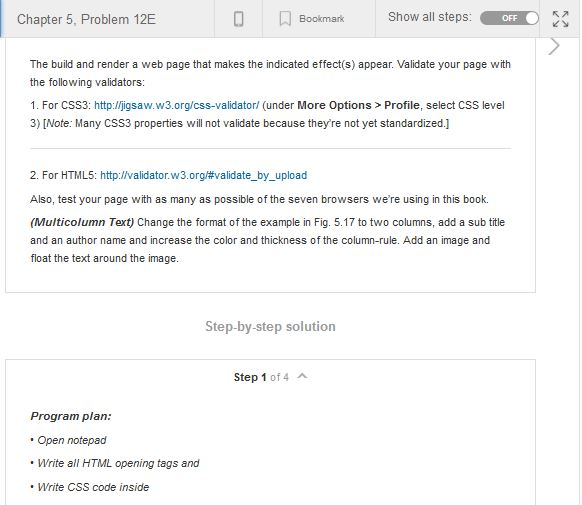
Chapter 5, Problem 12E Bookmark Show all steps: OFF The build and render a web page that makes the indicated effect(s) appear. Validate your page with the following validators: 1. For CSS3: http:lljigsaw.w3.org/css-validatorl (under More Options> Profile, select CSS level 3) [Note: Many CSS3 properties will not validate because they're not yet standardized.] 2. For HTML5: http://validator.w3.orgvalidate-by-upload Also, test your page with as many as possible of the seven browsers we're using in this book. (Multicolumn Text) Change the format of the example in Fig. 5.17 to two columns, add a sub title and an author name and increase the color and thickness of the column-rule. Add an image and float the text around the image. Step-by-step solution Step 1 of 4 A Program plan: Open notepad Write all HTML opening tags and Write CSS code inside
Step by Step Solution
There are 3 Steps involved in it

Get step-by-step solutions from verified subject matter experts