







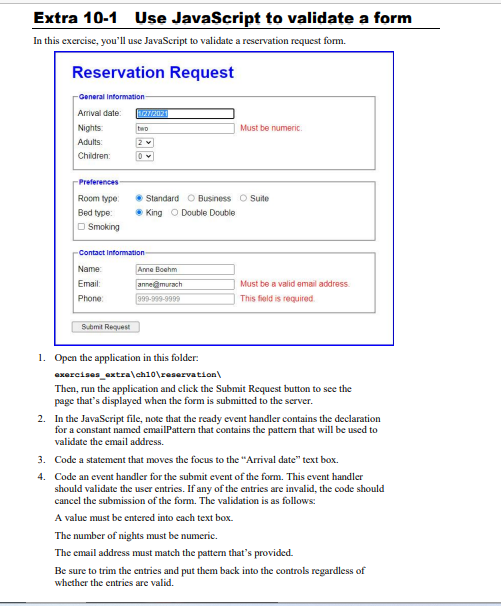
Question: //HTML Reservation request Reservation Request name=reservation_form id=reservation_form> General Information Arrival date: * Nights: * Adults: 1 2 3 4 Children: 0 1 2 3 4
//HTML
Reservation Request
// JavaScript
"use strict";
$(document).ready( () => {
const emailPattern = /\b[A-Za-z0-9._%+-]+@[A-Za-z0-9.-]+\.[A-Za-z]{2,4}\b/;
}); // end ready
Name: Email: annelimurach Must be a valid email address. Phone: This field is reguired. 1. Open the application in this folder: exereises_extra \eh10 eservation Then, run the application and click the Submit Request button to see the page that's displayed when the form is submitted to the server. 2. In the JavaScript file, note that the ready event handler contains the declaration for a constant named emailPattern that contains the pattern that will be used to validate the cmail address. 3. Code a statement that moves the focus to the "Arrival date" text box. 4. Code an event handler for the submit event of the form. This event handler should validate the user entries. If any of the entries are invalid, the code should cancel the submission of the form. The validation is as follows: A value must be entered into each text box. The number of nights must be numeric. The email address must match the pattern that's provided. Be sure to trim the entries and put them back into the controls regardless of whether the entries are valid
Step by Step Solution
There are 3 Steps involved in it

Get step-by-step solutions from verified subject matter experts
 Study Help