







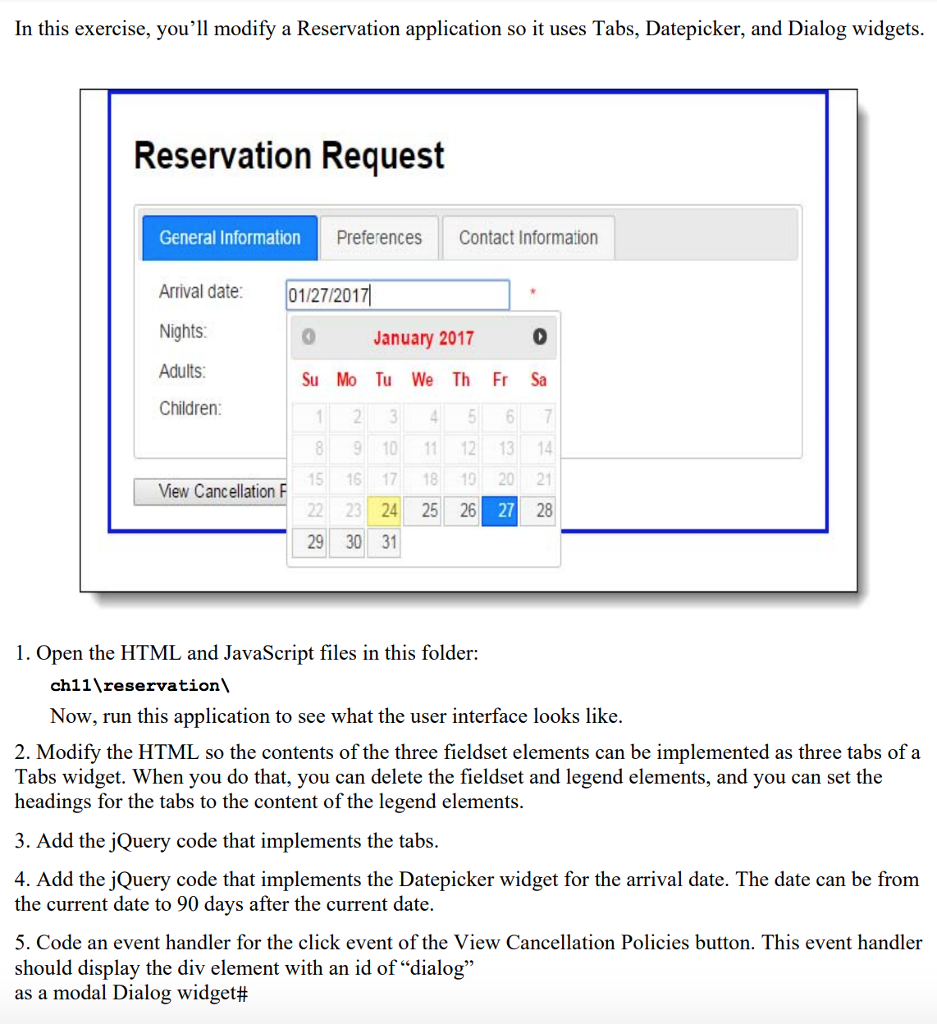
Question: index.html Reservation request Reservation Request name=reservation_form id=reservation_form> General Information Arrival date: * Nights: * Adults: 1 2 3 4 Children: 0 1 2 3 4
index.html
Reservation Request
main.css
body {
font-family: Arial, Helvetica, sans-serif;
font-size: 87.5%;
background-color: white;
margin: 0 auto;
width: 600px;
border: 3px solid blue;
padding: 10px 20px;
}
legend {
color: blue;
font-weight: bold;
margin-bottom: .8em;
}
label {
float: left;
width: 100px;
}
input, select {
margin-left: 1em;
margin-right: 1em;
margin-bottom: .5em;
}
input {
width: 14em;
}
input.left {
width: 1em;
padding-left: 0;
}
fieldset {
border: none;
margin-left: 0;
margin-top: 1em;
padding: 0;
}
input.last {
margin-bottom: 1em;
}
#adults, #children {
width: 35px;
}
#smoking {
width: 1em;
margin-left: 0;
}
#policies {
margin-left: 0;
width: 15em;
}
#submit {
width: 10em;
}
#dialog p {
font-size: 85%;
}
span {
color: red;
}
reservation.js
$(document).ready(function() {
var emailPattern = /\b[A-Za-z0-9._%+-]+@[A-Za-z0-9.-]+\.[A-Za-z]{2,4}\b/;
// move the focus to the first text box
$("#arrival_date").focus();
// the handler for the submit event of the form
// executed when the submit button is clicked
$("#reservation_form").submit(
function(event) {
var isValid = true;
// validate the requested arrival date
var arrivalDate = $("#arrival_date").val().trim();
if (arrivalDate == "") {
$("#arrival_date").next().text("This field is required.");
isValid = false;
} else {
$("#arrival_date").next().text("");
}
$("#arrival_date").val(arrivalDate);
// validate the number of nights
var nights = $("#nights").val().trim();
if (nights == "") {
$("#nights").next().text("This field is required.");
isValid = false;
} else if (isNaN($("#nights").val())) {
$("#nights").next().text("This field must be numeric.");
isValid = false;
} else {
$("#nights").next().text("");
}
$("#nights").val(nights);
// validate the name entry
var name = $("#name").val().trim();
if (name == "") {
$("#name").next().text("This field is required.");
isValid = false;
}
else {
$("#name").val(name);
$("#name").next().text("");
}
$("#name").val(name);
// validate the email entry with a regular expression
var email = $("#email").val();
if (email == "") {
$("#email").next().text("This field is required.");
isValid = false;
} else if ( !emailPattern.test(email) ) {
$("#email").next().text("Must be a valid email address.");
isValid = false;
} else {
$("#email").next().text("");
}
$("#email").val(email);
// validate the phone number
var phone = $("#phone").val().trim();
if (phone == "") {
$("#phone").next().text("This field is required.");
isValid = false;
} else {
$("#phone").next().text("");
}
$("#phone").val(phone);
// prevent the submission of the form if any entries are invalid
if (isValid == false) {
event.preventDefault();
}
} // end function
); // end submit
}); // end ready
response.html
body {
font-family: Arial, Helvetica, sans-serif;
background-color: white;
margin: 0 auto;
width: 600px;
border: 3px solid blue;
padding: 20px;
}
Thank you for your request!
We will contact you within the next 24 hours.
In this exercise, you'll modify a Reservation application so it uses Tabs, Datepicker, and Dialog widgets Reservation Request General Information Preferences Contact Information Arrival date 01/272017 Nights Adults Children January 2017 0 Su Mo Tu We Th Fr Sa 8 9 10 1112 13 1 5 16 17 18 1020 21 22 23 24 25 26 27 28 29 30 31 View Canc ellation F 1. Open the HTML and JavaScript files in this folder: chl1 eservation\ Now, run this application to see what the user interface looks like. 2. Modify the HTML so the contents of the three fieldset elements can be implemented as three tabs of a Tabs widget. When you do that, you can delete the fieldset and legend elements, and you can set the headings for the tabs to the content of the legend elements. 3. Add the jQuery code that implements the tabs 4. Add the jQuery code that implements the Datepicker widget for the arrival date. The date can be from the current date to 90 days after the current date 5. Code an event handler for the click event of the View Cancellation Policies button. This event handler should display the div element with an id of "dialo;g as a modal Dialog widget# In this exercise, you'll modify a Reservation application so it uses Tabs, Datepicker, and Dialog widgets Reservation Request General Information Preferences Contact Information Arrival date 01/272017 Nights Adults Children January 2017 0 Su Mo Tu We Th Fr Sa 8 9 10 1112 13 1 5 16 17 18 1020 21 22 23 24 25 26 27 28 29 30 31 View Canc ellation F 1. Open the HTML and JavaScript files in this folder: chl1 eservation\ Now, run this application to see what the user interface looks like. 2. Modify the HTML so the contents of the three fieldset elements can be implemented as three tabs of a Tabs widget. When you do that, you can delete the fieldset and legend elements, and you can set the headings for the tabs to the content of the legend elements. 3. Add the jQuery code that implements the tabs 4. Add the jQuery code that implements the Datepicker widget for the arrival date. The date can be from the current date to 90 days after the current date 5. Code an event handler for the click event of the View Cancellation Policies button. This event handler should display the div element with an id of "dialo;g as a modal Dialog widget#
Step by Step Solution
There are 3 Steps involved in it

Get step-by-step solutions from verified subject matter experts
 Study Help