







Question: html5 CSS3 Move the unordered list to a sidebar (use ) thats floated to the left of the main section ( ) of the page.
html5 CSS3
- Move the unordered list to a sidebar (use ) thats floated to the left of the main section (
) of the page. The width of the sidebar should be 175 pixels. (1 point each, 3 points) - Be sure to clear the footer (
- Adjust the margins and padding for the sidebar (
- Modify the HTML for the first heading in the main section (
) so its displayed on two lines. (2 points) - Modify the second heading as shown. Then, add an image (of your choice, related to your site) and the link as shown. The link should link to an external website. (1 point each, total 3 points)
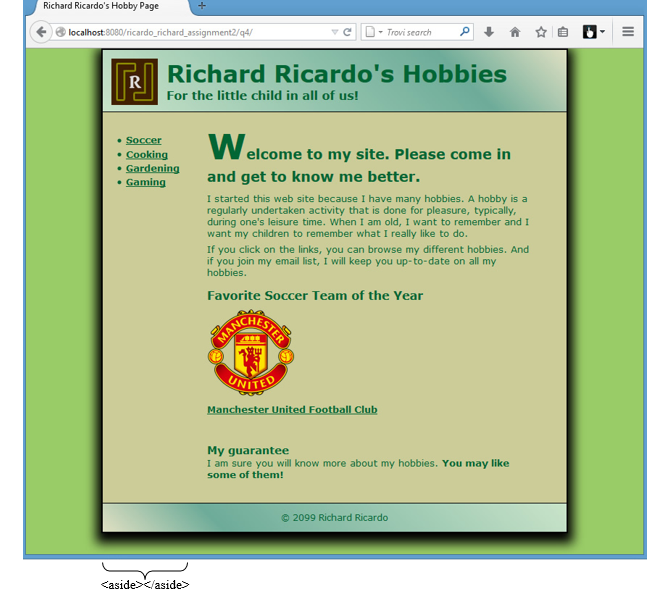
- I am having issues getting the aside to work for my part, it keeps going to far to the left.
For the little child in all of us!
The quick brown fox jumps over the lazy dog. change this text according to your needs. this is a paragraph, written inside p tag. the quick brown fox jumps over the lazy dog. the quick brown fox jumps over the lazy dog. the quick brown fox jumps over the lazy dog.
the quick brown fox jumps over the lazy dog. the quick brown fox jumps over the lazy dog.
Richard Ricardo's Hobbies
- Soccer
- Cooking
- Gardening
- Gamming
My Guarantee
I am sure you will know more about my hobbies.You may like some of them!===============
style.css
===============
/* change the body color */ body { background-color:#8FD98F; }
/* this container, the page on which we every element lies */ .container { background-color:#C8DF79; width:800px; margin-left:auto; margin-right:auto; box-shadow:0px 0px 20px 7px black; border: 2px solid black; margin-top:0px; color:#166007 } .logo { margin:10px; float:left; background-color:brown; height:90px; width:90px; } .banner { margin:10px; float:left; height:70px; width:*; padding-top:15px;
} .banner #title { font-size:40px; font-weight:bold; color:#166007 } .banner #tag { font-size:20px; color:#166007 } .header { background-color:#86BEA9; background-image: linear-gradient(45deg, white,#86BEA9 , white); height:110px; } .body { padding-top:30px; padding: 30px 20px 20px 20px; }
/* heading of body */ .body #heading { font-size:34px; color:#166007 }
/* change the size of first word */ .body #drop { font-size:64px; color:#166007 }
/* footer with reverse liner gradient */ .footer { height:30px; background-image: linear-gradient(-45deg, white ,#86BEA9 , white ); padding-top:15px; color:#166007 }
Step by Step Solution
There are 3 Steps involved in it

Get step-by-step solutions from verified subject matter experts
 Study Help