







Question: http://pages.mtu.edu/~suitsotefreqs.html This is a C programming. Use only If else statement to solve this. EE285 Lab 3: Musical Note Generator Part One This lab will
 http://pages.mtu.edu/~suitsotefreqs.html
This is a C programming. Use only If else statement to solve this.
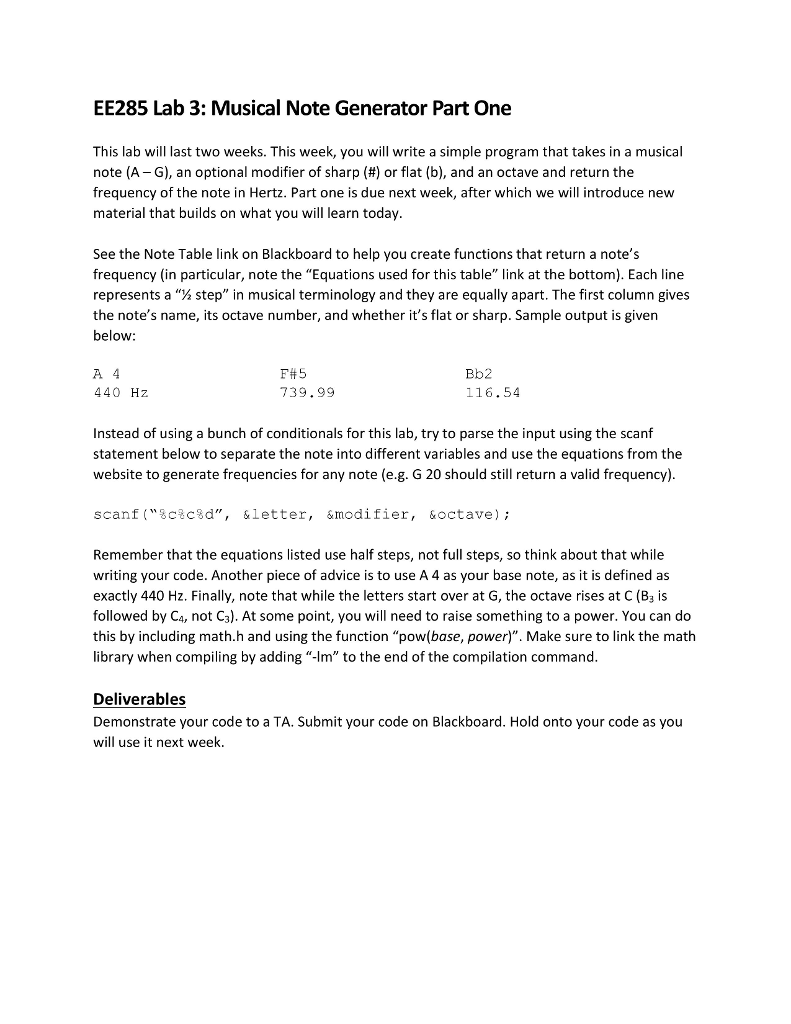
EE285 Lab 3: Musical Note Generator Part One This lab will last two weeks. This week, you will write a simple program that takes in a musical note (A-G), an optional modifier of sharp (#) or flat (b), and an octave and return the frequency of the note in Hertz. Part one is due next week, after which we will introduce new material that builds on what you will learn today See the Note Table link on Blackboard to help you create functions that return a note's frequency (in particular, note the "Equations used for this table" link at the bottom). Each line represents a 1% step" in musical terminology and they are equally apart. The first column gives the note's name, its octave number, and whether it's flat or sharp. Sample output is given below A 4 440 Hz F# 5 739.99 Bb2 116.54 Instead of using a bunch of conditionals for this lab, try to parse the input using the scanf statement below to separate the note into different variables and use the equations from the website to generate frequencies for any note (e.g. G 20 should still return a valid frequency) scanf ("3ctc%d", &letter, &modifier, &octave); Remember that the equations listed use half steps, not full steps, so think about that while writing your code. Another piece of advice is to use A 4 as your base note, as it is defined as exactly 440 Hz. Finally, note that while the letters start over at G, the octave rises at C (B3 is followed by Ca, not Ca). At some point, you will need to raise something to a power. You can do this by including math.h and using the function "pow(base, power)". Make sure to link the math library when compiling by adding "-Im" to the end of the compilation command Deliverables Demonstrate your code to a TA. Submit your code on Blackboard. Hold onto your code as you will use it next week
Step by Step Solution
There are 3 Steps involved in it

Get step-by-step solutions from verified subject matter experts
 Study Help