







Question: % HW3_9.m : TD Analysis, convolution % Script M-file graphically demonstrates the convolution process. figure(1) % Create figure window and make visible on screen x
% HW3_9.m : TD Analysis, convolution
% Script M-file graphically demonstrates the convolution process.
figure(1) % Create figure window and make visible on screen
x = inline('1.5*sin(pi*t).*(t>=0&t
defined between 0 and 1
h = inline('1.5*(t>=0&t=2&t
of 2 rect or boxcar functions
dtau = 0.005;
tau_start = -2; tau_end = 5;
tau = tau_start:dtau:tau_end; % define tau range
ti = 0; % set time index to zero
t_start = -0.5; t_end = 4;
tvec = t_start:.1:t_end;
y = NaN*zeros(1,length(tvec)); % Pre-allocate memory
for t = tvec,
ti = ti+1; % Time index
xh = x(t-tau).*h(tau); lxh = length(xh);
y(ti) = sum(xh.*dtau); % Trapezoidal approximation of convolution integral
subplot(2,1,1),plot(tau,h(tau),'k-',tau,x(t-tau),'k--',t,0,'ok');
axis([tau(1) tau(end) -2.0 2.5]); grid
patch([tau(1:end-1);tau(1:end-1);tau(2:end);tau(2:end)],...
[zeros(1,lxh-1);xh(1:end-1);xh(2:end);zeros(1,lxh-1)],...
[.8 .8 .8],'edgecolor','none');
xlabel('\tau'); legend('h(\tau)','x(t-\tau)','t',' h(\tau)x(t-\
tau)','Location','NorthEastOutside');
c = get(gca,'children'); set(gca,'children',[c(2);c(3);c(4);c(1)]);
subplot(2,1,2),plot(tvec,y,'k',tvec(ti),y(ti),'ok');
xlabel('t'); ylabel('y(t) = \int h(\tau)x(t-\tau) d\tau'); legend('output
y(t)','Location','NorthEastOutside');
axis([tau(1) tau(end) -1.0 2.0]); grid;
drawnow;
end
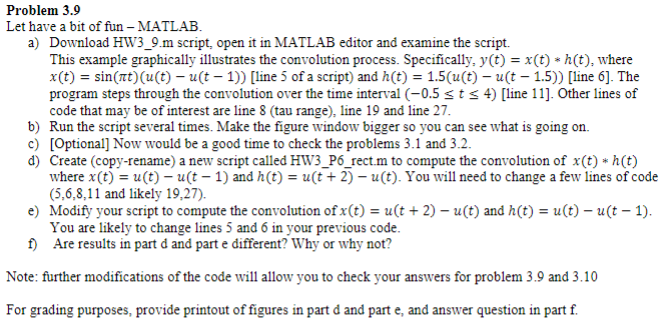
Problem 3.9 Let have a bit of fun - MATLAB. a) Download HW3_9.m script, open it in MATLAB editor and examine the script. This example graphically illustrates the convolution process. Specifically, y(t) = x(t) *h(t), where X(t) = sin(at) (u(t) - ut - 1)) (line 5 of a script) and h(t) = 1.5(u(t) - ut - 1.5)) (line 6]. The program steps through the convolution over the time interval (-0.5 st
Step by Step Solution
There are 3 Steps involved in it

Get step-by-step solutions from verified subject matter experts
 Study Help