







Question: I am giving the html and js code kindly solve it....thank you..i just need the code not the flowchart flowchart was Devise a flowchart
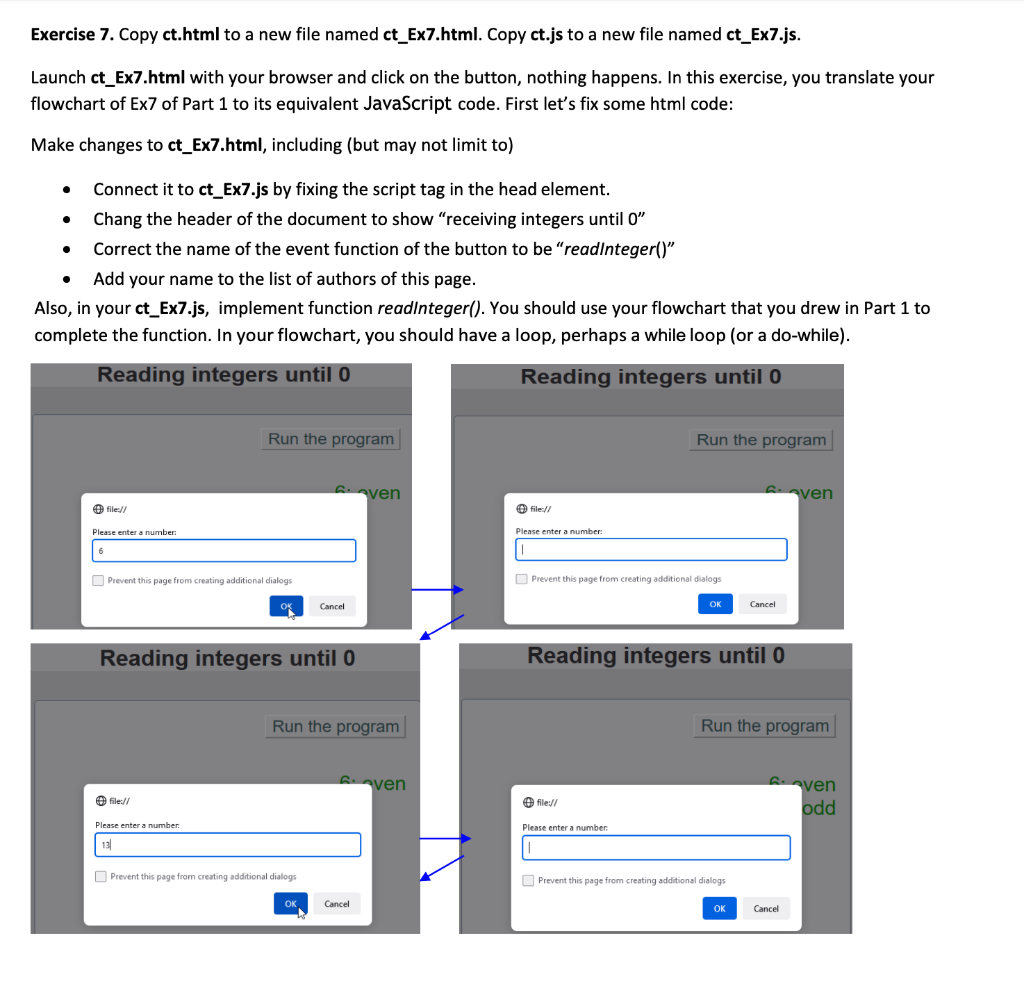
I am giving the html and js code kindly solve it....thank you..i just need the code not the flowchart
flowchart was " Devise a flowchart to keep on receiving an integer number from user and output whether the number is even or odd. The process repeats until a 0 is entered, then output program ended and ends. "
-------
html
-----
receiving integers until 0
-----
javascript
-----
// For: 23w EECS1012N, York University, Lassonde School of Engineering (LAS)
// in Ex7 to Ex13, change the name of the following function properly
function readInteger() {
/* this statement defines an object reference to the
html element having an ID "output".
Every time you want to output something, use outputObj */
var outputObj = document.getElementById("output");
// this statement receives some data and parses it to integer
var a = parseInt(prompt("Please enter a number: ", ""));
/* this statement add some message to our output Object used for Ex8
you would need to change the message to be appropriate in Ex9 to E13 */
// outputObj.innerHTML = "number: " + a + " its digits: "; // uncomment this line for Ex8
// translate the rest of your flowcharts to js here:
// factorial_B(a); // for Ex11 call function factorial_B, passing a
//the following statements inform the user that the program ended
//and disable the button. Ctrol+F5 to refresh the browser in order to start over
outputObj.innerHTML = outputObj.innerHTML + " " + "program ended";
document.getElementsByTagName("button")[0].setAttribute("disabled","true");
}
// for Ex11 take input named num and computer num!
/*factorial_B (num) {
// num is the input, calculate factorial of num. Use num as variable name.
var outputObj = document.getElementById("output");
}*/
---
css
---
* {
box-sizing: border-box;
background-color:LightGrey;
}
body {
font-family: NimbusSanL, Arial, sans-serif;
text-align: center;
color:#202020;
background-color:Silver;
}
div {
border:1px solid SlateGrey;
border-radius:5px;
margin: 20px;
}
.input {
border:none;
text-align:right;
}
p {
text-align:right;
padding: 20px;}
input, button {
font:inherit;
color:Blue;
width:100px;
padding-left: 5px;
}
button {
color:DarkSlateGrey;
width:200px
}
.strong {
font-family: NimbusSanL, Arial, sans-serif;
font-size:1.2em;
color:Green;
text-decoration:bold;
}
footer{
padding-top:10px;
text-align:center;
font-size:10px;
color:LightSlateGrey;
}
/* Responsive layout - makes the columns stack on
top of each other instead of next to each other */
[class*="column"] {
width: 80%;
display:inline-block;
height:60vh;
font-size:1.5em;
}
@media screen and (min-width:600px) {
[class*="column"] {
width:50%;
}
Exercise 7. Copy ct.html to a new file named ct_Ex7.html. Copy ct.js to a new file named ct_Ex7.js. Launch ct_Ex7.html with your browser and click on the button, nothing happens. In this exercise, you translate your flowchart of Ex7 of Part 1 to its equivalent JavaScript code. First let's fix some html code: Make changes to ct_Ex7.html, including (but may not limit to) - Connect it to ct_Ex7.js by fixing the script tag in the head element. - Chang the header of the document to show "receiving integers until 0 " - Correct the name of the event function of the button to be "readlnteger()" - Add your name to the list of authors of this page. Also, in your ct_Ex7.js, implement function readlnteger(). You should use your flowchart that you drew in Part 1 to complete the function. In your flowchart, you should have a loop, perhaps a while loop (or a do-while). Reading integers until 0 Reading integers until 0 (4) file// (5) file// Please enter a number: Please enter a number: I Prevent this page from creating additional dialogs Prevent this page from creating additional dialogs Reading integers until 0 Reading integers until 0 (3) file:// (4) file:/l Please enter a number. Please enter a number Prevent this page from creating additional dialogs Prevent this page from creating additionsl dialogs Exercise 7. Copy ct.html to a new file named ct_Ex7.html. Copy ct.js to a new file named ct_Ex7.js. Launch ct_Ex7.html with your browser and click on the button, nothing happens. In this exercise, you translate your flowchart of Ex7 of Part 1 to its equivalent JavaScript code. First let's fix some html code: Make changes to ct_Ex7.html, including (but may not limit to) - Connect it to ct_Ex7.js by fixing the script tag in the head element. - Chang the header of the document to show "receiving integers until 0 " - Correct the name of the event function of the button to be "readlnteger()" - Add your name to the list of authors of this page. Also, in your ct_Ex7.js, implement function readlnteger(). You should use your flowchart that you drew in Part 1 to complete the function. In your flowchart, you should have a loop, perhaps a while loop (or a do-while). Reading integers until 0 Reading integers until 0 (4) file// (5) file// Please enter a number: Please enter a number: I Prevent this page from creating additional dialogs Prevent this page from creating additional dialogs Reading integers until 0 Reading integers until 0 (3) file:// (4) file:/l Please enter a number. Please enter a number Prevent this page from creating additional dialogs Prevent this page from creating additionsl dialogs
Step by Step Solution
There are 3 Steps involved in it

Get step-by-step solutions from verified subject matter experts
 Study Help