







Question: I am having a difficult time knowing how to create code for GaussianFilter.java, LaplacianFilter.java, EdgyFilter.java, and UnsharpMaskingFilter.java. They must implement Filter and work with a
I am having a difficult time knowing how to create code for GaussianFilter.java, LaplacianFilter.java, EdgyFilter.java, and UnsharpMaskingFilter.java. They must implement Filter and work with a 2D array. I need an example of at least one of these filters with an explanation, please.
public interface Filter { /** * Modify the image according to your algorithm * * @param theImage The image to modify */ void filter(PixelImage theImage); }
----------------------------------------------------------------------------------------------------------------------
public class Pixel { public static final int RED = 0, GREEN = 1, BLUE = 2; // RGB color values for this pixel (0-255) public int[] rgb; /** * Constructor for objects of class Pixel * Initializes the pixel values; * @param red value for red portion of pixel * @param green value for green portion of pixel * @param blue value for blue portion of pixel * @throws IllegalArgumentException if any of the parameters * are not within the bounds of 0 - 255 */ public Pixel(int red, int green, int blue) { if ((red 255) || (green 255) || (blue 255)) { throw new IllegalArgumentException("bad RGB value for Pixel"); } rgb = new int[3]; rgb[RED] = red; rgb[GREEN] = green; rgb[BLUE] = blue; } }
---------------------------------------------------------------------------------------------------
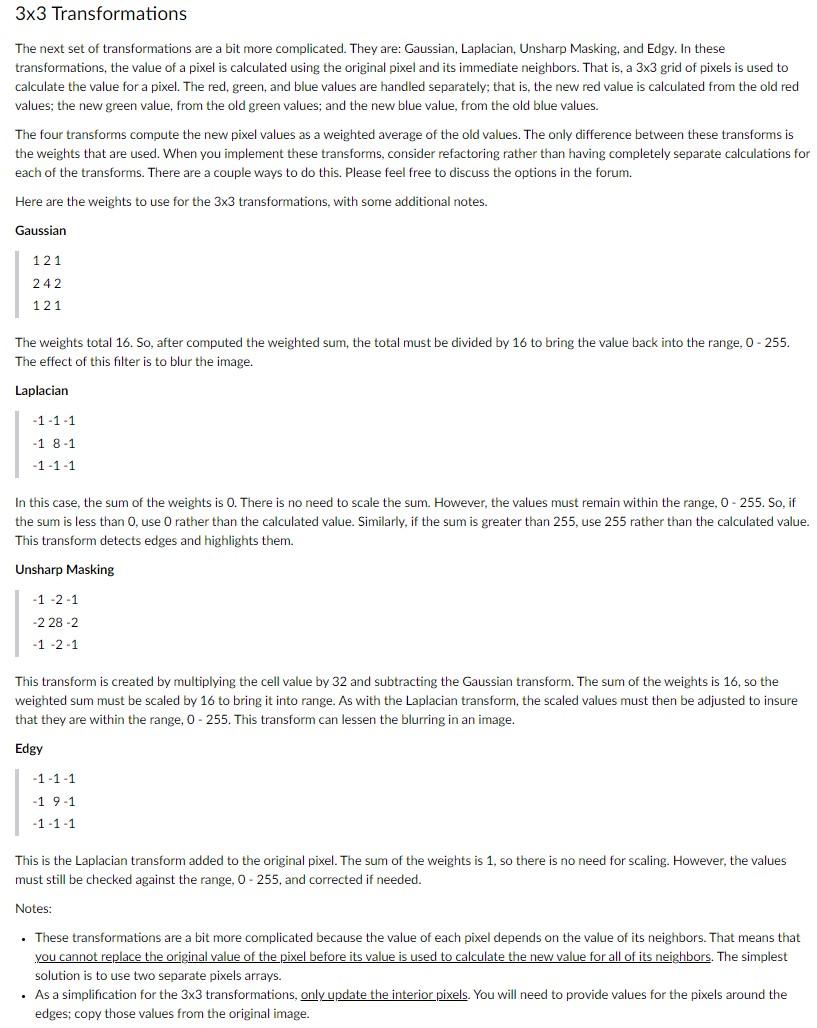
public class PixelImage { private BufferedImage myImage; private int width; private int height; /** * Construct a PixelImage from a Java BufferedImage * @param bi The image */ public PixelImage(BufferedImage bi) { // initialise instance variables this.myImage = bi; this.width = bi.getWidth(); this.height = bi.getHeight(); } /** * Return the width of the image */ public int getWidth() { return this.width; } /** * Return the height of the image */ public int getHeight() { return this.height; } /** * Return the image's pixel data as an array of Pixels. * @return The array of pixels */ public Pixel[][] getData() { /* The Raster has origin 0,0 , so the size of the * array is [width][height], where width and height are the * dimensions of the Raster */ Raster r = this.myImage.getRaster(); Pixel[][] data = new Pixel[r.getHeight()][r.getWidth()]; int[] samples = new int[3]; // Translates from java image data to Pixel data for (int row = 0; row 33 Transformations The next set of transformations are a bit more complicated. They are: Gaussian, Laplacian, Unsharp Masking, and Edgy. In these transformations, the value of a pixel is calculated using the original pixel and its immediate neighbors. That is, a 33 grid of pixels is used to calculate the value for a pixel. The red, green, and blue values are handled separately; that is, the new red value is calculated from the old red values; the new green value, from the old green values; and the new blue value, from the old blue values. The four transforms compute the new pixel values as a weighted average of the old values. The only difference between these transforms is the weights that are used. When you implement these transforms, consider refactoring rather than having completely separate calculations for each of the transforms. There are a couple ways to do this. Please feel free to discuss the options in the forum. Here are the weights to use for the 33 transformations, with some additional notes. Gaussian 121242121 The weights total 16 . So, after computed the weighted sum, the total must be divided by 16 to bring the value back into the range, 0 - 255 . The effect of this filter is to blur the image. Laplacian 111181111 In this case, the sum of the weights is 0 . There is no need to scale the sum. However, the values must remain within the range, 0 - 255 . So, if the sum is less than 0 , use 0 rather than the calculated value. Similarly, if the sum is greater than 255 , use 255 rather than the calculated value. This transform detects edges and highlights them. Unsharp Masking 1212282121 This transform is created by multiplying the cell value by 32 and subtracting the Gaussian transform. The sum of the weights is 16 , so the weighted sum must be scaled by 16 to bring it into range. As with the Laplacian transform, the scaled values must then be adjusted to insure that they are within the range, 0255. This transform can lessen the blurring in an image. Edgy 111191111 This is the Laplacian transform added to the original pixel. The sum of the weights is 1 , so there is no need for scaling. However, the values must still be checked against the range, 0255, and corrected if needed. Notes: - These transformations are a bit more complicated because the value of each pixel depends on the value of its neighbors. That means that you cannot replace the original value of the pixel before its value is used to calculate the new value for all of its neighbors. The simplest solution is to use two separate pixels arrays. - As a simplification for the 33 transformations, only update the interior pixels. You will need to provide values for the pixels around the edges; copy those values from the original image Step by Step Solution
There are 3 Steps involved in it
1 Expert Approved Answer
Step: 1 Unlock

Question Has Been Solved by an Expert!
Get step-by-step solutions from verified subject matter experts
Step: 2 Unlock
Step: 3 Unlock
 Study Help