







Question: I am having an issues running my power shell script and I can't figure out why. Could I possibly get a step by step process
I am having an issues running my power shell script and I can't figure out why. Could I possibly get a step by step process to follow along side?
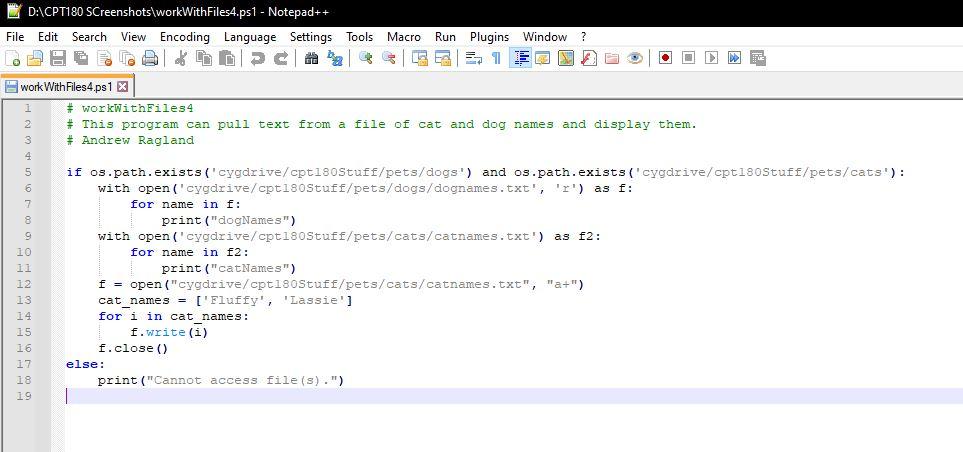
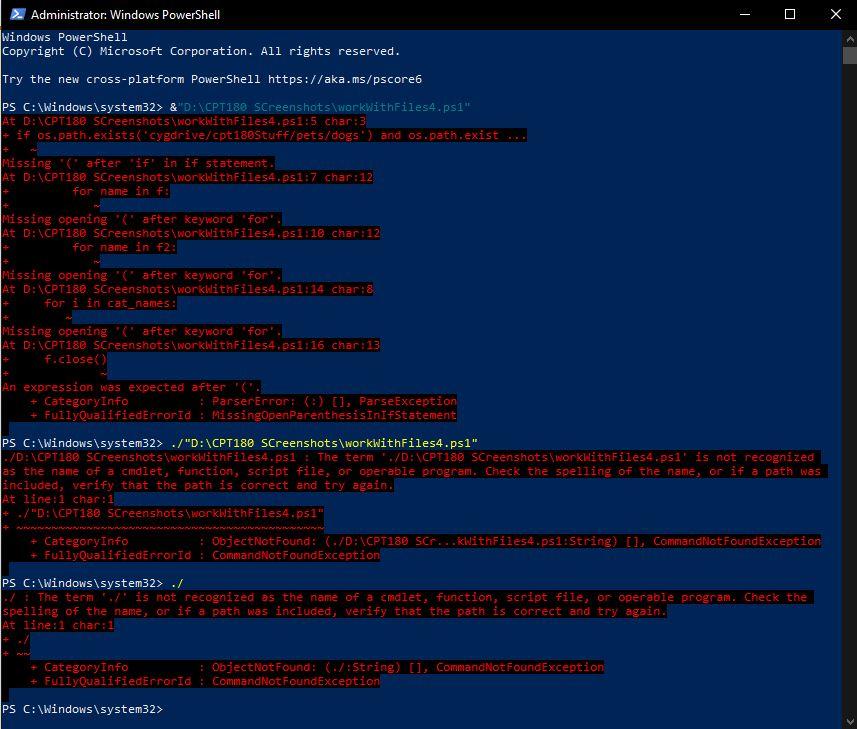
D: CPT180 SCreenshots workWithFiles4.ps1 - Notepad++ File Edit Search View Encoding Language Settings Tools Macro Run Plugins Window? LO DE LEER work With Files 4.ps1 x # workWithFiles4 # This program can pull text from a file of cat and dog names and display them. # Andrew Ragland if os.path.exists('cygdrive/cptisoStuff/pets/dogs') and os.path.exists('cygdrive/cpt180Stuff/pets/cats): with open('cygdrive/cpt180Stuff/pets/dogs/dognames.txt', 'r') as f: for name in f: print ("dogNames") with open('cygdrive/cpt180Stuff/pets/cats/catnames.txt') as 2: for name in f2: print("catNames") f = open("cygdrive/cpt180Stuff/pets/cats/catnames.txt", "a+") cat_names = ['Fluffy', 'Lassie'] for i in cat names: f.write(i) f.close() else: print("Cannot access file (s).") 17 18 19 - Administrator: Windows PowerShell Windows PowerShell Copyright (C) Microsoft Corporation. All rights reserved. Try the new cross-platform PowerShell https://aka.ms/pscore6 PS C:\Windows\system32> & D:XCPT180 screenshots workwithFiles4.psI" At D:\CPT180 screenshots workwithFiles4.251:5 char: 3 - if os. path.exists('cygdrive/cpt180stuff/pets/dogs') and os.path exist Missing ( after 'if'in if statement. At D:\CPT180 screenshots woricuithFiles4.ps1:7 char:12 for name in f: Missing opening 'C' after keyword for At D:\CPT180 screenshots workwithFiles4.psi :10 char:12 for name in f2: Missing opening '' after keyword 'for At D: CP1180 Screenshots workwithFiles4.ps1:14 char;8 for i in cat_nales: Missing opening 'C' after keyword for At D:\CPT180 screenshots workwithFiles4.ps1:16 char: 13 f.close An expression was expected after a CategoryInfo : ParserError: () [1, ParseException FullyQualifiedErrorid : MissingOpenParenthesisInIfStatement PS C:\Windows\system32> ./"D:\CPT180 Screenshots\workwithFiles4.ps1" |-/D:\CPT180 Screenshots woridithFiles4.ps1 : The term /D:\CPT180 Screenshots worklithFiles4.pl' is not recognized as the name of a cmdiet, function, script file, or operable program. Check the spelling of the name, or if a path was included, verify that the path is correct and try again. At line:1 char:1 + ./"D: (CPT132 Screenshots workwithFiles4.ps1" CategoryInfo : ObjectNot Found: (/D:\CPT130 scr...KWithFiles4.psi: String) [1, commandNotFoundException + Fully QualifiedErrorid : CommandNotFoundException PS C:\Windows\system32> ./ ./ I The term is not recognized as the name of a cmdlet, function, script file, or operable program. Check the spelling of the name or if a path was included, verify that the path is correct and try again. At line: 1 char:1 CategoryInfo : Object Not Found: (./:String) [1, commandNotFoundException FullyQualifiedErrorid : CommandNotFoundException PS C:\Windows\system32> D: CPT180 SCreenshots workWithFiles4.ps1 - Notepad++ File Edit Search View Encoding Language Settings Tools Macro Run Plugins Window? LO DE LEER work With Files 4.ps1 x # workWithFiles4 # This program can pull text from a file of cat and dog names and display them. # Andrew Ragland if os.path.exists('cygdrive/cptisoStuff/pets/dogs') and os.path.exists('cygdrive/cpt180Stuff/pets/cats): with open('cygdrive/cpt180Stuff/pets/dogs/dognames.txt', 'r') as f: for name in f: print ("dogNames") with open('cygdrive/cpt180Stuff/pets/cats/catnames.txt') as 2: for name in f2: print("catNames") f = open("cygdrive/cpt180Stuff/pets/cats/catnames.txt", "a+") cat_names = ['Fluffy', 'Lassie'] for i in cat names: f.write(i) f.close() else: print("Cannot access file (s).") 17 18 19 - Administrator: Windows PowerShell Windows PowerShell Copyright (C) Microsoft Corporation. All rights reserved. Try the new cross-platform PowerShell https://aka.ms/pscore6 PS C:\Windows\system32> & D:XCPT180 screenshots workwithFiles4.psI" At D:\CPT180 screenshots workwithFiles4.251:5 char: 3 - if os. path.exists('cygdrive/cpt180stuff/pets/dogs') and os.path exist Missing ( after 'if'in if statement. At D:\CPT180 screenshots woricuithFiles4.ps1:7 char:12 for name in f: Missing opening 'C' after keyword for At D:\CPT180 screenshots workwithFiles4.psi :10 char:12 for name in f2: Missing opening '' after keyword 'for At D: CP1180 Screenshots workwithFiles4.ps1:14 char;8 for i in cat_nales: Missing opening 'C' after keyword for At D:\CPT180 screenshots workwithFiles4.ps1:16 char: 13 f.close An expression was expected after a CategoryInfo : ParserError: () [1, ParseException FullyQualifiedErrorid : MissingOpenParenthesisInIfStatement PS C:\Windows\system32> ./"D:\CPT180 Screenshots\workwithFiles4.ps1" |-/D:\CPT180 Screenshots woridithFiles4.ps1 : The term /D:\CPT180 Screenshots worklithFiles4.pl' is not recognized as the name of a cmdiet, function, script file, or operable program. Check the spelling of the name, or if a path was included, verify that the path is correct and try again. At line:1 char:1 + ./"D: (CPT132 Screenshots workwithFiles4.ps1" CategoryInfo : ObjectNot Found: (/D:\CPT130 scr...KWithFiles4.psi: String) [1, commandNotFoundException + Fully QualifiedErrorid : CommandNotFoundException PS C:\Windows\system32> ./ ./ I The term is not recognized as the name of a cmdlet, function, script file, or operable program. Check the spelling of the name or if a path was included, verify that the path is correct and try again. At line: 1 char:1 CategoryInfo : Object Not Found: (./:String) [1, commandNotFoundException FullyQualifiedErrorid : CommandNotFoundException PS C:\Windows\system32>
Step by Step Solution
There are 3 Steps involved in it

Get step-by-step solutions from verified subject matter experts
 Study Help