







Question: I am having some troubles creating a GUI look using Java program. 1)Having troubles producing the label image and student teacher image. 2) The button
I am having some troubles creating a GUI look using Java program.
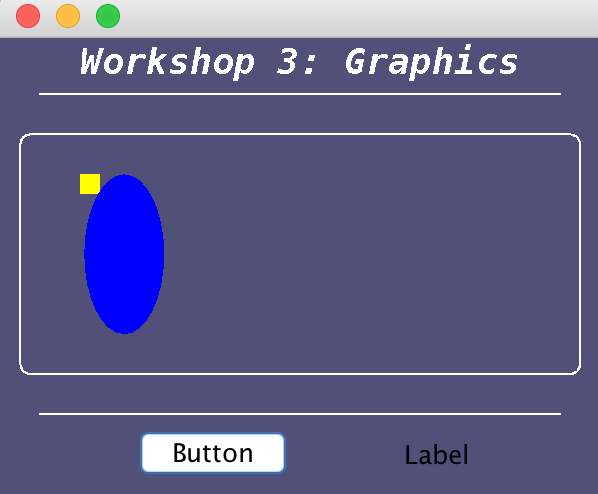
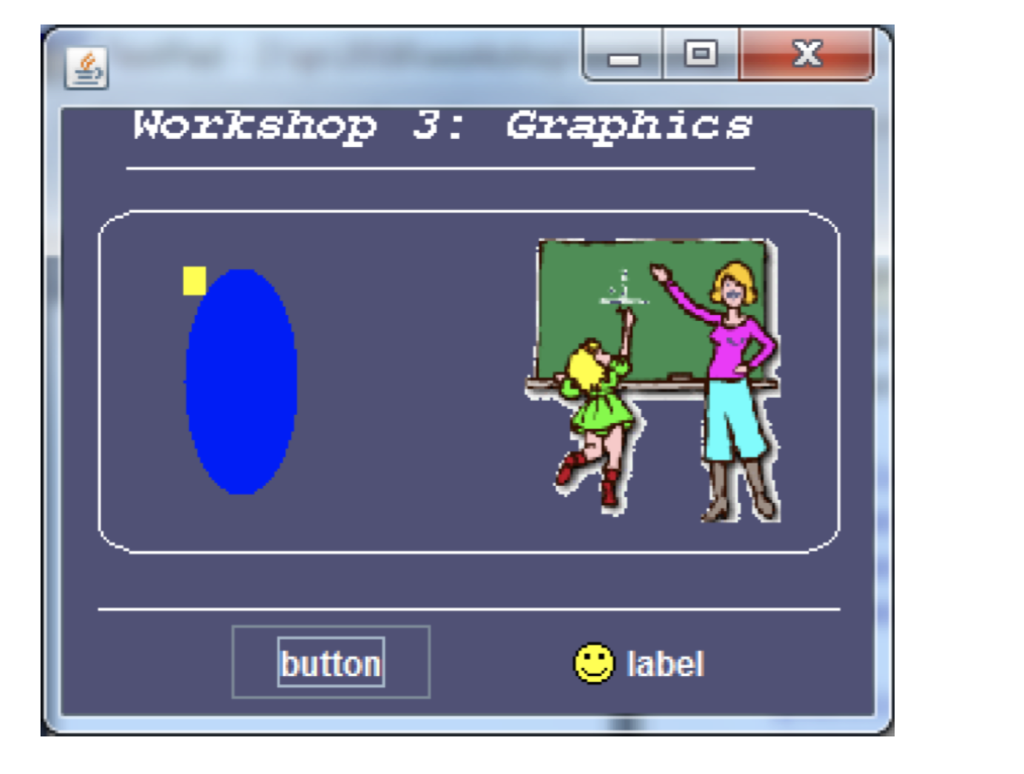
1)Having troubles producing the "label image" and "student teacher image".
2) The button shape isn't coming out as accurate.
3) The word "label" isn't accurate either
The first image is what I have gotten so far and the second image is what I am trying to reproduce.
import javax.swing.*;
import java.awt.*;
//import java.image.ImageView;
//import javafx.scene.image.Image;
class prac3 extends JFrame
{
private static final long serialVersionUID = 1L;
public void paint(Graphics g)
{
super.paint(g);
getContentPane().setBackground( new Color(80, 80, 120));
g.setColor(Color.WHITE);
g.setFont(new Font("MonoSpaced", Font.BOLD+Font.ITALIC, 18));
g.drawString("Workshop 3: Graphics", 40, 40);
g.drawLine(20, 50, 280, 50);
g.drawRoundRect(10, 70, 280, 120, 10, 10);
g.drawLine(20, 210, 280, 210);
g.setColor(Color.YELLOW);
g.fillRect(40, 90, 10, 10);
g.setColor(Color.BLUE);
g.fillOval(42, 90, 40, 80);
Image image=new ImageIcon("educ1.gif").getImage();
g.drawImage(image,170,75,90,100, this);
}
public static void main(String[] args)
{
JFrame frame = new prac3();
frame.setDefaultCloseOperation(JFrame.EXIT_ON_CLOSE);
frame.getContentPane().setBackground(new Color(80, 80, 120));
frame.setSize(300,250);
JLabel l = new JLabel("Label");
ImageIcon smiley = new ImageIcon("smiley.gif");
l.setLayout(new FlowLayout());
Object color;
//l.setColor(Color.WHITE);
l.setHorizontalAlignment(JLabel.RIGHT);
l.setIcon(smiley);
l.setBackground(new Color(80, 80, 120));
l.setToolTipText("This Is A Label");
JButton b = new JButton();
b.setText("Button");
b.setBackground(new Color(80, 80, 120));
b.setToolTipText("This is a Button");
JPanel p = new JPanel();
FlowLayout layout = new FlowLayout();
layout.setHgap(50);
p.setLayout(layout);
p.setBackground(new Color(80, 80, 120));
p.add(b);
p.add(l);
frame.add(BorderLayout.SOUTH, p);
frame.setVisible(true);
}
}
**********************
import javax.swing.*;
import java.awt.*;
class ShowGraphics extends JFrame {
public void paint(Graphics g) {
super.paint(g);
getContentPane().setBackground( new Color(80, 80, 120));
g.setColor(Color.cyan); // set front color
g.setFont(new Font("SansSerif", Font.BOLD+Font.ITALIC, 16)); // set fonts
g.drawString("Graphics Demo",20,50);
g.setColor(new Color(255,0,0));//change front color
g.fillRoundRect(20, 60, 100, 50, 50,25);
this.setBackground(Color.cyan);
g.clearRect(45, 73, 50, 25);//draw a filled rectangle with the specified width and height
}
}
Workshop 3: Graphics Button Label
Step by Step Solution
There are 3 Steps involved in it

Get step-by-step solutions from verified subject matter experts
 Study Help