







Question: i am having some troubles with the Inventory Pivot Table, thank you EA4-A2 Edit an Inventory Listing and Create a PivotTable for Electronic World In
i am having some troubles with the Inventory Pivot Table, thank you
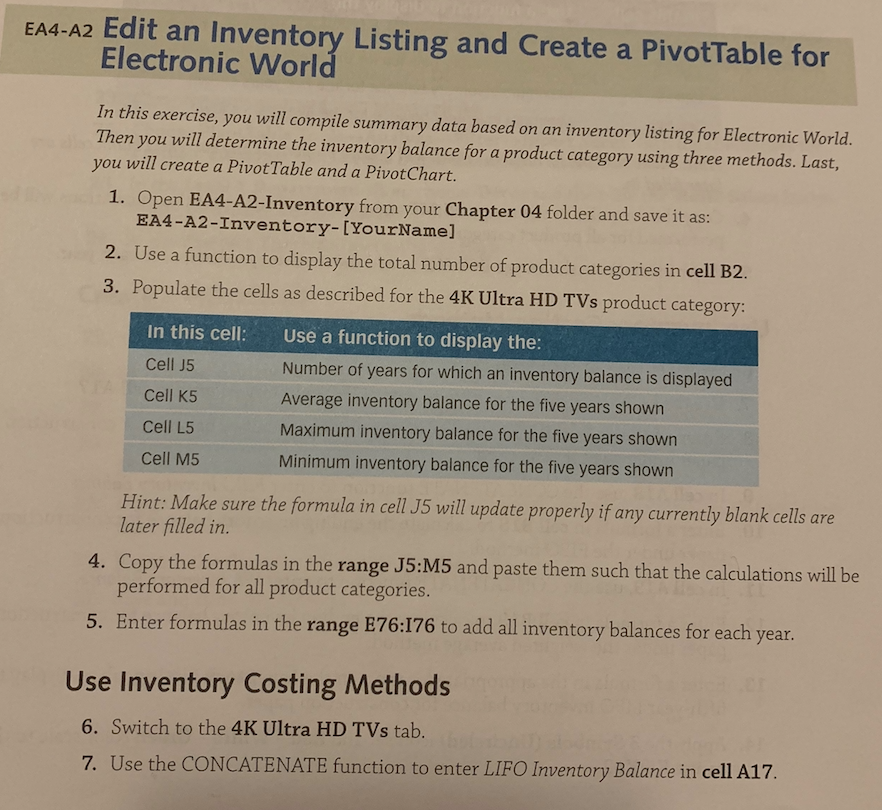
EA4-A2 Edit an Inventory Listing and Create a PivotTable for Electronic World In this exercise, you will compile summary data based on an inventory listing for Electronic World. Then you will determine the inventory balance for a product category using three methods. Last, you will create a Pivot Table and a PivotChart. 1. Open EA4-A2-Inventory from your Chapter 04 folder and save it as: EA4-A2-Inventory-[YourName] 2. Use a function to display the total number of product categories in cell B2. 3. Populate the cells as described for the 4K Ultra HD TVs product category: In this cell: Use a function to display the: Cell J5 Number of years for which an inventory balance is displayed Cell K5 Average inventory balance for the five years shown Cell L5 Maximum inventory balance for the five years shown Cell M5 Minimum inventory balance for the five years shown Hint: Make sure the formula in cell J5 will update properly if any currently blank cells are later filled in. 4. Copy the formulas in the range J5:M5 and paste them such that the calculations will be performed for all product categories. 5. Enter formulas in the range E76:176 to add all inventory balances for each year. Use Inventory Costing Methods 6. Switch to the 4K Ultra HD TVs tab. 7. Use the CONCATENATE function to enter LIFO Inventory Balance in cell A17
Step by Step Solution
There are 3 Steps involved in it

Get step-by-step solutions from verified subject matter experts
 Study Help