







Question: I am making a macro excel that that opens PuTTY and does an SSH. The way I have it now is that if other people
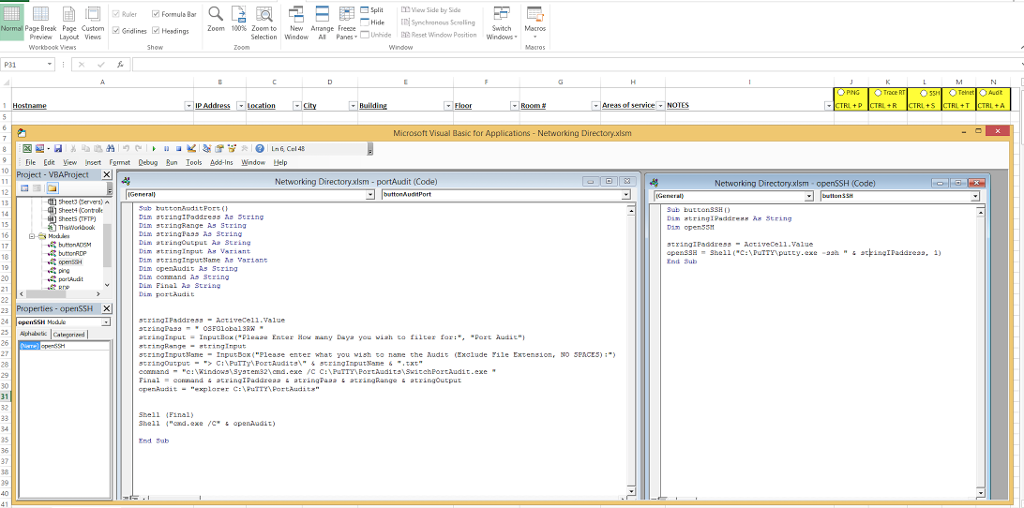
I am making a macro excel that that opens PuTTY and does an SSH. The way I have it now is that if other people want to run this macro, they need or save the putty folder into the their c drive in this exact path. Is there any way I can make this macro in a way that it just searches the directory for PuTTY and runs it, regardless of where it is saved?
Formula Bar Hide Norma Page Break Page custom MGidl MHendingE Zoom 100% Arrange freeze pewiew Selection window Al Panes DUnhide Reset window position windows IP Address Location Microsoft Visual Basic for Applications Networking Directory.xlsm 9 File de View yset Format Debug Ban loob Add-Ins window Help Project VBAProject Networking Directoryxlsm portAudit (Code) General Port Sheet 4 contule Sheets (FTP) ringRange As ingoutpl Aa String Dim openAudi. As String Dam command As String Dian Final Aa Strine Dam PartAudi 23 Properties openSSH XU Active Cell Value awany Daya you tea for Port Audit Input lane ingoatpat indows angoutput openAudit End sub Networking Directoryxlsm openSSH (Code) PuTTY putty Formula Bar Hide Norma Page Break Page custom MGidl MHendingE Zoom 100% Arrange freeze pewiew Selection window Al Panes DUnhide Reset window position windows IP Address Location Microsoft Visual Basic for Applications Networking Directory.xlsm 9 File de View yset Format Debug Ban loob Add-Ins window Help Project VBAProject Networking Directoryxlsm portAudit (Code) General Port Sheet 4 contule Sheets (FTP) ringRange As ingoutpl Aa String Dim openAudi. As String Dam command As String Dian Final Aa Strine Dam PartAudi 23 Properties openSSH XU Active Cell Value awany Daya you tea for Port Audit Input lane ingoatpat indows angoutput openAudit End sub Networking Directoryxlsm openSSH (Code) PuTTY putty
Step by Step Solution
There are 3 Steps involved in it

Get step-by-step solutions from verified subject matter experts
 Study Help