







Question: I am struggling with my case problem this week. I'm not sure what I am supposed to be typing in. Numbers 1-18 HTML 512 HTME
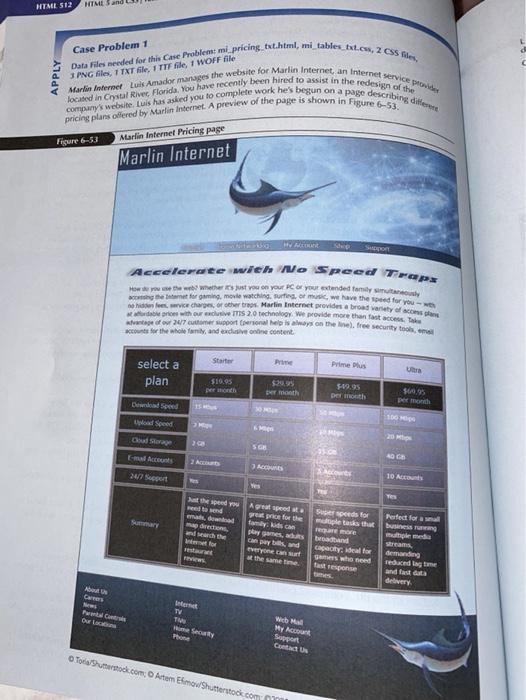
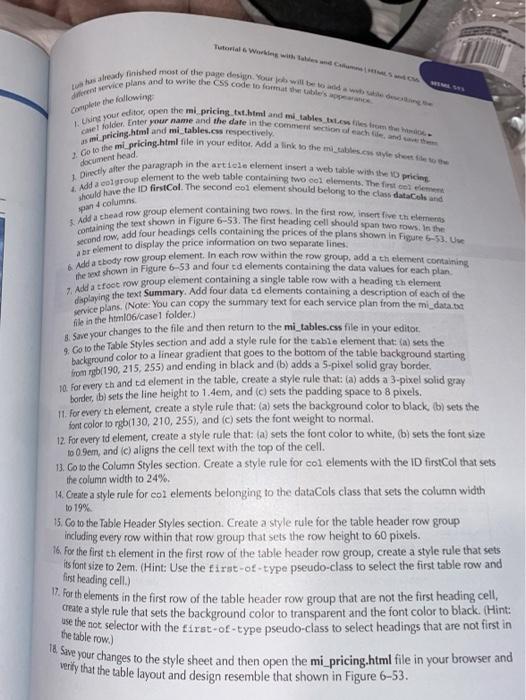
HTML 512 HTME and Case Problem 1 APPLY PNG files, 1TXT Sle, 1 TTF file, 1 WOFF file Data Files needed for the Case Problem mi pricing it.html, mi tables tuless, 2 CSS files, located in Crystal Rive Florida, You have recently been hired to assist in the redesign of the Marlotte Lul Amador mange the website for Marlin Internet, an Internet service power pricing plans offered by Marlin Internet. A preview of the page is shown in Figure 6-53. company's website, Luis has asked you to complete work he's begun on a page describing die Figure 6-53 Atarlin Internet Pricing Page Marlin Internet Accelerate mich No Speed Trap How you wewwert your or your extended family stay So he vice charon, e cher Martin Boterort reddet a broad variety of school et for online, movie watch move the feed for you tuwe dewr 24/7 to 200 ron el mapa on the ne), free security tools, em scote for the whole family, and a dusive online content. Starter Prime Plus select a plan Utta $10.95 pero $24.95 De month DEN Peth Dead Seel pload speed Doudo SG EA ACID 24/7 Sport 10 Acco Tes perdo Aged med price for the family is an play games, Super speeds for multiple tasks the SY Perfect for Bussum mulle media Fest brand Capacity for Swed false demanding reduced lag time and fast dat delivery Car Fm Cm Our TV TW My Account Sport CU Tota Suto.com Atom Emo Shutterstock.com Complete the following Labeady finished most of the parte design. You will be dintre ce plans and to wile the CSS code tomate's 1. Using your editor open the mi pricing Ext.html and mi tables the test us m.pricing.html and mi tables.css respectively che folder. Enter your name and the date in the commentioned the 2 Go to the mi pricing.html file in your editor. Add a link to the mi abs.co I Directly after the paragraph in the article element insert a web table with the pricing should have the ID firstCol. The second col element should belong to the class dataCols and Add a group element to the web table containing two col elements. The first con Add a chead row group element containing two rows. In the first row, insert five themes containing the text shown in Figure 6-53. The first heading cell should span two rows. In the second row, add four headings cells containing the prices of the plans shown in Figure 5-53. U document head spar 4 columns file in the hom06/case folder) br element to display the price information on two separate lines. here shown in Figure 6-53 and four ed elements containing the data values for each plan Add a troct row group elements four dans del cablicow with a heading en element diplo plans. (Note: You can copy the summary text for each service plan from the mi_data.ba Swe your changes to the file and then return to the mi_tables.css file in your editor Sockground color to a linear gradient that goes to the bottom of the table background starting Go to the Table Styles section and add a style rule for the table element that: (a) sets the 10. for every eh and ta element in the table, create a style rule that: (a) adds a 3-pixel solid gray border, b) sets the line height to 1.4em, and (c) sets the padding space to 8 pixels. 11. for every th element, create a style rule that: (a) sets the background color to black, (b) sets the font color to rgb(130, 210, 255), and (c) sets the font weight to normal. 12. For every td element, create a style rule that: (a) sets the font color to white, (b) sets the font size 10 0.9em, and (c) aligns the cell text with the top of the cell. 13. Co to the Column Styles section. Create a style rule for col elements with the ID firstCol that sets the column width to 24%. 1. Create a style rule for co2 elements belonging to the dataCols class that sets the column width to 19% 15. Co to the Table Header Styles section. Create a style rule for the table header row group including every row within that row group that sets the row height to 60 pixels. 16. For the first th element in the first row of the table header row group, create a style rule that sets its font size to 2em. (Hint: Use the first-of-type pseudo-class to select the first table row and W. For thelements in the first row of the table header row group that are not the first heading cell create a style rule that sets the background color to transparent and the font color to black. (Hint: the the not selector with the first-of-type pseudo-class to select headings that are not first in le Sore your changes to the style sheet and then open the mi pricing.html file in your browser and verky that the table layout and design resemble that shown in Figure 6-53. first heading cell.) the table row.)
Step by Step Solution
There are 3 Steps involved in it

Get step-by-step solutions from verified subject matter experts
 Study Help