







Question: I am trying to use the function in excel NORMINV(RAND(),mean,std) . But when I drag down on the bottom right corner, as you can see
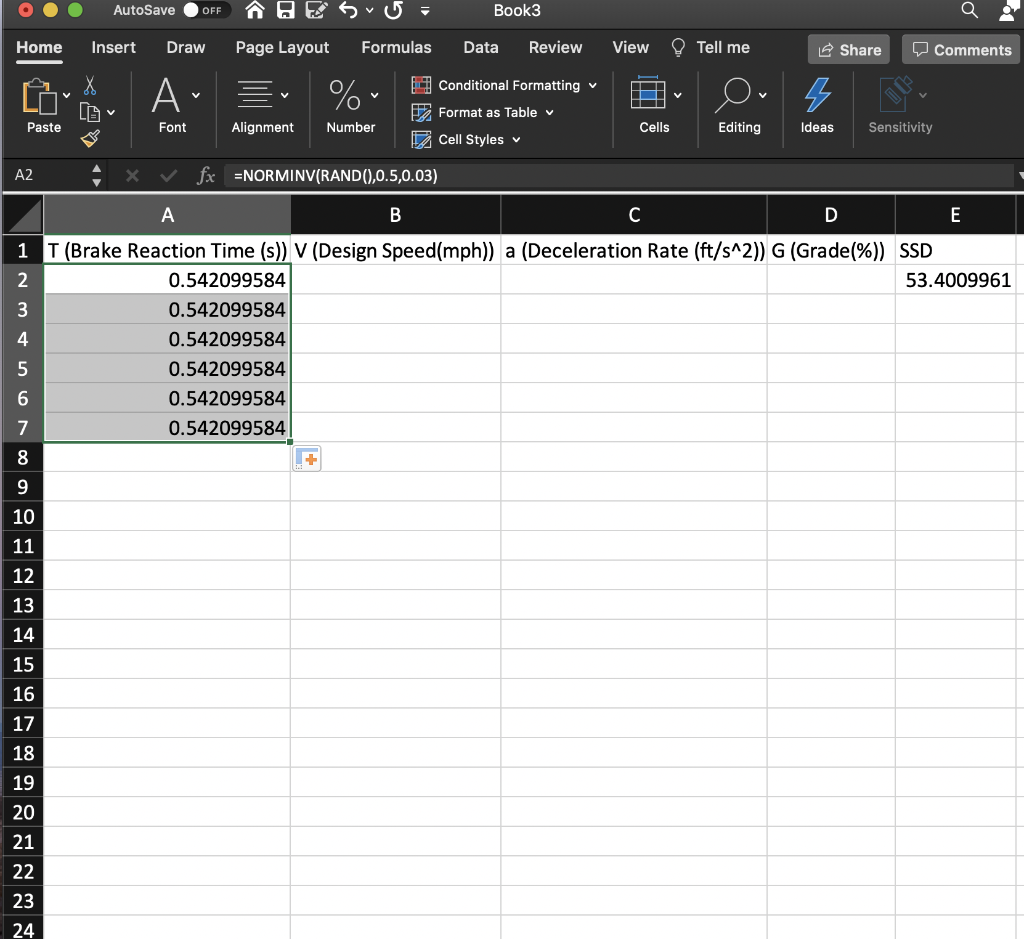
I am trying to use the function in excel NORMINV(RAND(),mean,std) . But when I drag down on the bottom right corner, as you can see excel uses the same generated random number for the whole column. What I am looking for is a new random number with the inputted mean and std in each cell for the whole column. This has been really frustrating because I have inputted the same formula as my friend and yet he is getting a whole series of random numbers, but like shown, I am not. This is a mac.
AutoSave OFF Book3 Home Insert Draw Page Layout Formulas Data Review View Tell me Share Comments A % V 5 Conditional Formatting Format as Table Cell Styles Paste Font Alignment Number Cells Editing Ideas Sensitivity A2 x fx =NORMINV(RAND(),0.5,0.03) A B C D E 1 T (Brake Reaction Time (s)) V (Design Speed(mph)) a (Deceleration Rate (ft/s^2)) G (Grade(%)) SSD 2 0.542099584 53.4009961 3 0.542099584 4 0.542099584 5 0.542099584 6 0.542099584 7 0.542099584 8 9 10 11 12 13 14 15 16 17 18 19 20 21 22 23 24
Step by Step Solution
There are 3 Steps involved in it

Get step-by-step solutions from verified subject matter experts
 Study Help