







Question: I am using Visual Studio 2017 and the language C++ Create a new project called Frame2. Enter the following program to your project as Frame2.cpp.
I am using Visual Studio 2017 and the language C++
Create a new project called Frame2. Enter the following program to your project as Frame2.cpp. Use this program for exercises 4-5.
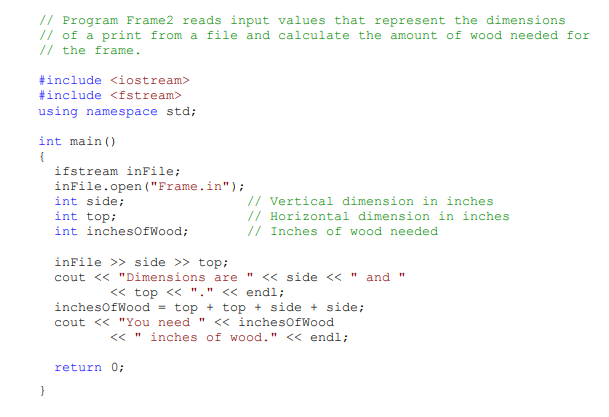
Exercise 4.
Create a data file in the same directory as program Frame2, and name it Frame.in. Make the values in the file consistent with the input statements. Run program Frame2. Show the contents in your Frame.in file and the output of your program in the lab report.
please explain the process of adding the file in visual studio 2017 because i am new to visual studio and C++
/7 Program Frame2 reads input values that represent the dimensions // of a print from a file and calculate the amount of wood needed for // the frame #include
Step by Step Solution
There are 3 Steps involved in it

Get step-by-step solutions from verified subject matter experts
 Study Help